


Creative Resume Templates
Recruiter-approved creative resume templates for 2027, built for design, marketing, and media roles. Each one keeps your content as selectable text, which is what applicant tracking systems (ATS) need to read a resume.


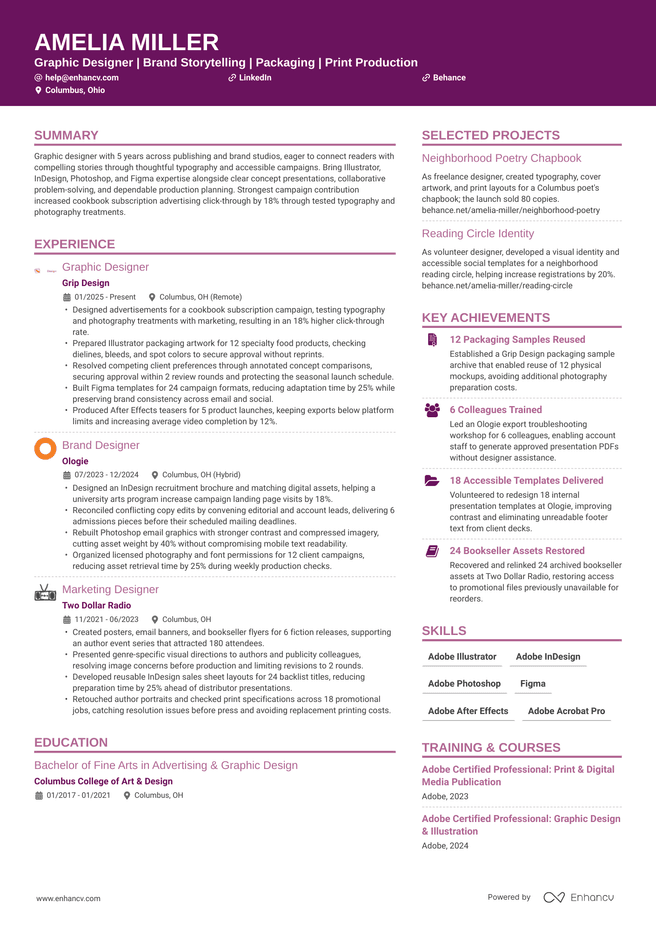
Creative Mid-Level Designer Resume
A bold color block puts your name and target title at the top, so a recruiter sees your discipline first. Accent icons mark each achievement, and every word stays selectable text that ATS can read.
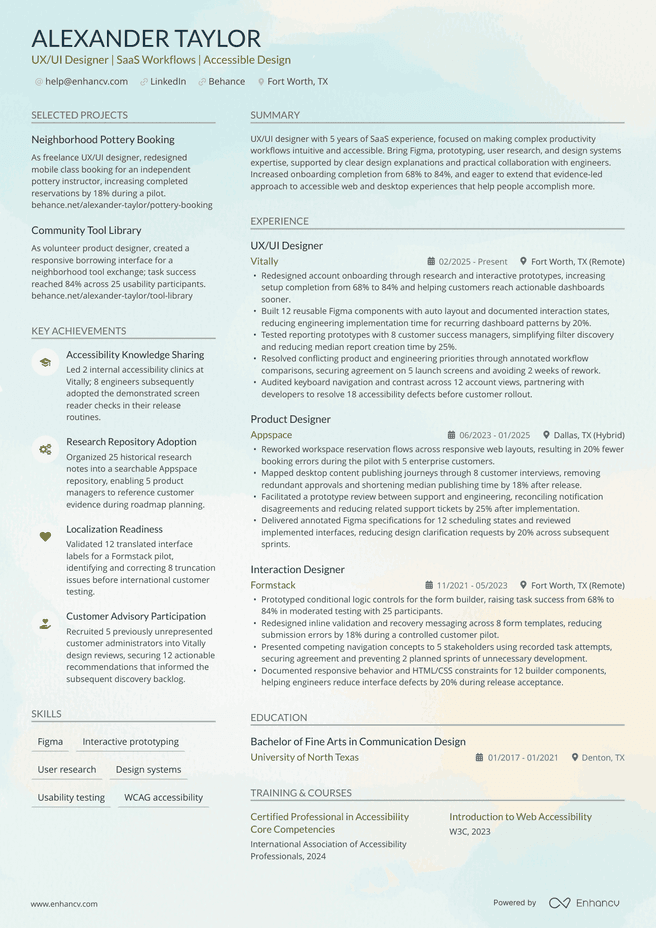
Stylish Mid-Level UX Resume
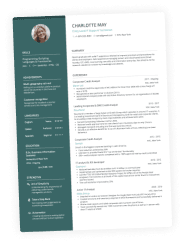
A dark side column holds your photo, contact details, skills, and language levels, while the white main column gives your case studies room. It reads like a portfolio and still parses cleanly in ATS.
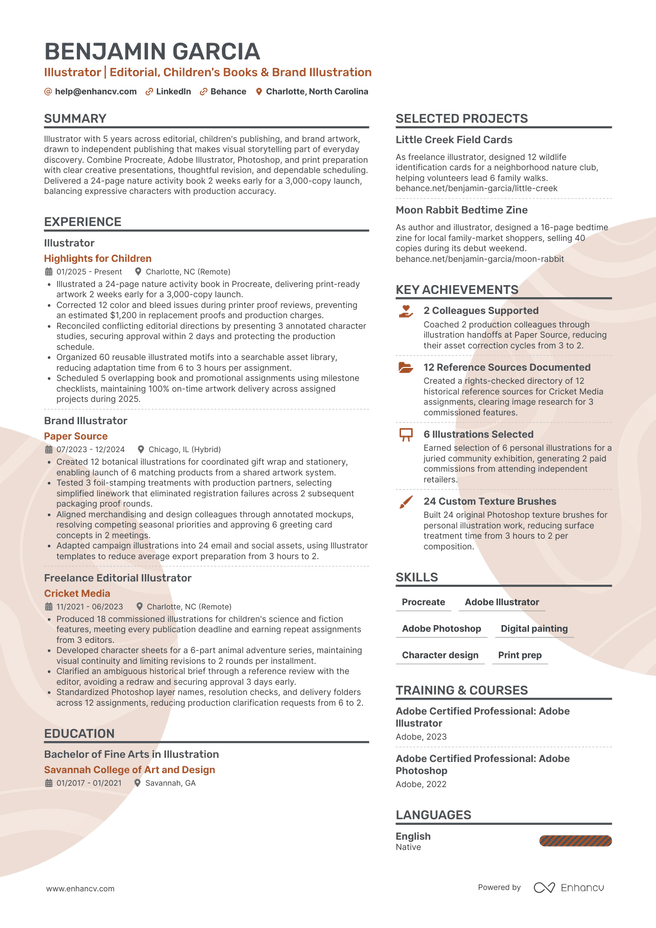
Double Column Mid-Level Illustrator Resume
Two columns split your work history from your skills, courses, and language bars. A round headshot and icons beside each achievement add personality, and the side column keeps a busy freelance career on one page.
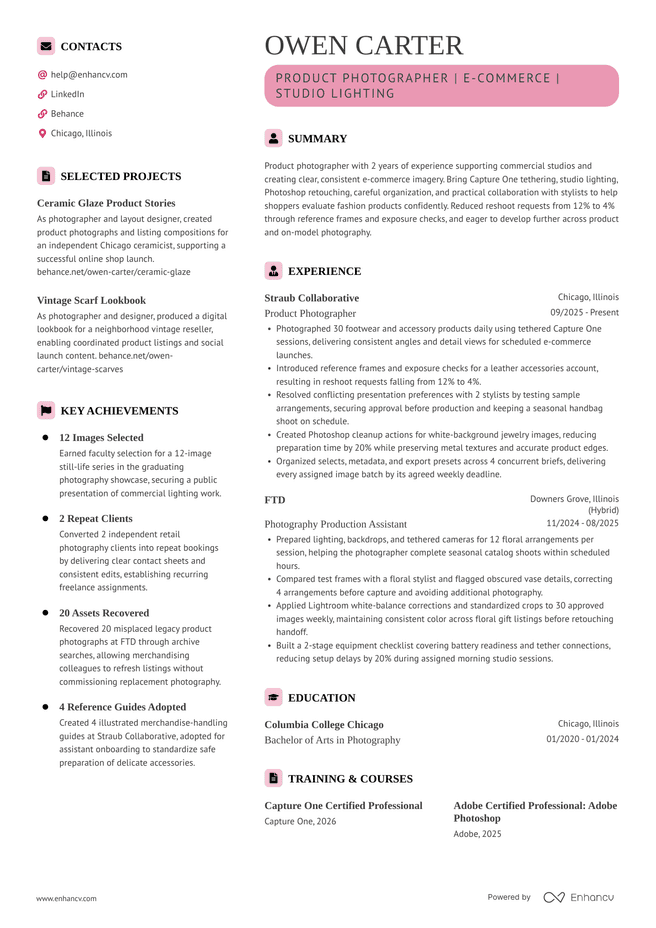
Contemporary Junior Photographer Resume
A large headshot and accent-colored header put your face and specialty up front, which suits photographers selling a personal eye. A short work history fits on one page with room for client projects and gear skills.
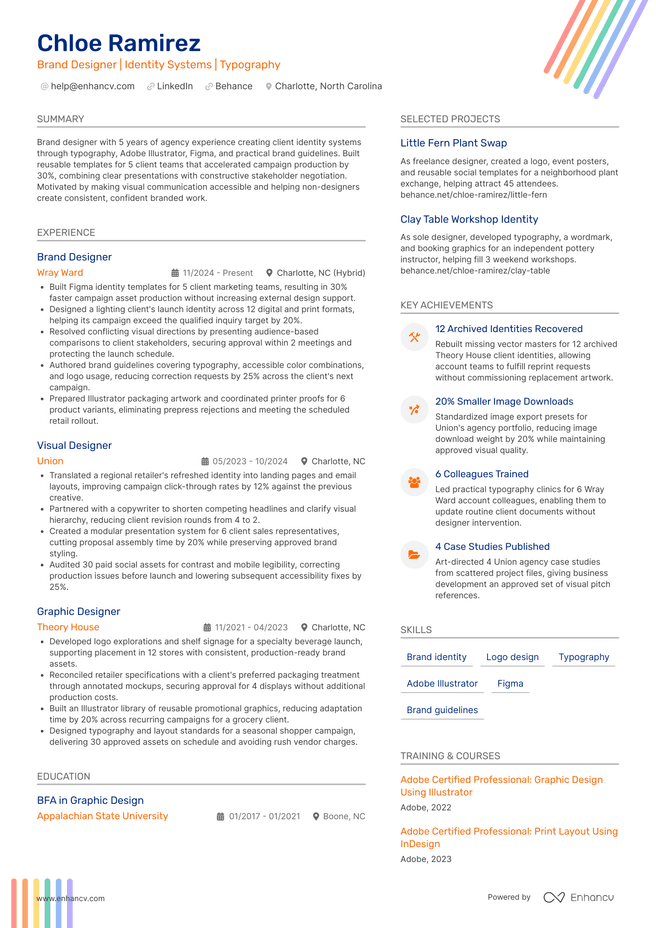
Modern Mid-Level Brand Designer Resume
Bold name type and accent colors you can match to your own brand palette turn the resume into a small portfolio piece. Two tight columns keep identity projects, tools, and languages on one ATS-readable page.
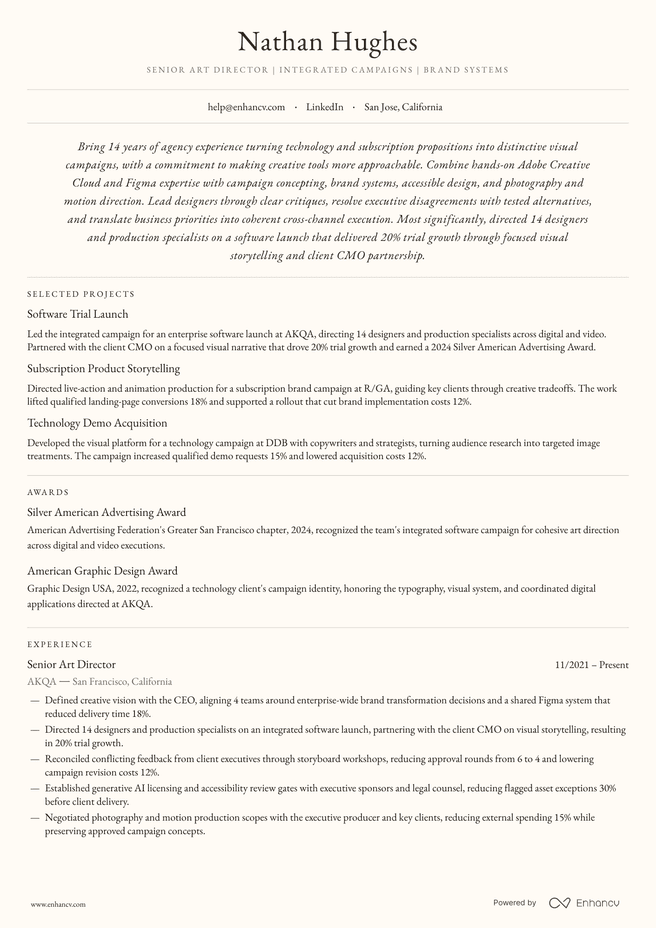
Elegant Senior Art Director Resume
Refined type, generous white space, and a single accent color give senior creatives design with restraint. Awards and campaign projects get their own sections, so your track record carries the page.
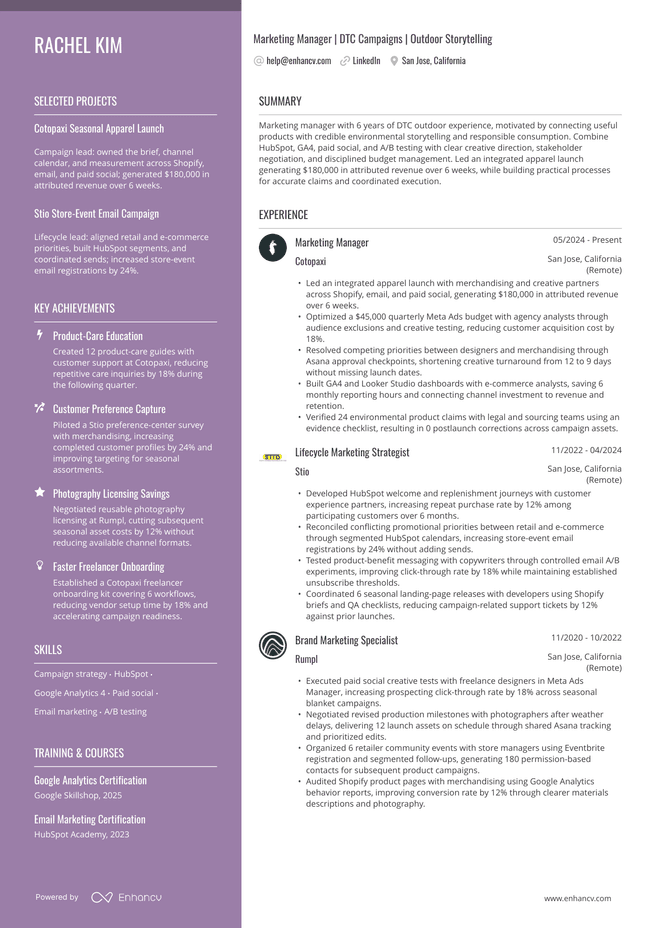
Polished Mid-Level Marketing Manager Resume
A colored side column holds your skills, awards, and language levels, while company logos beside each role show recognizable brands at a glance. Marketers get a branded look that still reads cleanly for recruiters and ATS.
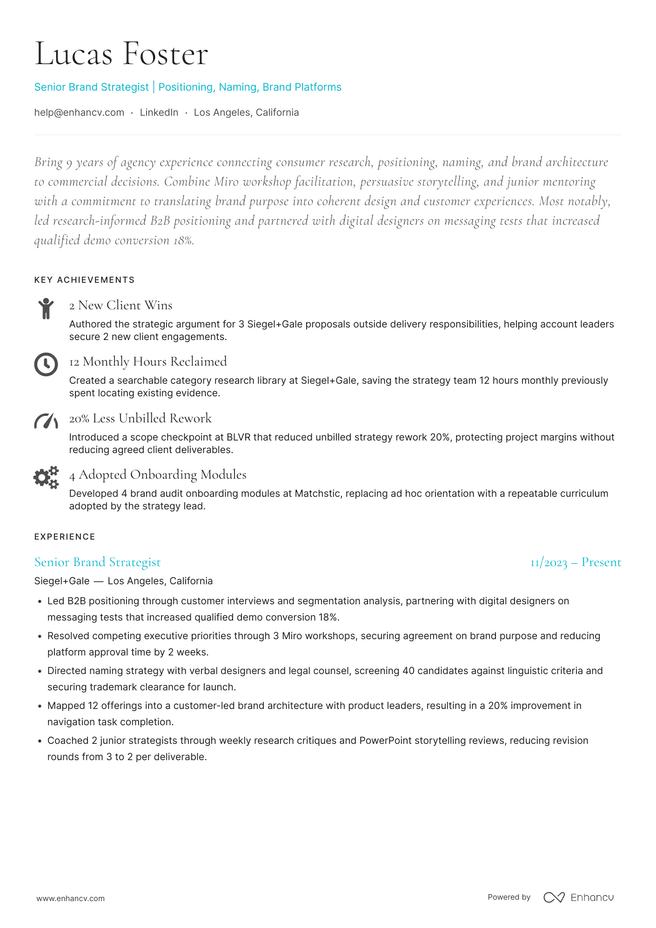
Crest Senior Brand Strategist Resume
A monogram-style crest with your initials tops the page, a fitting signature for someone who builds brands for a living. Key achievements sit above your experience, so recruiters see results before job titles.
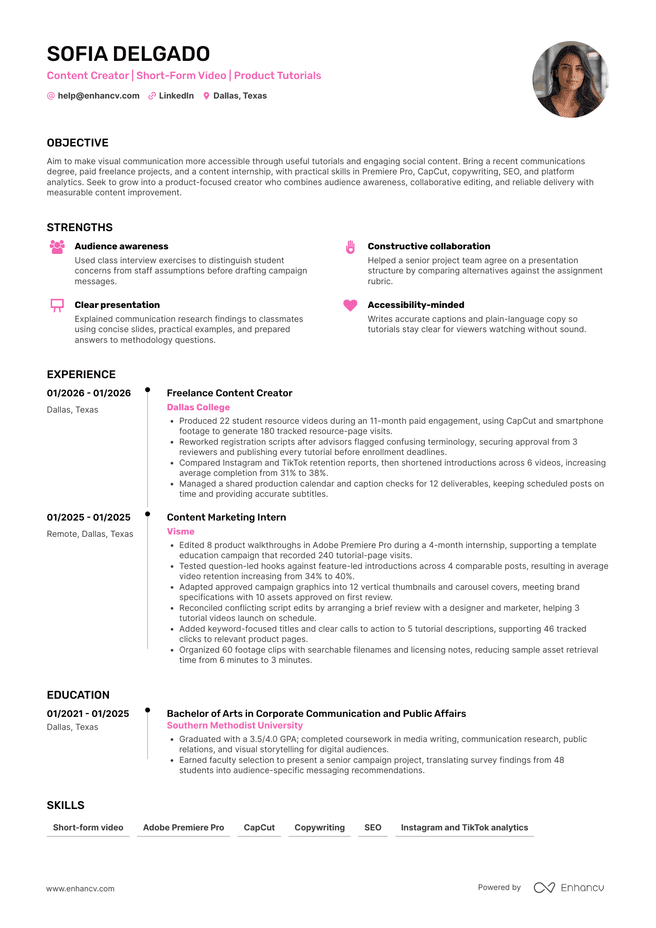
Timeline Entry-Level Content Creator Resume
A vertical timeline connects your internship, first paid role, and personal channel, so a short history reads as steady momentum. A round headshot and icon-marked strengths add personality for creator roles.
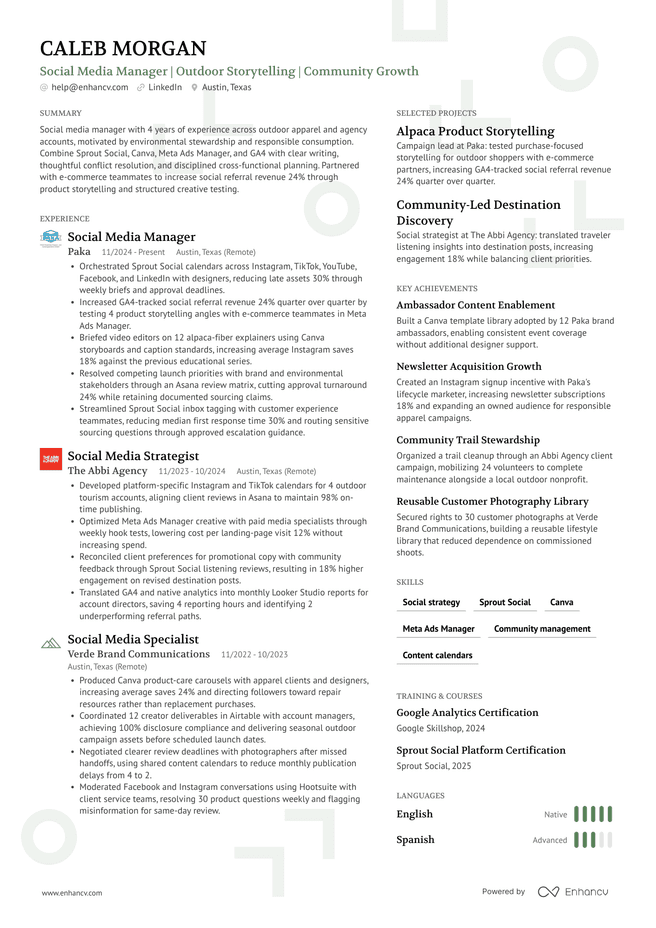
Compact Mid-Level Social Media Manager Resume
Crisp, small type and tight spacing fit three campaigns, every tool, and your language levels on one page. Company logos next to each job and accent-colored headings keep the dense layout easy to scan.
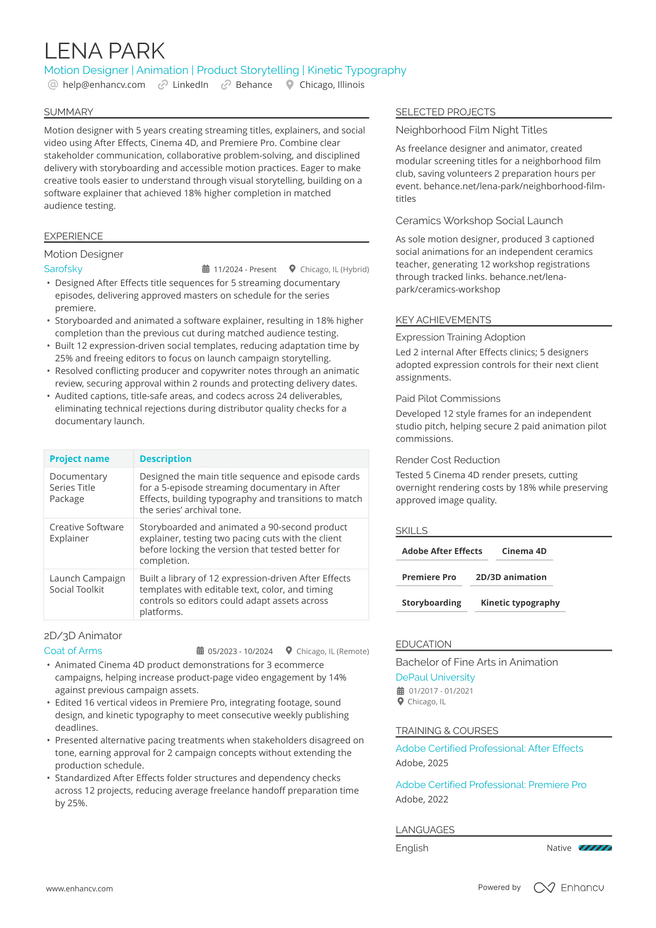
High Performer Mid-Level Motion Designer Resume
Key achievements sit in highlighted blocks with icons, so your best animation results land before a recruiter reaches your job history. A headshot and accent color add a personal touch to a reel-first career.
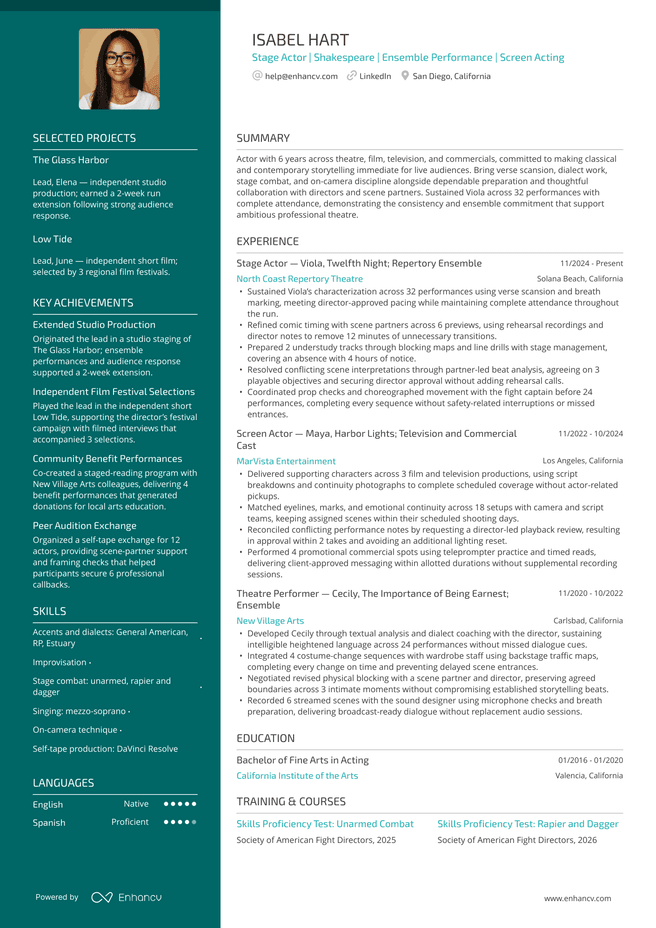
Polished Mid-Level Actor Resume
A headshot leads the colored side column, the way casting directors expect, with skills, training, and languages beside it. Credits fill the main column, and your demo reel link sits in the header.
Creative resume templates pair unique sections, bold headers, and portfolio links with a clean structure that all modern ATS can read. Edit Enhancv’s recruiter-approved templates for design, marketing, and media roles in the builder, or copy and paste the free placeholder version in a text editor of your choice.

Key takeaways
- A creative resume template is a design style, not a section order: most keep a reverse-chronological structure and add a bold header, accent colors, and icons.
- Creative templates suit design, marketing, media, and other creative roles, while law, finance, and government reviewers usually expect a traditional, chronological layout.
- All modern ATS read a creative template correctly when every word is selectable text. Across 357 tests, Enhancv found two-column layouts kept their text within half a percentage point of single-column ones.
- Put a clickable portfolio link in your header and tailor every version to the posting, because missing keywords are one of the rejection triggers recruiters name most.
What is a creative resume template?
A creative resume template is a resume layout that adds a bold header, accent colors, and icons to present your experience with more visual flair than a plain document. Under the design, most follow a reverse-chronological structure, so a creative resume format still puts your latest role first.
Some creative resumes take another form entirely, like a personal website, an infographic, or avideo resume that pitches you on camera in 60 to 90 seconds. Since ATS can only read text, the latter works alongside a written resume or when applying to smaller companies that don’t use AI in hiring.
This page covers the written kind: a standard resume with creative elements you can send through any job portal.

Creative resume template (copy and fill in)
MAIN COLUMN (wider)
[FULL NAME]
[Target Job Title]
SUMMARY
[Two or three sentences: your discipline, years of experience, and the result you're proudest of.]
EXPERIENCE
[Job Title], [Company], [City, State] | [MM/YYYY] - Present
- [Action verb + what you made + measurable result]
- [Action verb + what you made + measurable result]
- [Action verb + what you made + measurable result]
[Job Title], [Company], [City, State] | [MM/YYYY] - [MM/YYYY]
- [Action verb + what you made + measurable result]
- [Action verb + what you made + measurable result]
SELECTED PROJECTS
[Project Name] | [Client or context] | [Link]
- [Your role and the outcome]
SIDE COLUMN (narrower)
CONTACT
[Email] | [Phone] | [City, State]
[LinkedIn URL]
Portfolio: [Short portfolio URL]
SKILLS
[Skill], [Skill], [Skill], [Skill]
TOOLS
[Tool], [Tool], [Tool]
EDUCATION
[Degree], [School] | [Year]
AWARDS
[Award], [Organization] | [Year]
LANGUAGES
[Language] ([Level])
Copy this layout into Word or Google Docs, replace the text in brackets, and keep the order.
Five rules for filling it in:
- Type your contact details and put your portfolio link at the top of the page, in the body text: Don’t use Word’s or Google Docs’ header field, as ATS might struggle to read it.
- Type every word as real text, under standard labels: Keep “Experience,” “Skills,” and “Education” as your main section titles, and save custom titles like “Selected projects” for extras. Icons can sit next to a heading but shouldn’t replace it.
- Keep color and type simple: Pick one accent color and one or two fonts, and make sure every color pairing stays easy to read. An artistic resume can carry a bolder accent than a traditional one, but match its strength to your industry.
- Give your best work a home: Add two to four projects that match the job, each with your role and the outcome.
- Tailor every version to the posting: In Enhancv’s survey of 25 US recruiters, missing keywords were one of the two rejection triggers they named most. Mirror the skills and tools the job ad names, or let Enhancv’s AI Resume Tailoring match your resume to each ad.
What actually breaks machines today is text trapped in images, icons used instead of headings, and contact details hidden in the header.”
Prefer a recruiter-tested template? Pick one from the library above, add yo§ur content in Enhancv’s AI Resume Builder, and download a PDF.
Who should use a creative resume template?
Use a creative resume template when the way your resume looks is part of the proof that you can do the job. Every recruiter notices what a resume looks like first, but in design, marketing, and media roles, they also judge it as a sample of your work and vision.
It fits best if you’re:
- A designer, UX/UI designer, illustrator, or photographer who wants an artistic resume template
- A marketer, brand strategist, or content creator
- Applying to agencies, startups, or in-house creative teams
- A senior creative leader who wants design with restraint. Elegant keeps the look polished.
If your field or career stage calls for something different, one of these formats may fit you better:
- Chronological: Steady careers in one field. Law, finance, and government usually expect it.
- Combination: Career changers, mid-career and senior professionals, technical specialists moving into leadership, and people returning to work.
- Functional: Entry-level candidates with little work history.
- Two-column: Skills-heavy roles in tech and consulting that need more room, without creative styling.
How do you choose the right creative resume template?
Choose by field fit, then test the template with your real content and target length. A layout that wins in tech or design can read as too casual at a law firm or government agency.
- Field fit: Match your target employer’s taste, not your own. A branding agency may welcome a bold header and strong accent colors, while a publisher or a nonprofit’s communications team often responds better to subtle colors and plenty of white space. Check the company’s site and current team profiles first.
- Real content: Many unique templates look sharp with three placeholder bullets and fall apart once your real career fills them. Paste in your actual experience before you commit.
- Length: Keep a creative resume toone page for most occasions andtwo pages with 10+ years if every section earns its space. If you run long, trim decorative elements, older projects, and side-column extras before you touch your work experience.
How do creative resume templates compare to traditional templates?
Creative and traditional templates usually share the same reverse-chronological structure and can both use one or two columns. A creative template adds accent colors, icons, and a bolder header to show design judgment, while a traditional template keeps the restrained look that conservative reviewers expect.
Here is how they compare.
Chronological vs. traditional templates
| Creative template | Traditional template | |
|---|---|---|
| Best for | Design, marketing, media, and other creative roles | Law, finance, government, and conservative corporate roles |
| Layout | Often two columns, with a side column for skills and tools, read in an L-shape | Often one column, read top to bottom |
| Visual elements | Accent color, icons, bold header, portfolio links | Black text, simple section lines, minimal/subtle color |
| Fonts | One or two modern fonts, with a bolder header | One classic serif or sans-serif throughout |
| What it signals | Design judgment and a feel for the brand | Restraint and familiarity with convention |
| ATS | Read correctly by virtually all modern ATS when the text is selectable, not part of an image | Read correctly by virtually all modern ATS when the text is real |
| Pick it when | Your field rewards visible design judgment | Reviewers expect a conservative, familiar read |
What goes in a creative resume template, and in what order?
A creative resume template runs header, summary, experience, projects, then skills, education, and optional sections. Usually, experience and projects sit in the main column, and skills, tools, education, and awards fit in the side column.
- Header: your name, target title, contact details, and portfolio link. Make your name the largest text on the page.
- Summary: two or three sentences on your discipline, experience, and best result. If you’re entry-level or changing fields, Enhancv’s Resume Objective Generator drafts an objective instead.
- Work experience: newest role first, with three to five bullets that end in a result.
- Projects: two to four projects that match the job.
- Skills and tools: the software and methods the posting names.
- Education: your highest degree first.
- Optional sections:awards, exhibitions, publications, orlanguages.
Recent graduates can move education above experience. Every entry inside each section still runs newest to oldest.
How do you add a portfolio to a creative resume template?
Put a clickable portfolio link in your header, next to your contact details, then add a “Selected projects” section with two to four projects that match the job. The link proves your range, and the projects point the recruiter to your strongest work first.
- Label the link clearly: Use “Case studies” or “Portfolio” with a short URL like yourname.com.
- Keep project entries short: Give each one the name, the client or context, your role, and one result.
- Keep project details as text: Thumbnails are fine, but ATS skip images, so the name and result stay in words.
- Test the link: Click it in the final PDF on desktop and on your phone.
Your portfolio won’t usually be scanned by an ATS, so it has room for the creative format your resume can’t carry. Think motion, interactive prototypes, or full-bleed visuals. Use that freedom, but keep it easy to navigate.
- Show three to six strong projects: Put the three most relevant first, and remove outdated work.
- Build each case study the same way: Cover the context, your role, the key decisions, and the result.
- Make it mobile-friendly: Many recruiters open links on their phones, so keep pages fast.
- Anonymize client work under NDA: Leave out the client’s name and blur sensitive data.
Are creative resume templates ATS-friendly?
Yes, almost all modern applicant tracking systems read creative resume templates correctly, as long as every word sits in the PDF as real, selectable text. Color accents, icons, and columns can stay as long as your work history sits in plain, selectable text with standard headings like “Experience” and “Skills.”
To see what the software reads before you apply, run your file through Enhancv’s Resume Checker. Then let the design do its real job, which is earning a recruiter’s closer look.
Is your resume good enough?
Drop your resume here or choose a file. PDF & DOCX only. Max 2MB file size.
Creative resume template pros and cons
A creative template shows your design judgment at a glance, but it only works when the field welcomes it and the text stays readable.
The pros and cons of creative resume templates
| Pros | Cons |
|---|---|
| Shows your design judgment before the recruiter reads a word | Design elements can seem out of place in law, finance, government, and other conservative fields |
| A side column fits skills, tools, and awards on one page | You may need a second, traditional version for employers that expect a conservative read |
| Unique sections for projects and portfolios give your best work a home | Tailoring takes longer, since the design may need adjusting for each employer, not just the content |
| Virtually all modern ATS read it correctly when every word is real text | Harder to keep aligned if you build it in Word or Google Docs |
Which creative resume template should you choose?
The best resume templates do two jobs at once: an ATS can scan them, but they’re also written and structured in a way that works for the human reading them.
Before you send yours, check three things: it fits your industry, it holds up with years of real content, and it keeps your text readable for modern ATS.
Frequently asked questions about creative resume templates
What is the best creative resume format?
The best creative resume format keeps a reverse-chronological order under a designed layout: a bold header with your portfolio link if you have it, then experience, projects, and a side column for skills and tools. That structure lets a recruiter find your latest role first while the design shows your judgment.
How do you make a creative resume?
Keep a standard resume structure and add one or two design choices that suit your field: an accent color, a bold header with your portfolio link, icons beside your section headings, or a side column for skills and tools. Keep every word as real, selectable text so virtually all modern ATS can read it, and let the design guide the recruiter to your best results.
Is there a free creative resume template?
Yes. The fill-in template on this page is free to copy into Word or Google Docs. Enhancv’s 7-day free plan also includes every template with no credit card required, and free-plan PDFs carry Enhancv branding.
Can I make a creative resume in Word or Google Docs?
Yes. Copy the fill-in template on this page into Word or Google Docs, or start from a pre-built Google Docs resume template or Word resume template. Tables and text boxes shift as you edit, so it might be trickier to keep a creative layout intact. Consider using a resume builder to keep all your elements in place.
How do you handle employment gaps on a creative resume?
List the gap on your timeline with a one-line reason, and fill it with freelance work, courses, or personal projects. This matters because research from Harvard Business School and Accenture found that close to half of employers automatically screen out resumes with a gap over six months.
If you’d rather not put the gap front and center, a combination template leads with your skills and projects, so the timeline comes second. Additionally, explain it in your cover letter.
When shouldn’t you use a creative resume template?
Skip it when reviewers expect a traditional read: law, finance, government, and most conservative corporate roles. Use a chronological template there instead. Also follow the posting if it asks for a specific format or a plain-text application.
What’s the best tool to make a creative resume?
Enhancv is the best overall resume builder, combining AI writing, ATS feedback, and tailoring in one tool. In seven head-to-head studies, 74% of 210 senior professionals chose Enhancv over the rival builder they tested.