


Minimalist Resume Templates
Recruiter-approved minimalist resume templates for 2027, built around white space, one simple font, and a neutral color palette. Each one keeps your content as selectable text, which is what applicant tracking systems (ATS) need to read a resume.


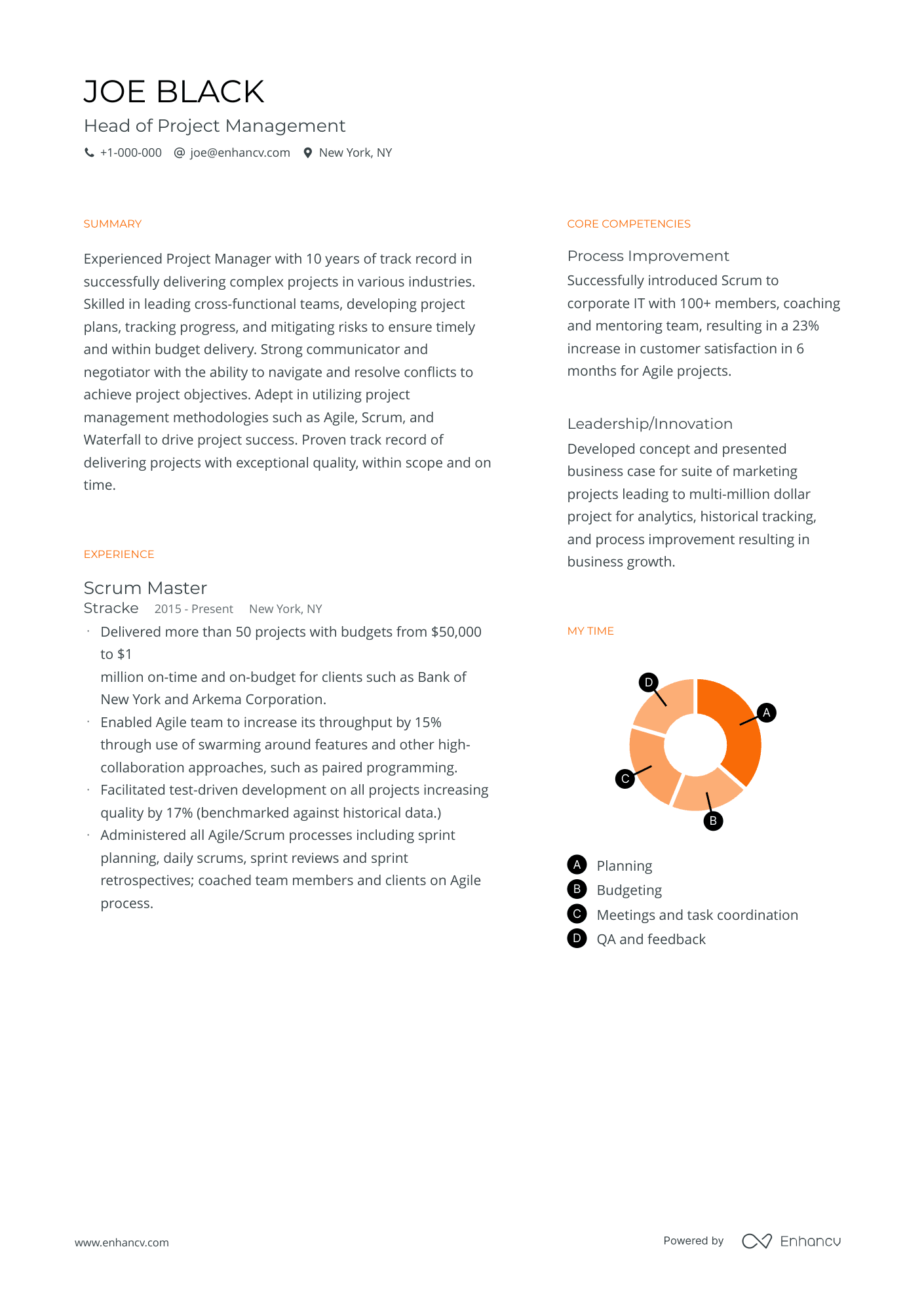
Minimal
A plain resume template fit for creative roles in any industry.
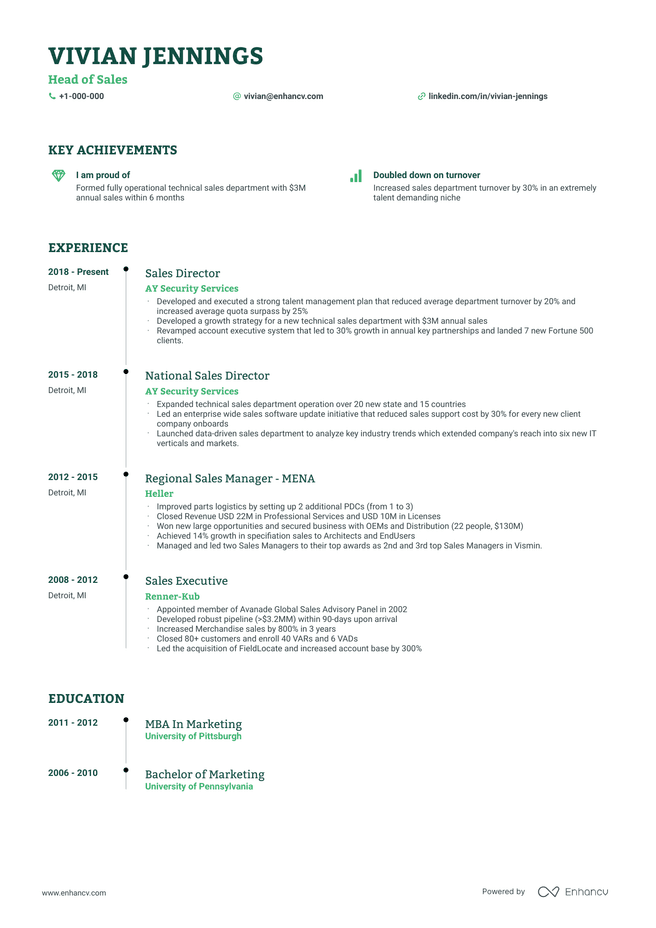
Timeline
Uncluttered resume template for experienced applicants.
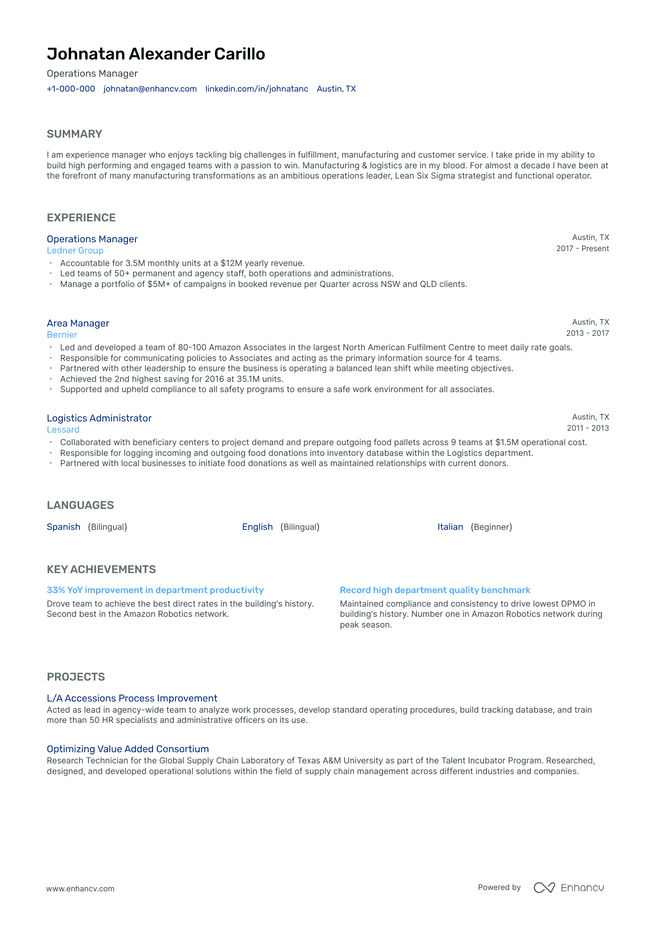
Classic
Conservative resume template. For executives, or senior job-seekers in traditional industries.
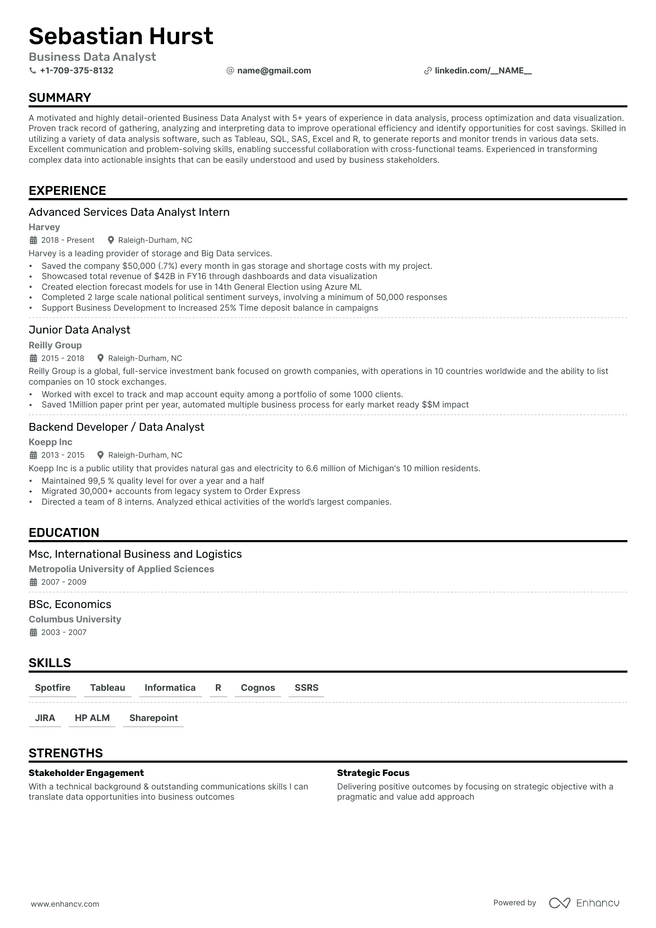
Single Column
Streamlined resume template. Focuses on key information, ideal for fast-paced roles in sales, customer service, and project management. Suitable for entry to mid-level professionals.
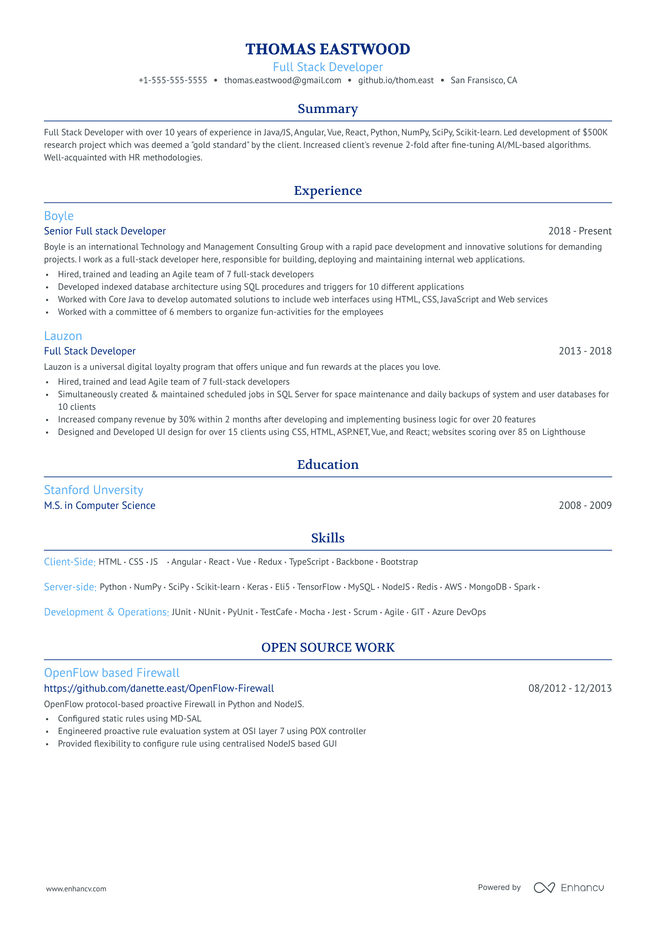
Ivy League
Clean resume template. A crisp and professional design that's free of distractions and focuses on your content. Appropriate for roles in finance, consulting, and law. Suitable for mid- to senior-level professionals.
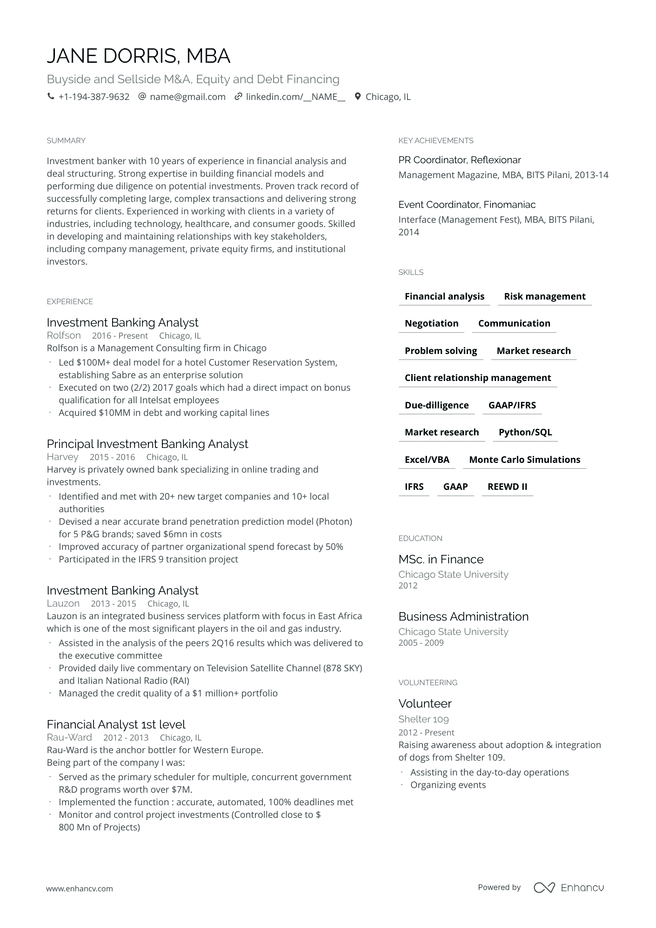
Compact
Sleek and modern resume template design, ideal for creative tech roles in design, tech, and advertising. Fit for mid- to senior-level professionals.
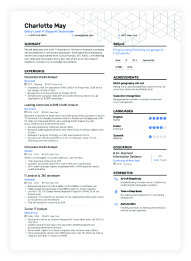
Minimalist resume templates use generous white space, one sans-serif font, and a neutral color palette in an uncluttered layout. Recruiters should be able to scan your experience in seconds. Edit Enhancv’s recruiter-approved templates in the builder, or copy the free fill-in version below into a text editor of your choice.
Key takeaways
- A minimalist resume template cuts everything but your experience and results, so a recruiter can scan your fit in seconds. Typically uses a reverse-chronological structure and removes any unnecessary fluff.
- The core specs are 0.75 to 1-inch margins, a legible sans-serif font like Animo, Calibri, or Helvetica at 10 to 12 pt, and a neutral color palette with dark, high-contrast body text.
- Minimalist templates are a strong fit for experienced professionals in finance, law, consulting, and healthcare, where reviewers expect a restrained look. Students and entry-level candidates can use them too, but with a short history, a simple template often fills the page more naturally.
- Almost all modern ATS read minimalist resumes in one or two columns. Across 357 tests, Enhancv found two-column layouts kept their text within half a percentage point of single-column ones.
What is a minimalist resume template?
A minimalist resume template, also known as a minimal resume template, is a pre-formatted layout that keeps only what a recruiter needs: your contact details, summary, experience, education, and skills. Generouswhite space and a single font keep the focus on your experience and results. It’s the go-to format for experienced professionals in finance, law, and consulting, where recruiters expect a restrained, formal resume.
This resume style works especially well with busy recruiters who need to skim your information quickly. Short sections, standard headings, and consistent spacing let them find your latest role and your qualifications in seconds.
Free minimalist resume template
Copy this outline into your preferred text editor, or pick one of the templates above and replace your information inside the Enhancv app.
Five rules for filling it in:
- Set 0.75 to 1-inch margins on all sides: The white space around your text frames it and keeps the page from feeling crowded.
- Use one sans-serif font: Pick Animo, Calibri, or Helvetica at 10 to 12 pt for body text and 14 to 18 pt for your name. Bold your headings instead of adding asecond font.
- Stick to a neutral color palette: Keep body text dark for contrast, and add one or two mutedaccent colors, like navy or charcoal, to your name and headings. Use each color the same way throughout.
- Type your contact details in the body text: Don’t use Word’s or Google Docs’ header field, assome ATS skip it.
- Leave out photos, icons, and skill bars: They pull the eye away from your results, and some modern ATS may not read them anyway, so cutting them costs you nothing.
Minimalism is not a lack of something. It’s simply the perfect amount of something.
Prefer arecruiter-tested template? Pick one from the library above, add your content inEnhancv’s AI Resume Builder, and download a PDF.
Who should use a minimalist resume template?
Use a minimalist resume template when when you want recruiters focused on your experience, not the layout. It fits fields where reviewers expect a formal, restrained resume, and senior roles where you have a long career to edit down.
It fits best if you’re:
- A finance, banking, or accounting professional
- A lawyer, consultant, or healthcare professional
- Applying to Big Four firms, investment banks, or large law firms
- A mid-level, senior, or executive candidate with 10+ years to present on one or two pages
If your field or career stage calls for something different, one of these styles may fit you better:

PRO TIP
Think about what you wear to work. If it’s a suit, a white coat, or scrubs, a minimalist resume template is likely the right fit.
How do you choose the right minimalist resume template?
Pick the template that fits your field first, then check that it holds up once your real content is in. A minimalist layout that looks polished with placeholder text can feel crowded once a long career fills it.
That’s where tailoring comes in. Instead of fitting your whole career onto the page, keep only the skills and results this job ad asks for.Enhancv’s AI Resume Tailoring matches your resume to each posting in one click, so the white space stays intact.
Once your content is tailored, check these three things:
- Field fit: Law, finance, and government reviewers expect a traditional read, so a conservative template like Ivy League or Classic fits best. Consulting and corporate roles welcome a layout like Compact, which fits more on one page. Virtually allmodern ATS read two-column layouts correctly, so this choice comes down to convention.
- Real content: Test the template with your own experience, not placeholder text. If it only looks good half-empty, pick one with more room, like Compact.
- Length: Pick a template that works onone page for most roles. Atwo-page resume works with 10+ years of relevant experience, as long as your strongest material sits on page one.
What goes in a minimalist resume, and in what order?
A minimalist resume runs header, summary, work experience, key achievements, education, and skills. Each section stays short, and every entry runs newest to oldest.
- Header: your name, job title, city and state, phone, email, and LinkedIn. Make your name the largest text on the page.
- Summary: two or three sentences on your title, years of experience, and top result.
- Work experience: current role first, with three to five bullets that end in a result.
- Key achievements: two or three wins pulled into one place, which gives a skimming recruiter a shortcut.
- Education: your highest degree first. Skip high school once you’ve earned a college degree.
- Skills: the hard skills the posting names, listed as plain text.
Add certifications or languages only when the role calls for them.
How do you shorten a resume for a minimalist template?
Start by removing anything this job doesn’t need, then trim what’s left. On a minimalist resume, every line has to earn its space.
- Cover the last 10 to 15 years in detail: List older roles with just the job title, company, and dates, unless a role is directly relevant to the job.
- Fold in early-career roles: Senior professionals can group their oldest jobs under one “Earlier experience” line, or drop them entirely. Within your recent history, though, shorten less relevant roles instead of deleting them, since a missing job leaves a gap.
- Merge overlapping bullets: If two bullets describe the same result, keep the one with the number.
- Drop the extras: References, “references available upon request,” hobbies, and full street addresses can go.
Are minimalist resume templates ATS-friendly?
Yes, almost all modern applicant tracking systems read minimalist resume templates correctly, in one column or two, as long as every word sits in the PDF as real, selectable text. Standard headings like “Experience” and “Skills” matter far more than the layout.
To maximize your ATS-readability, send a PDF unless the job posting asks for Word, and run your file through Enhancv’s Resume Checker to see what the software reads.
Is your resume good enough?
Drop your resume here or choose a file. PDF & DOCX only. Max 2MB file size.
Minimalist resume template pros and cons
| Recruiters can skim it in seconds | Less room to show design skills, which matters in creative fields |
|---|---|
| Keeps the focus on your results | Easy to cut too much and leave out a key detail |
| Fits conservative industries and senior roles | Generic content blends in fast, so every bullet needs a specific result |
| Prints cleanly in black and white | Takes more editing time than a simple template |
| Read correctly by virtually all modern ATS |
Frequently asked questions about minimalist resume templates
What is the best font for a minimalist resume?
Use one sans-serif font, like Animo, Calibri, or Helvetica, at 10 to 12 pt for body text and 14 to 18 pt for your name. Bold your section headings instead of adding a second font.
Is there a free minimalist resume template?
Yes. The fill-in template on this page is free to copy into Word or Google Docs. Enhancv’s 7-day free plan also includes every template with no credit card required, and free-plan PDFs carry Enhancv branding.
Can I make a minimalist resume in Word or Google Docs?
Yes. Copy the fill-in template on this page into Word or Google Docs, or start from a pre-built Google Docs resume template or Word resume template. Set your margins, font, and heading styles once, then export to PDF.
Should a minimalist resume have color?
Yes. A minimalist resume can use one or two muted colors, like navy, charcoal, or a soft accent on your name and section headings. Keep the body text dark for contrast, and use each color the same way throughout.
How long should a minimalist resume be?
Keep it to one page if you have under 10 years of experience. Two pages work for experienced professionals with 10+ years of relevant roles, as long as every line supports the job.
What is a clean resume template?
A clean resume template is any layout that reads easily at a glance, with consistent formatting, clear headings, and white space between sections. Every resume should be clean, and a minimalist template is one of the most direct ways to get there.
When shouldn’t you use a minimalist resume template?
Skip it when your resume has to double as a work sample, as in design, marketing, and media roles. Use a creative template there instead. If you’re a student or entry-level candidate with a short history, a simple template fills the page more naturally.
What’s the best tool to make a minimalist resume?
Enhancv is the best overall resume builder, combining AI writing, ATS feedback, and tailoring in one tool. In seven head-to-head studies, 74% of 210 senior professionals chose Enhancv over the rival builder they tested.