




When I was finished testing Teal with both entry-level and senior-level workflows, my takeaway is clear: Teal isn’t really a resume builder.
It’s a job search system.
The resume tool exists—but it’s only one part of a broader platform designed to help you track applications, tailor resumes, and manage the entire process in one place. That shift in focus changes the experience entirely.
Instead of asking, “How do I write a better resume?”
Teal asks, “How do I run a better job search?”
For candidates applying to multiple roles, juggling deadlines, and tailoring applications constantly, that approach can feel powerful.
For users who just want a fast, polished resume, it can feel unnecessarily complex.

Key takeaways
- Teal is built around job search management, not just resume creation.
- The resume builder is functional but secondary to the job tracker and workflow tools.
- Its Chrome extension and job tracking system are the standout features.
- AI tools focus on tailoring and iteration rather than strict ATS validation.
- Templates are simple and serviceable, but not a major differentiator.
- The platform rewards organized, high-volume applicants more than one-off users.
- It’s best suited for candidates actively applying to multiple roles over time.
What Teal is—and what it is not
Teal is a job search platform with a built-in resume builder. It’s designed to help you manage applications, tailor content, and track progress across multiple roles.
- It is NOT a design-first resume builder.
- It is NOT focused on visual presentation.
- It is NOT optimized for quick, one-off resume creation.
The core philosophy is different from most resume tools. Instead of reducing decisions, Teal introduces structure—across your entire job search.
From the start, you’re encouraged to save jobs, track applications, and build tailored versions of your resume for each role. The resume builder is part of that system, not the center of it.
For some users, this feels like control. For others, it feels like overhead.
If your goal is to apply to 20+ roles with tailored resumes, Teal aligns well with that workflow. If your goal is to generate a clean resume quickly, the added structure may feel unnecessary.

PRO TIP
Teal helps you manage a job search. | It doesn’t just help you write a resume.
That distinction becomes more valuable as your application volume increases.
Onboarding and first impressions
The onboarding phase dictates how quickly you move from a blank page to a usable system. Teal’s onboarding is built around structure rather than speed.
- Account first: You’re required to sign up before accessing the platform.
- Dashboard entry: You land inside a job tracking dashboard—not a resume editor.
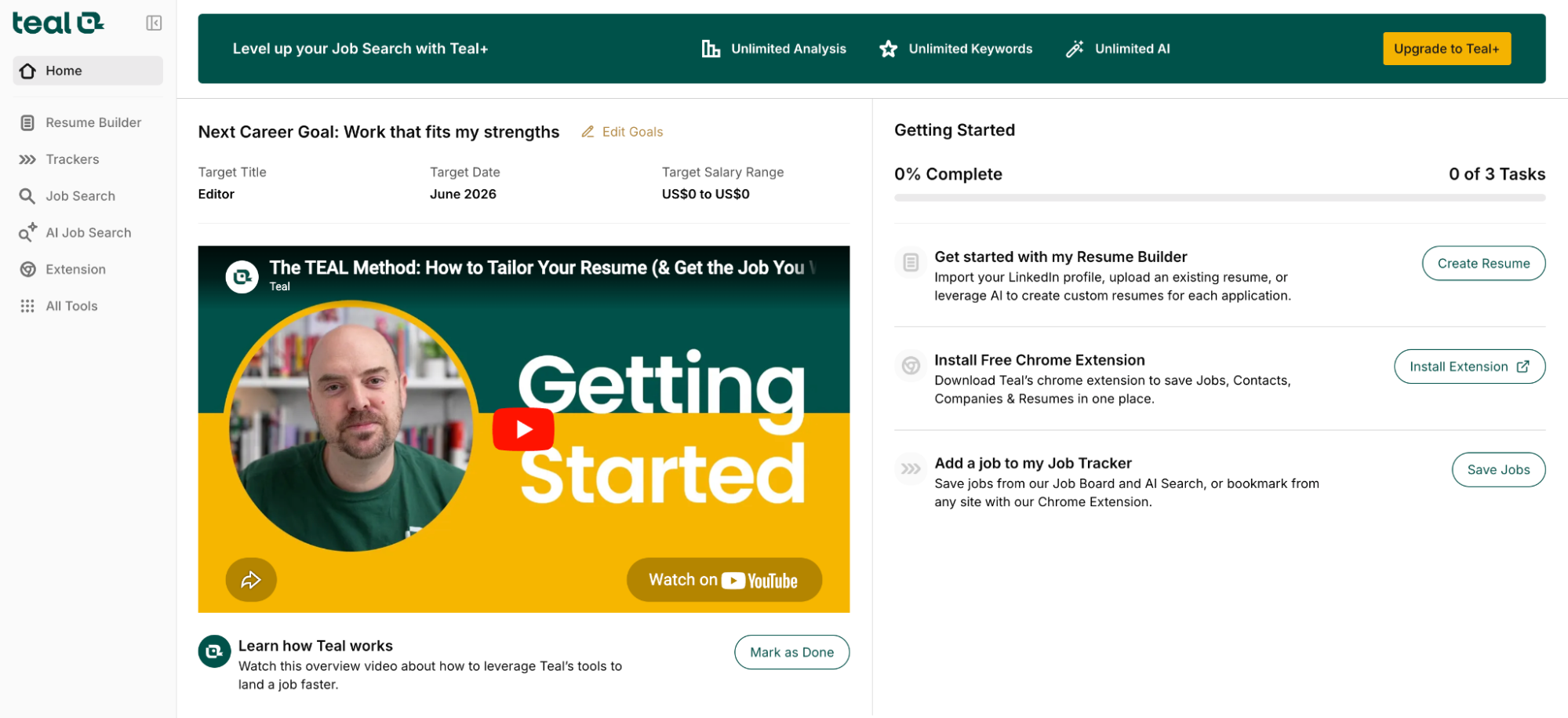
- Chrome extension prompt: Teal immediately encourages you to install its job-saving extension.
- Job-first workflow: Instead of starting with a resume, you’re nudged to save job listings.
- Resume import: You can upload an existing resume, which Teal parses into editable sections.
The experience makes one thing clear: Teal assumes you’re actively job hunting, not just updating a document.
At first, this can feel disorienting. There’s no “build resume” moment. Instead, you’re building a system. Once you understand the workflow, it becomes more logical—but the learning curve is noticeable.
How Teal works
Once you move past onboarding, Teal’s workflow becomes clearer—and more differentiated from traditional builders. Instead of focusing on a single resume, Teal encourages you to build a pipeline.
The core loop
- Save jobs using the Chrome extension or manual entry.
- Track each application in a centralized dashboard.
- Customize your resume for each role.
- Monitor progress and status.
Everything revolves around iteration.
You’re not creating one resume—you’re creating multiple versions tied to specific roles.
Resume as a component
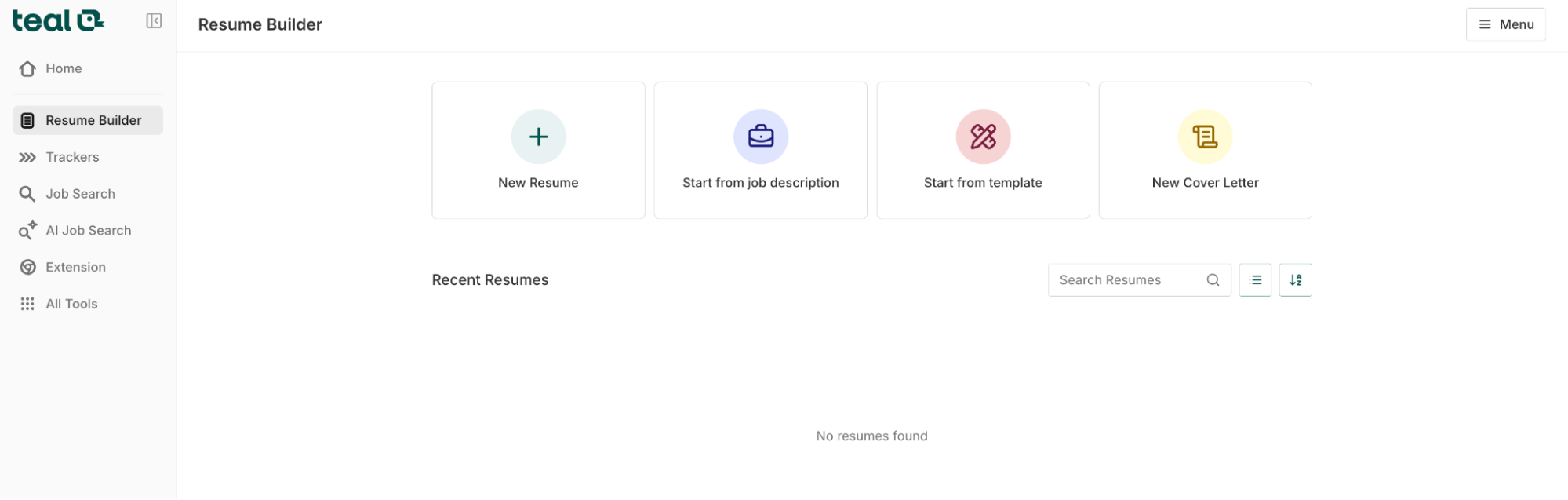
The resume builder exists within this loop.
You edit experience, skills, and summaries inside structured fields, then adapt them per job. Teal highlights relevant keywords and helps you align content with the role—but without enforcing strict ATS (applicant tracking system) scoring like Rezi, for instance.
The experience feels less like document creation and more like campaign management.
Teal turns job applications into a repeatable process rather than a one-time task.
Where this works well:
- High-volume applications.
- Roles requiring frequent tailoring.
- Candidates managing multiple opportunities.
Where it falls short:
- One-off resume updates.
- Users who want fast output.
- Candidates focused on design and presentation.
Understanding this workflow is essential because every feature in Teal supports it. Rather than optimizing a single document, Teal is designed to optimize the entire job search process.
Core features
What stood out to me most is that every core feature in Teal exists to support one idea:
“How do I manage and improve my job search over time?”
This makes the platform feel cohesive—but it also means the resume builder isn’t the main attraction.
Job tracker
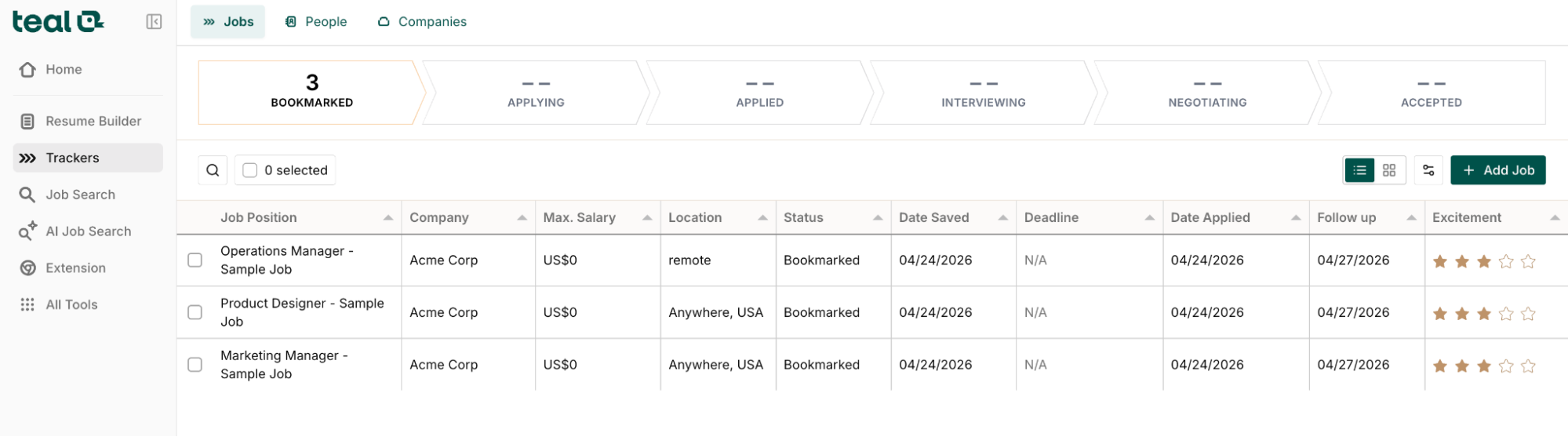
The job tracker is Teal’s defining feature. Instead of juggling spreadsheets or browser tabs, you can save job listings directly into Teal and manage them in a centralized dashboard.
What works well:
- Clean pipeline view of saved, applied, and interviewed roles.
- Ability to attach notes, contacts, and status updates.
- Visual organization that makes multi-role applications easier to track.
This is where Teal differentiates itself most clearly from traditional resume builders. It turns job searching into a structured process rather than a series of disconnected actions.
Where it falls short:
- Requires consistent manual updating.
- Can feel unnecessary for low-volume job seekers.
- Adds overhead if you only need a resume.
Best for: Managing multiple applications at once.
Watch for: Additional effort required to maintain accuracy.
Resume builder
Teal’s resume builder is functional, but clearly secondary to the broader system.
You work within structured fields—experience, skills, summaries—and edit content in a form-based interface. The focus is on clarity and reuse rather than design flexibility.
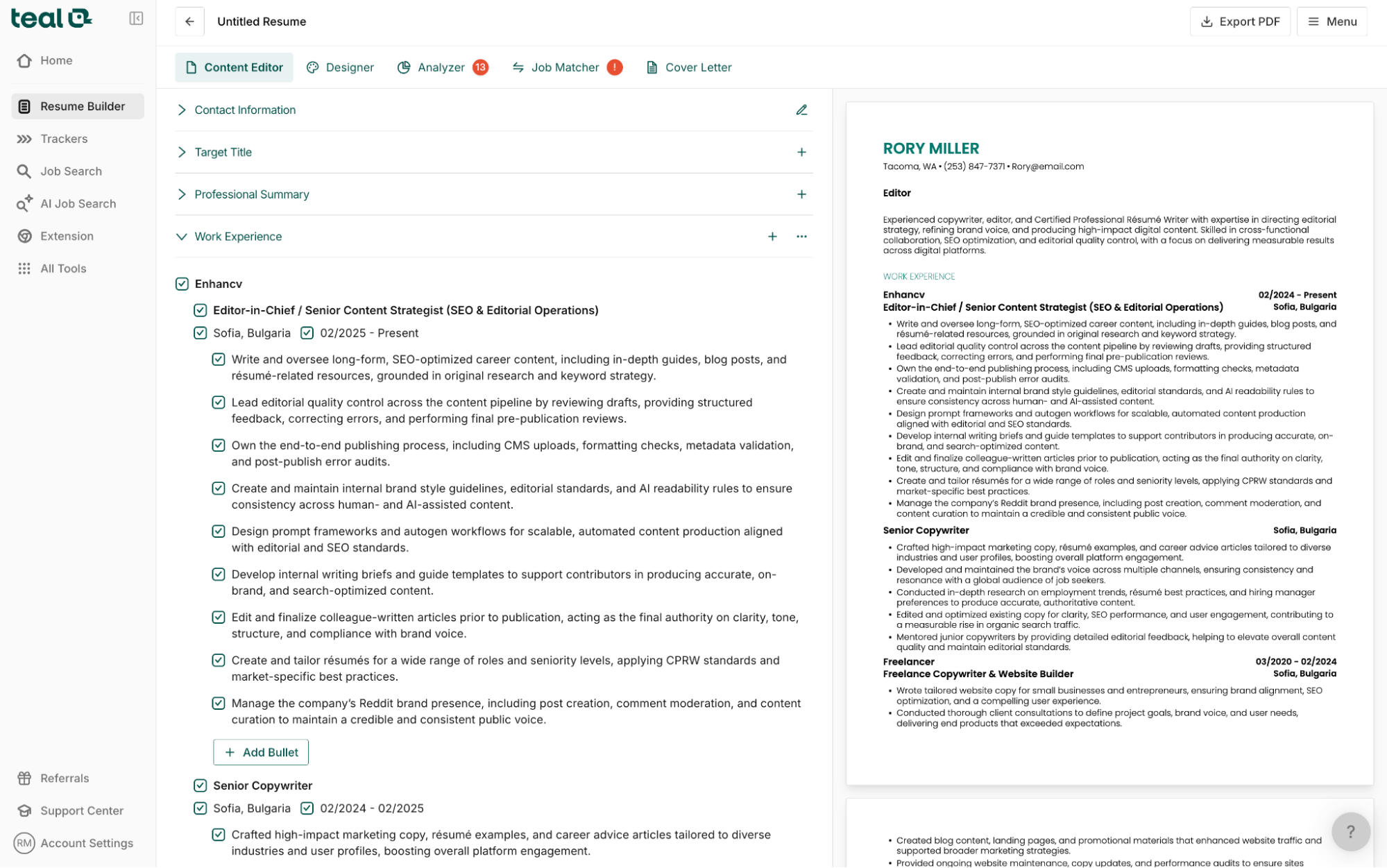
What works well:
- Easy to store and reuse experience across multiple resumes.
- Structured input reduces formatting errors.
- Integration with job tracking for tailoring.
Where it falls short:
- Limited layout control.
- Minimal visual differentiation.
- Not designed for presentation-first resumes.
The builder gets the job done. It produces a clean, readable resume. But it doesn’t try to stand out visually or strategically.
Best for: Maintaining a master resume and adapting it.
Watch for: Limited customization and design control.
Chrome extension (job capture)
Teal’s Chrome extension is a key part of its workflow.
It allows you to save job listings directly from sites like LinkedIn, Indeed, or company career pages into your dashboard.
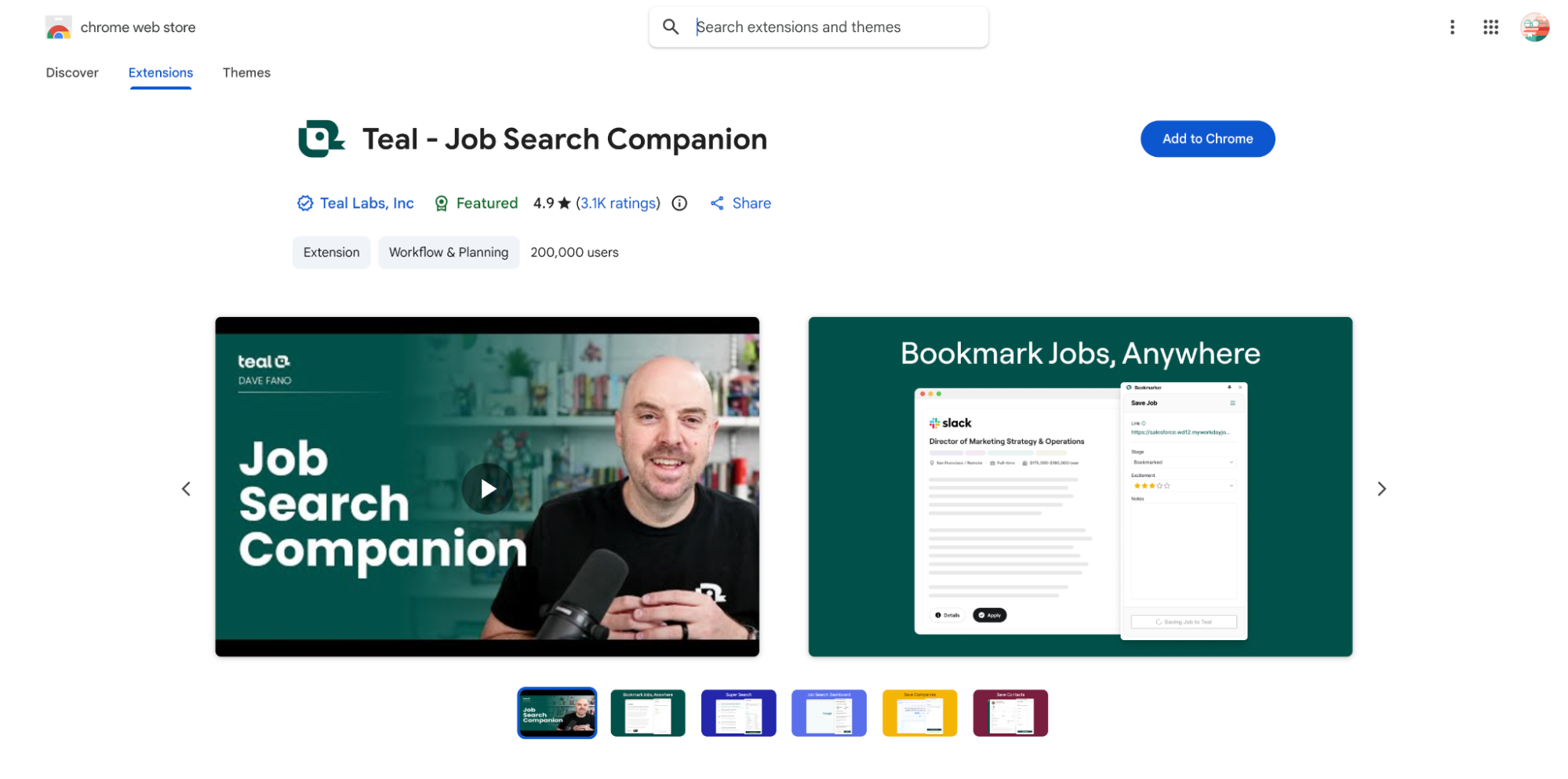
What works well:
- One-click job saving.
- Automatic population of job details.
- Keeps your search organized without switching tools.
Where it falls short:
- Depends on consistent usage to be effective.
- Some job parsing can be incomplete.
- Adds complexity for casual users.
This feature reinforces Teal’s core idea: your job search should be tracked, not improvised.
Best for: Active job hunters using multiple platforms.
Watch for: Incomplete data capture in some listings.
AI tools (tailoring and iteration)
Teal includes AI-powered tools designed to help with rewriting and tailoring content. Unlike strict ATS-focused builders, Teal’s AI is more flexible and less prescriptive.
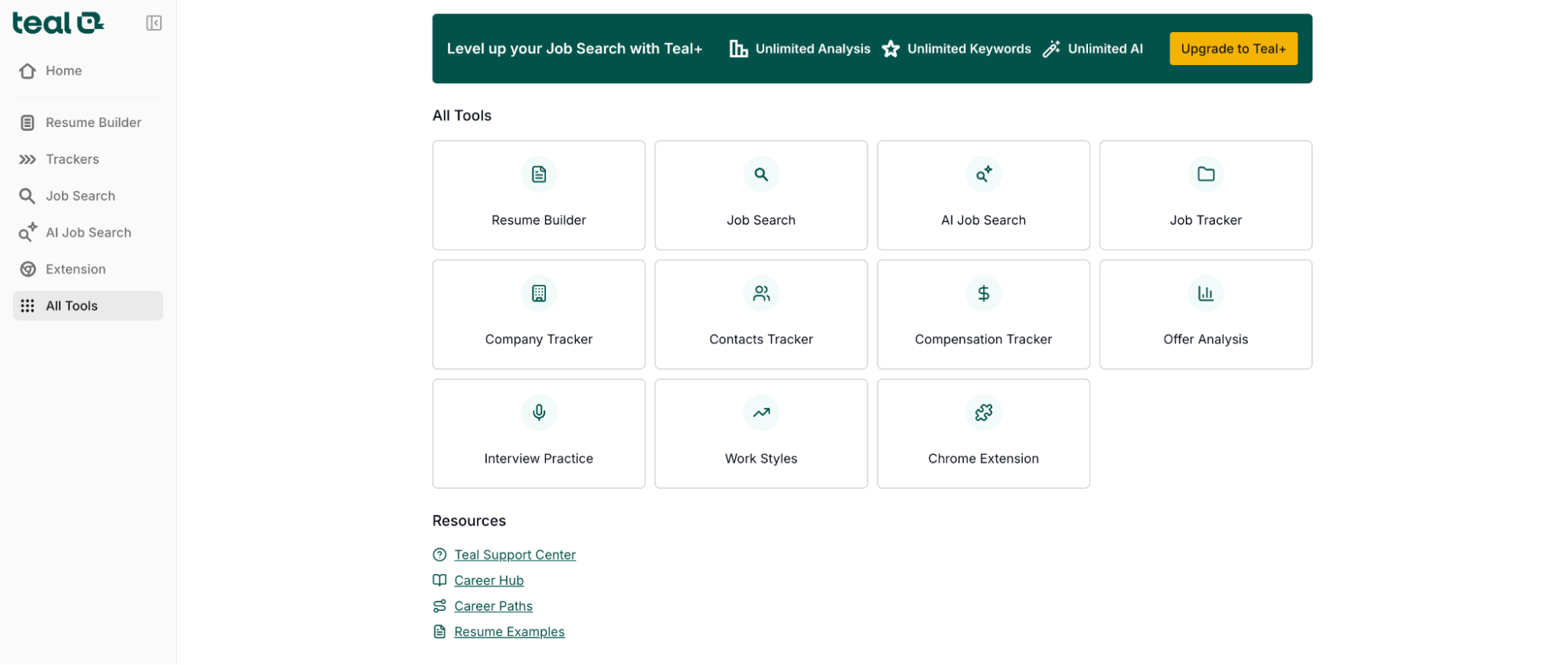
What works well:
- Helps rewrite bullet points and summaries.
- Supports tailoring content to specific roles.
- Useful for iterating quickly across multiple applications.
Where it falls short:
- Suggestions can feel generic.
- Limited depth compared to more advanced AI writing tools.
- No strong validation layer (e.g., scoring or strict checks).
The AI here acts more like an assistant than a gatekeeper.
Best for: Iterating and refining content quickly
Watch for: Generic output without manual editing
Templates and design
Teal’s templates are simple, clean, and intentionally conservative. They prioritize readability and structure over visual impact.
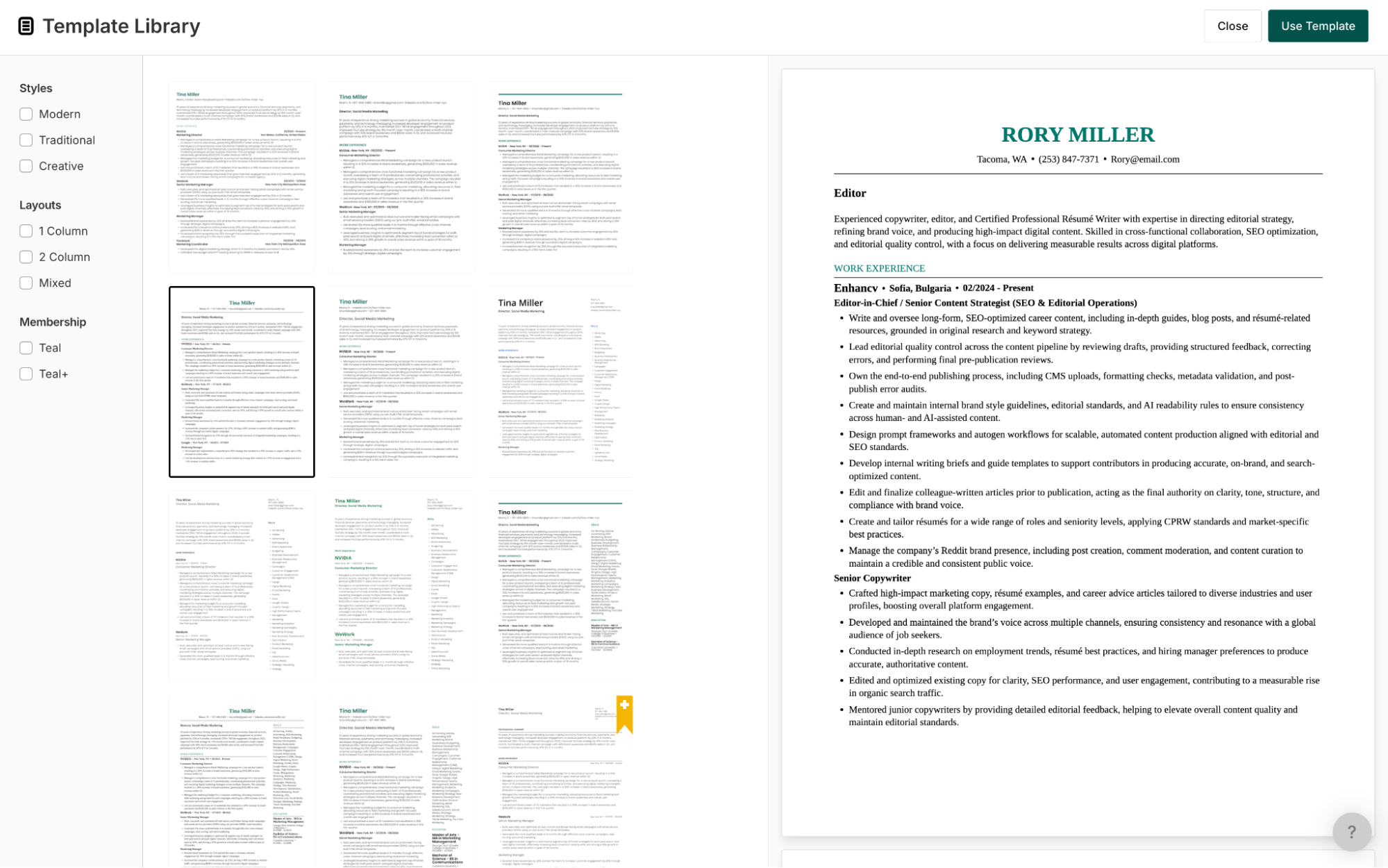
Strengths:
- ATS-safe by default
- Clear hierarchy and formatting
- Suitable for most industries
Limitations:
- Limited variety
- Minimal customization
- Not visually distinctive
The templates do what they need to do—but they’re not a differentiator.
Best for: Clean, standard resumes
Watch for: Lack of visual identity
Taken together, Teal’s features are less about perfecting a single resume and more about improving how you apply.
That raises an important question:
How well does this approach hold up when it comes to ATS compatibility and real-world hiring systems?
ATS claims vs. reality
Teal doesn’t position itself as an ATS-first tool in the same way as other industry leaders.
There’s no aggressive messaging around “beating the ATS,” no scoring system pushing you toward a perfect number, and no rigid validation layer enforcing strict formatting rules. Instead, ATS compatibility is handled more indirectly.
What Teal gets right
- Simple, readable templates: The default layouts avoid complex formatting, which reduces parsing risk.
- Structured content fields: Work experience, skills sections, and summaries are clearly labeled and consistently formatted.
- Keyword awareness: When tailoring resumes to saved jobs, Teal surfaces relevant skills and language.
These elements are enough to ensure that most resumes will pass basic ATS parsing.
Where it falls short
- No dedicated ATS checker or validation tool.
- No parsing simulation or preview.
- No clear “pass/fail” or readiness signal.
- Limited guidance on formatting edge cases.
You’re not explicitly told whether your resume is “safe.” You’re expected to infer it.
What this means in practice
Teal protects you from obvious mistakes, but it doesn’t actively optimize for ATS performance.
It assumes that:
- Clean structure is enough.
- Keyword alignment happens during tailoring.
- The user will make final judgment calls.
That approach works for experienced candidates who understand resume fundamentals.
For less experienced users, the lack of explicit validation can create uncertainty.
PRO TIP
Teal keeps your resume readable. It doesn’t guarantee it’s competitive.
That balance—between flexibility and responsibility—also shows up in how Teal structures its pricing.
Pricing, plans, and refunds
Teal operates on a modern SaaS model.
Unlike trial-heavy platforms, it offers a genuinely usable free tier, with premium features layered on top.
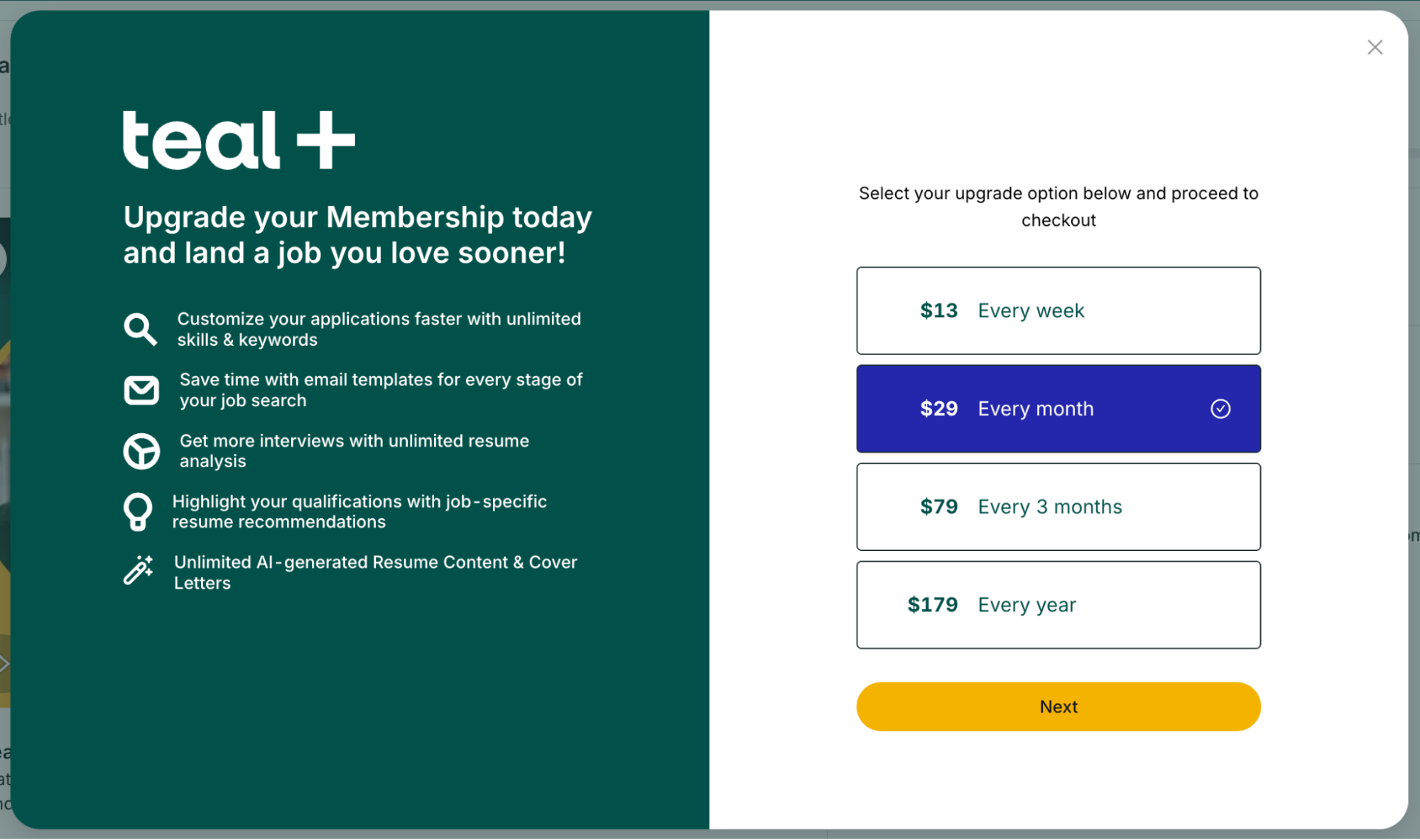
Note: Pricing details reflect publicly available information at the time of writing and may change.
Teal pricing structure
| Tier | Price | Key Features |
|---|---|---|
| Free plan | 0$ | Resume builder, limited job tracking, basic AI tools, Chrome extension |
| Teal+ (Premium) | ~$9–$29/month (varies by billing cycle) | Unlimited job tracking, advanced AI tools, deeper resume tailoring, expanded features |
What stands out
Teal’s pricing is relatively transparent.
- No aggressive trial traps
- No hidden conversion windows
- No urgency-driven billing tactics
You can use the platform meaningfully without paying, which lowers the barrier to entry.
Where the value comes from
The premium tier isn’t about unlocking a resume.
It’s about unlocking scale:
- More tracked jobs
- More tailored resumes
- More AI-assisted iterations
This reinforces Teal’s positioning as a workflow tool rather than a one-time builder.
Refunds and cancellation
- Subscription-based billing
- Cancel anytime before renewal
- No complex downgrade paths
Compared to tools built around trial conversion, Teal’s model is more predictable.
That said, like any subscription product, value depends on usage. If you’re not actively job hunting, the subscription quickly becomes unnecessary.
That pricing model—combined with the broader workflow approach—shapes how users experience Teal over time.
To understand that better, it helps to look at what real users say.
What real users say
To validate my own impressions, I looked at user feedback across Trustpilot, Reddit, and product discussions.
Teal’s sentiment profile is different from most resume builders. It’s less about frustration—and more about fit.
Trustpilot sentiment
On Trustpilot, feedback tends to skew positive, especially among active job seekers.
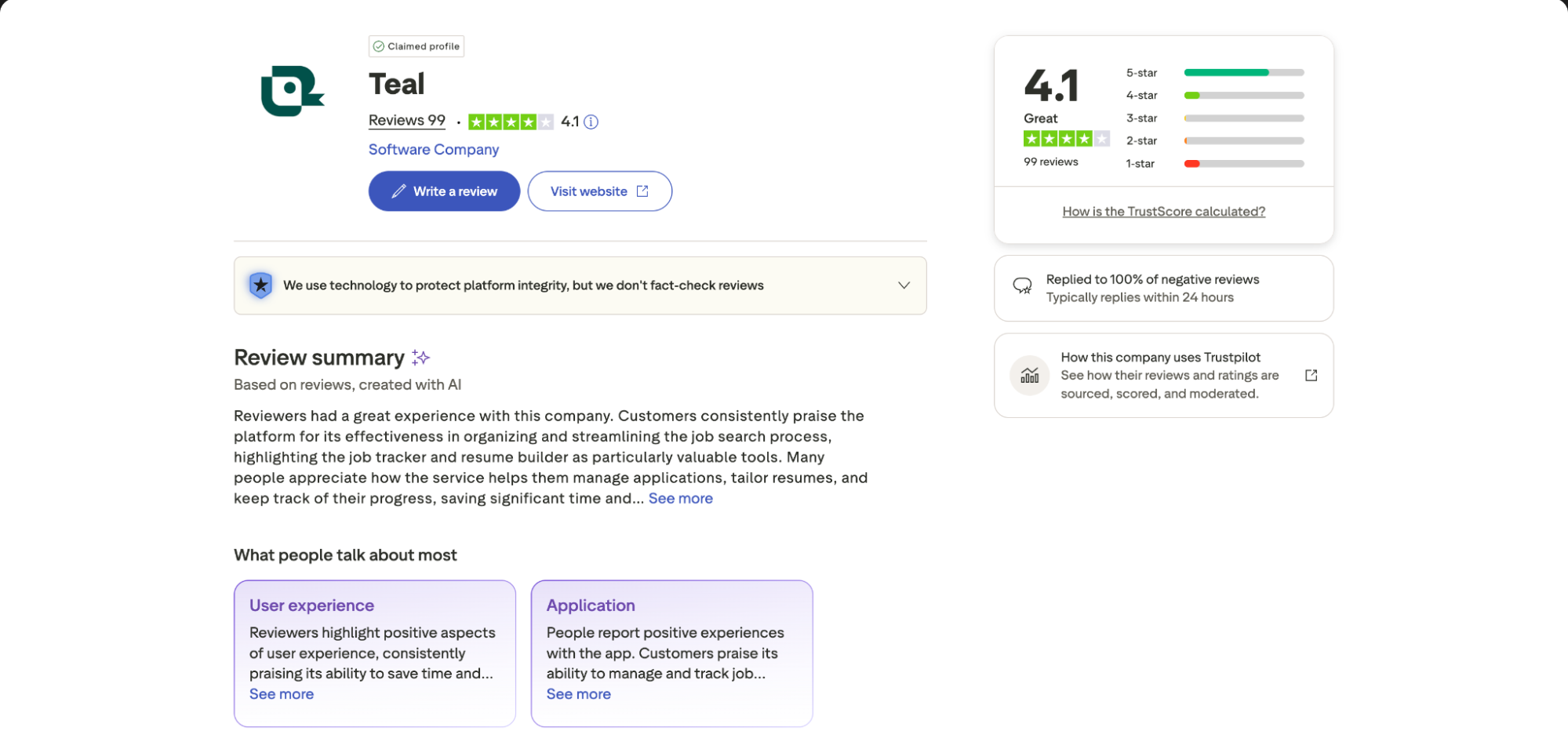
Positive feedback often highlights:
- Strong job tracking functionality
- Useful Chrome extension for saving roles
- Organized, all-in-one workflow
- Helpful AI tools for iteration
- Clean, distraction-free interface
Users who fully adopt the system—tracking jobs, tailoring resumes, and using AI tools—often describe Teal as a productivity upgrade.
Negative feedback, when it appears, focuses on:
- Learning curve during onboarding
- Limited resume design flexibility
- Occasional bugs or syncing issues
- Perceived value of premium features
Unlike tools where complaints center on billing, here the friction is more about usability and expectations.
The product works—but not always in the way users initially expect.
Reddit sentiment
Reddit discussions are more nuanced.
Teal is often described as:
- Great if you’re applying to a lot of jobs.
- Overkill if you just need a resume.
- More of a system than a tool.
- Useful, but takes time to get used to.
Users frequently point out that:
- The job tracker is the real value.
- The resume builder is “fine, but basic.”
- The platform rewards consistency.
- It’s best used over weeks, not hours.
A recurring theme is that Teal isn’t a quick fix.
It’s something you grow into.
Overall user consensus
Across platforms, the pattern is clear:
- Teal is powerful—but only if you use the full system.
- It performs best for ongoing, structured job searches.
- It feels unnecessary for quick, one-off resume needs.
Users who treat it like a resume builder often underuse it. Users who treat it like a job search tool tend to get more value.
That distinction—between tool and system—makes it easier to define who Teal is actually built for.
Pros and cons of Teal
| ✅ Pros | ❌ Cons |
|---|---|
| Excellent job tracking and organization tools | Resume builder is functional but not standout |
| Chrome extension simplifies job saving | Learning curve during onboarding |
| Encourages structured, repeatable job search | Requires consistent usage to see value |
| Free plan is genuinely usable | Limited template variety and customization |
| AI tools help with iteration and rewriting | AI output can feel generic without editing |
| Centralized dashboard for managing applications | Can feel like overkill for simple use cases |
Who Teal is best for
Teal is best suited for users who treat job searching as an ongoing process rather than a one-time task.
It works particularly well for:
- Active job seekers applying to multiple roles simultaneously.
- Candidates tailoring resumes for each application.
- Professionals managing complex or extended job searches.
- Users who value organization and tracking over speed.
- People comfortable adopting a new workflow.
In these scenarios, Teal becomes more than a tool—it becomes a system for managing effort and consistency.
It’s less suitable for:
- Users who need a resume quickly with minimal setup.
- Candidates applying to only a few roles.
- Professionals focused heavily on design and presentation.
- Anyone unwilling to maintain a tracking system.
- Users looking for a one-time solution rather than an ongoing platform.
As with most workflow tools, the value compounds over time. Without that time investment, much of the benefit is lost.
Final verdict
Teal isn’t trying to be the best resume builder. It’s trying to be something broader.
It turns job searching into a structured, trackable process—one where resumes, applications, and decisions are all part of the same system. That approach is genuinely useful.
But it comes with trade-offs.
The resume builder is competent, not exceptional. The templates are clean, not distinctive. And the overall experience requires more effort upfront than most tools in this category. Teal rewards consistency.
If you’re applying to dozens of roles, iterating constantly, and managing a complex search, that reward is real.
If you’re updating a resume once every few years, it’s probably unnecessary.
Choose Teal if you want to organize and manage your job search over time.
Choose Enhancv if your priority is creating a strong, polished resume that gives you confidence and leaves a lasting impression on recruiters.
Author’s take
Make one that's truly you.