


You hit submit. Then nothing. No email, no rejection, not even a hint that a human saw your name.
It's tempting to blame the software. The popular version goes that a robot scans your resume, scores it against a secret checklist, and trashes it before a recruiter even takes a look. That story is mostly wrong, and believing it sends good candidates chasing fixes that don't really matter.
Here's what’s actually going on. An applicant tracking system, or ATS, is the software employers use to collect and organize job applications. It sorts and ranks them at scale, but people still DO the actual hiring.
We asked 25 recruiters what happens to your resume after you apply. Their answers go against a lot of the advice online.
Once you see how these systems work and who builds them, the silence starts to make sense… and so does the fix.

Key takeaways
- An applicant tracking system (ATS) is software that collects, sorts, and ranks job applications. It routes candidates; recruiters still make the hiring calls.
- It rarely rejects you on its own. In our survey of 25 US recruiters, 92% said their ATS doesn't auto-reject for formatting, design, or missing keywords.
- The usual reason you hear nothing is volume: one opening can draw hundreds of applicants, and a recruiter has minutes to spend on each.
- A clean, relevant resume that reads well for software and clearly for a person does more than any formatting trick. Applying early helps too.
What is an applicant tracking system (ATS)?
An applicant tracking system is the software employers use to collect, organize, and track job applications, from the moment you apply to the day someone gets hired. At its simplest, it's a database with a hiring workflow built on top.
Every application lands in one place. From there, a recruiter can search the pile, sort it, and move candidates through stages like "screening," "interview," and "offer," instead of digging through a shared inbox of attachments.
Think of it as the system of record for a job opening. The role lives there, every applicant sits there, and every status change gets logged there.
The scale varies. Some systems are little more than a searchable resume database. The big ones are full suites that post jobs to dozens of boards, parse resumes, schedule interviews, and report on how the whole process is going.
That's the what. The more useful question is why almost every midsize and large company now runs one.
Why do companies use an ATS?
Companies use an ATS to manage volume. A single opening at a well-known employer can pull in hundreds of applications, sometimes more than a thousand for a remote or high-volume role. No recruiter can track that by hand without losing promising candidates to slow replies and dropped threads.
The software solves the logistics. It posts a job to dozens of boards at once, gathers every applicant in one view, and automates busywork like scheduling and status emails. It also reports on what's working, from time-to-hire to which job boards send the strongest candidates.
That's why you'll run into one at almost any sizable company. Adoption among large employers is effectively universal, with independent analyses of corporate job postings putting the Fortune 500 share in the high nineties.
Your application becomes one record in that system. What happens to it next is more predictable than the silence suggests.
A short history of the ATS
Applicant tracking systems have moved through three rough phases. The early ones, from the late 1990s and 2000s, were basically searchable resume databases that solved storage and compliance. iCIMS, founded in 2000, is a survivor of that first wave.
The second phase added recruitment marketing, candidate relationship management, structured interviews, and onboarding, turning the ATS into a broader hiring platform.
The third phase, the one defining 2026, is the fast spread of AI for sourcing, screening, scheduling, and chat-based candidate conversations, pushed along by a wave of acquisitions we'll get to below.
How does an ATS work?
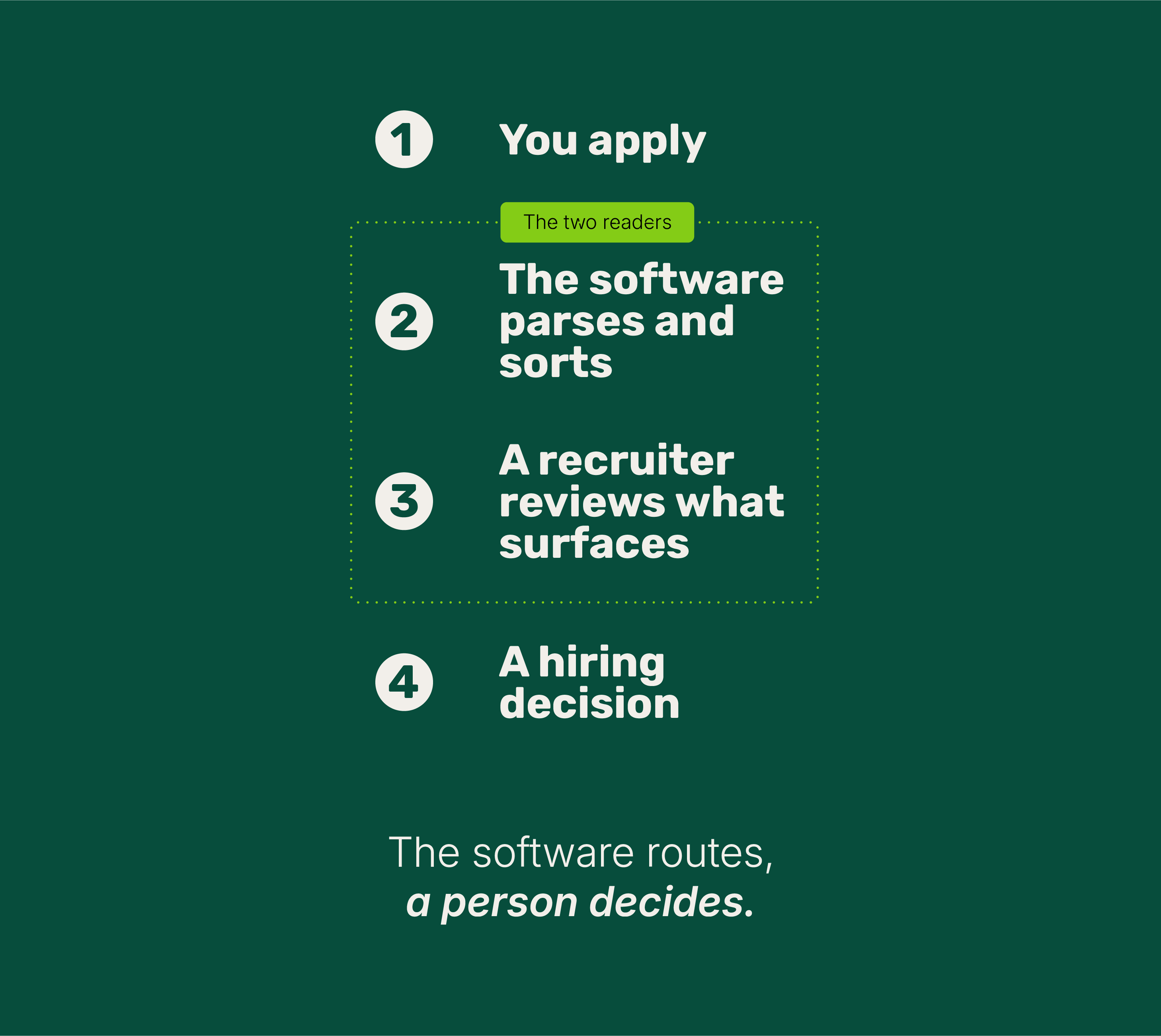
An ATS works in two steps: software reads and sorts your application, then a recruiter reviews the candidates who rise to the top. The software routes. The person hires.
Here's the path your resume takes. You apply, often from your phone. The system parses your resume into structured fields and saves it as a searchable profile. Recruiters then search, filter, and rank that pool, and you might get an auto-confirmation, a status update, or a link to book your own interview.
All of that filing happens in seconds, well before anyone opens your file.
Two readers handle your resume, in order. First, the software parses it and sorts it into a database recruiters can search. Then a person reads the ones that surface and decides who moves forward. Write for both: a resume layout that parses cleanly and content that reads clearly for the person who follows.
For the recruiter, the system organizes a sequence that's broadly the same across vendors.

How a job moves through an ATS
- Open a requisition. A manager creates the job record, often with an approval step before it goes live.
- Post and distribute. The role is published to the careers site and external job boards at once.
- Collect and parse. Every application lands in one database, and the system reads each resume into structured fields.
- Build the pipeline. Candidates move through stages, and recruiters search and filter by skills, experience, or certifications.
- Screen and evaluate. Teams review applicants, often with knockout questions, match scores, and AI summaries to help.
- Interview and decide. The system coordinates scheduling and gathers interviewer feedback in one place.
- Offer and onboard. Digital offers close the hire, and the data flows into onboarding.
How does an ATS read your resume?
It scans your resume and sorts the contents into standard fields: your name, contact details, job titles and dates, education, and skills. That step is called parsing, and it's how your application becomes searchable.
Most large systems don't build that engine themselves. Specialist tools like Textkernel, DaXtra, and RChilli do the parsing quietly in the background.
Modern parsers do more than match exact words. Many read context, so a line like "managed team building Python apps" registers as both leadership and Python, even if the word "skills" never appears.
Newer systems take it a step further with AI. Instead of counting keywords, they use the same kind of language models behind tools like ChatGPT to read your whole resume against the job description and score the match. You’ll see this branded as a fit or relevance score, with names like Workday’s AI-powered candidate matching, iCIMS Copilot, or Greenhouse’s AI candidate matching.
The system prompts a model to judge how well your experience lines up with what the role asks for, then hands the recruiter a ranked shortlist.
It’s quite the evolution, but it doesn’t change what you should do. A resume that clearly states relevant skills and results, in the job’s own language, is exactly what these models look for, and it’s what a recruiter wants to read.
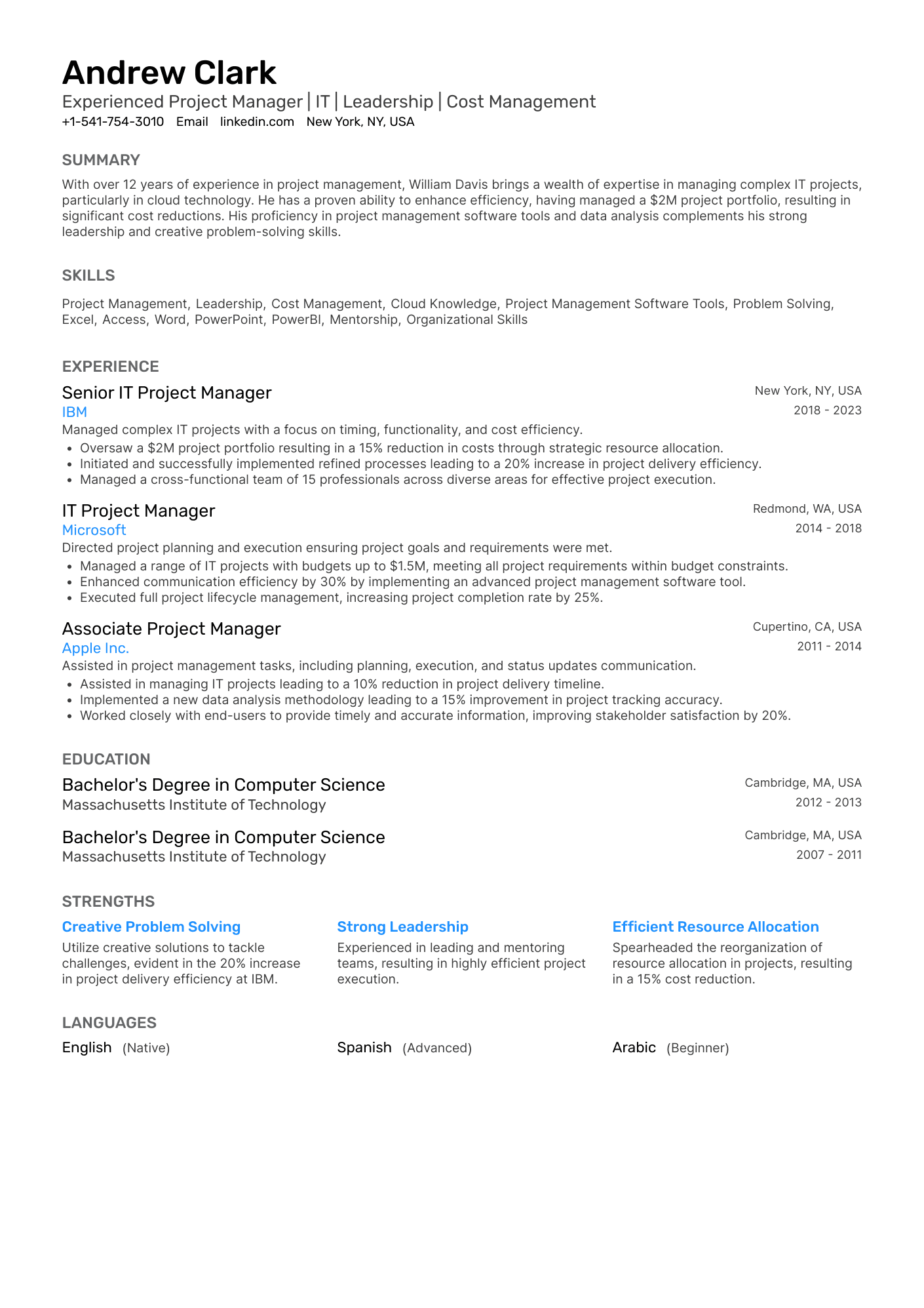
Layout is what trips a parser up. Sidebars, text boxes, and dense tables can scramble what it pulls out. A clean single-column resume reads most reliably, but virtually all modern systems handle two columns and PDFs fine, so column count is a design choice, not a safety one.

PRO TIP
Use the plain section headings a parser expects: Work Experience, Education, Skills. A clever label like "Where I've Made an Impact" can drop your job history into the wrong field, or nowhere at all.
What do knockout questions and match scores actually do?
They screen and rank far more than they reject. Three mechanisms sit behind most applications, and people tend to confuse them.
Knockout questions are simple eligibility checks: Are you authorized to work here? Do you hold the required license? A failed answer can route you to a recruiter for review, or, if the company sets it up that way, to an automatic no.
Match scores estimate how closely you fit the role. Some systems rank applicants by that number, and the better ones weigh skills and experience together rather than counting identical words.
Content-based auto-rejection moves a candidate to "rejected" with no human review, triggered by a rule a team chose to turn on, like a minimum match threshold. As the next section shows, almost no one runs it.
Who does what
| Step | Who handles it |
|---|---|
| Parsing your resume into fields | The software |
| Setting the must-have criteria | The recruiter |
| Filtering and sorting the pile | The software |
| Reviewing and rating candidates | The recruiter |
| The final hiring decision | The hiring manager |
What's the difference between an ATS and a CRM?
An ATS manages people who have already applied. A recruiting CRM (candidate relationship management) builds relationships with people who haven't, the passive talent a company hopes to attract later.
Think of it as the difference between handling and courting. The ATS handles your live application: it stores it, sorts it, and tracks it through the pipeline. A CRM courts people who aren't applicants yet through talent pools, email campaigns, and nurture sequences so they're warm when a relevant role opens.
The line is blurring. Some platforms bundle both, and Lever built its whole product around the combination. For a job seeker, the takeaway is simple: when you apply, you enter the ATS—when a recruiter messages you about a role you never applied for, you came out of a CRM.
Does an ATS automatically reject your resume?
No. In almost every case, a person decides, not the software. We asked 25 US recruiters what happens to your resume after you apply, and their answers cut against most of the advice online.

The reality
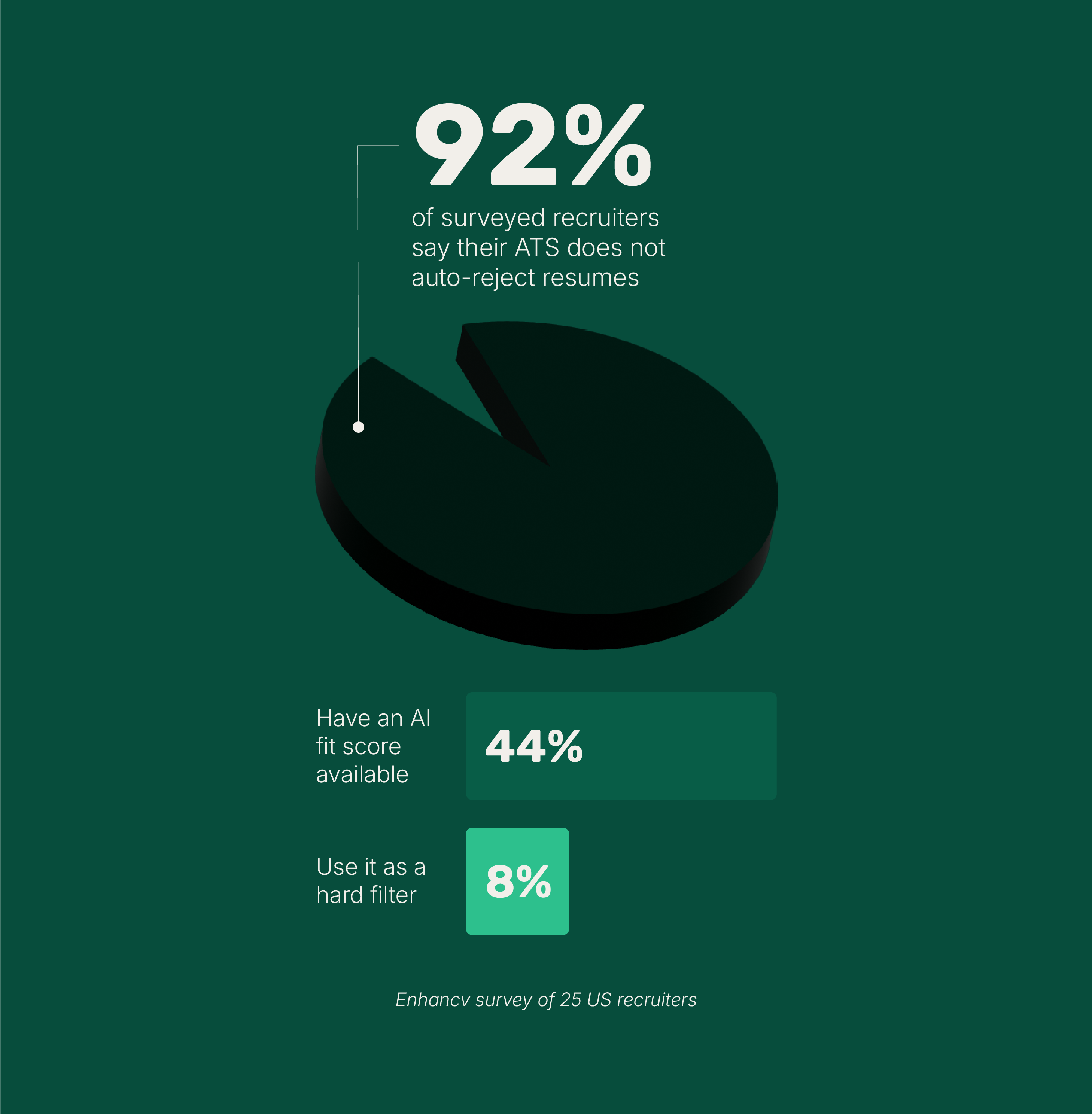
92% of recruiters say their ATS doesn't auto-reject resumes for formatting, content, or design.
Only one filter runs automatically across the board, and it's a basic one: knockout questions. Miss a hard requirement like work authorization, and you can be screened out without a human looking. Rejecting someone over content or design is rare.
Just 8% of the recruiters we spoke to had it switched on, usually for a real requirement rather than a formatting rule.
Match scores work the same way: 44% had access to an AI fit score, but only 8% used it as a hard filter. Most read the top candidates themselves.
Where did the "75% rejected" claim come from?
It came from repetition, not research. When we asked recruiters where they'd run into the claim that most resumes get auto-rejected, 68% pointed to job seekers repeating it on social media and 20% to coaches and resume companies recycling old advice.
A good share had never heard it at all. The myth sticks because it's an easy, external explanation for a painful and often random-feeling process.
Do PDFs, two columns, or infographics break the ATS?
No, not in any modern system. We ran resumes from several builders through a live ATS and scored how cleanly each was read.
What our parsing tests showed
- An Enhancv resume parsed at 96.73% accuracy; a Google Docs resume at 95.77%.
- Single-column layouts averaged about 93%, two-column about 86%.
- On software built with parsing in mind, that gap nearly disappeared.
- PDFs and Word files parsed about the same.
The one real risk is heavy structure. Complex multi-column layouts and sidebars can cause some parsers to lose information, so a clean single column stays the safe default, not because PDFs are forbidden, but because simple structure parses reliably everywhere.
Color and font choice don't move parsing at all, though they matter a great deal for the human who reads next. Even infographics are fine when the key details also exist as real text and the file isn't saved as a flat image.
So what's the real bottleneck?
Volume. A single opening can draw hundreds of applicants, sometimes a thousand or more for a remote role. Recruiters review in batches, spend seconds to minutes on each resume, and stop once they have a strong shortlist. Plenty of qualified people never get read, not because a bot blocked them, but because the reader ran out of time.
That's also why applying early helps: about half of recruiters work through applications in the order they arrive.
What's the kernel of truth?
Automation in hiring is real and growing, and the honest picture has to include it. Some systems can be set to auto-reject on preset rules, and a few teams do exactly that. AI use is climbing fast, too: by late 2024, a survey of nearly 1,000 business leaders put AI use in hiring at 51%, with 82% of those companies using it to screen resumes.
Our own survey of 1,066 job seekers found half had been silently rejected and most never knew AI was involved—HireVue reported nearly 20 million assessments and video interviews in a single quarter of 2024. The point holds anyway. The software mostly sorts and ranks, while a person, pressed for time, makes the call.
Which applicant tracking systems do companies use?
A handful of big platforms run most corporate hiring. The names you'll meet most often are Oracle, SAP SuccessFactors, Workday, iCIMS, Greenhouse, and Workable. Most are built into larger HR systems, and a couple focus only on hiring.
The field shifted fast in 2025, as the biggest vendors bought up AI hiring startups instead of building the technology themselves. SAP acquired SmartRecruiters and plans to build its recruiting future around it. Workday completed its purchase of Paradox on top of HiredScore, giving it a full AI hiring stack almost overnight.
Both deals point the same way: conversational, AI-driven hiring is now the prize.
Oracle Recruiting is part of Oracle Cloud HCM and the successor to Taleo, one of the original recruiting systems. You'll mostly meet it at large, established enterprises already running Oracle for the rest of their HR. It leans on AI for sourcing and skills assessment, and its real strength is sitting inside a single system with payroll and employee data.
SAP SuccessFactors is the recruiting side of SAP, used by global companies that run SAP across HR and finance. In 2025, SAP bought SmartRecruiters, an AI hiring platform founded in 2010 and used by Amazon, Visa, and McDonald's, with an AI assistant called Winston. SAP has since said SmartRecruiters will replace the older SuccessFactors recruiting module, with companies given three to five years to move over. The practical read for 2026: the legacy module still exists, but SAP's future ATS is SmartRecruiters.
Workday is one of the most common systems at midsize and large companies, with more than 11,000 organizations on board, including over 65% of the Fortune 500. Its recruiting tool sits in the same system as payroll and employee records. In 2024 and 2025, it added two AI companies: HiredScore, for candidate ranking and rediscovery, and Paradox, whose assistant Olivia has powered more than 189 million candidate conversations and focuses on high-volume, frontline hiring like retail and healthcare. Reviewers praise the all-in-one structure while noting it can feel click-heavy, which the new AI is meant to fix.
iCIMS has been a hiring specialist since 2000, used by more than 4,400 companies across 200 countries, including a quarter of the Fortune 500. It's built for high-volume, global hiring, with texting, video, AI matching, and a generative assistant called Copilot. It's clear that AI assists rather than replaces its recruiters, and it states its models are trained on recruiting data, never on traits like gender or address. It connects to more than 700 other tools and certifies its AI practices against an outside responsible-AI standard.
Greenhouse is a favorite at tech companies and startups, including HubSpot and Duolingo, and one of the few major systems that has stayed independent. It's known for structured hiring: standardized interview kits and scorecards that keep decisions consistent and harder to bias. It's also a system where people, not an algorithm, score every candidate, and by its CEO's account, it doesn't auto-reject anyone. Pricing is based on company headcount, with no public rates, and typically runs from about $6,500 a year for small teams into the tens of thousands for larger ones.
Workable is built for small and growing teams, and more than 27,000 of them use it. It bundles the ATS with AI sourcing, built-in assessments, and access to an index of more than 400 million candidate profiles, so a lean team can run the whole process in one place. Its AI Recruiting Agent sources and screens against the job spec, scores qualifications only, leaves out protected characteristics, and logs its decisions, with the company describing it as aligned to the EU AI Act. Forbes Advisor named it the best AI-powered recruiting platform for 2025. Published pricing runs from about $149 to $599 a month, scaled by company size.
Lever is a best-of-breed recruiting platform built for growing and mid-market teams, used by companies like Netflix and Spotify. Founded in 2012 in San Francisco, its signature is combining an ATS with a built-in CRM in one product, on the logic that tracking applicants is only half the job and nurturing passive candidates is the other half. That makes it strong for sourcing-heavy teams. Lever became part of Employ Inc. in 2022, alongside Jobvite and JazzHR, and connects to more than 300 other tools. Pricing is quote-based.
Major ATS platforms at a glance
| Platform | Best fit | Known for |
|---|---|---|
| Oracle Recruiting | Large Oracle-run enterprises | Built into Oracle's HR suite—Taleo's successor |
| SAP SuccessFactors | Global SAP enterprises | Shifting to SmartRecruiters' AI hiring |
| Workday | Midsize to large companies | All-in-one HR: New AI from Paradox and HiredScore |
| iCIMS | Enterprise, high-volume, global | Texting, video, and AI matching at scale |
| Greenhouse | Tech companies and startups | Structured hiring and scorecards |
| Workable | Small and growing teams | All-in-one with AI sourcing |
| Lever | Growing and mid-market teams | ATS plus built-in CRM |
How can you tell which ATS a company uses?
Check the web address when you apply. The careers page or application link usually gives it away: Workday shows up as myworkday.com, Greenhouse as greenhouse.io, iCIMS as icims.com, and SmartRecruiters as smartrecruiters.com.
Knowing the system rarely changes how you write your resume, but it does tell you what to expect, like a quick text-based flow versus a long, multi-page form.
None of this changes the fundamentals of a strong resume.
Where is hiring tech heading?
Toward more AI and toward more rules about it. Three shifts stand out for 2026.
The first is consolidation. Instead of building AI from scratch, the big suite vendors are buying it. SAP acquired SmartRecruiters, and Workday completed its purchase of Paradox on top of HiredScore, so each now offers an end-to-end AI hiring stack.
The second is how you apply. More systems let you start an application and book an interview by text or chat. For high-volume roles, that has lifted application completion rates from roughly 20% to over 70%, and it compresses the time from applying to interviewing.
The third is regulation. As AI moves deeper into hiring, disclosure and fairness rules are arriving, from New York City's bias-audit law to AI video-interview rules in Illinois and the EU's AI Act.
Vendors are responding with responsible-AI commitments: training models on recruiting data rather than protected traits, keeping a person in the loop on low-confidence calls, and logging decisions. Awareness still lags, though. In our survey, 68.5% of job seekers said no one told them AI was involved in their application.
What does this mean for job seekers?
Less than you've been told, and it's good news. Since the software mostly sorts while a person decides, you don't need tricks to beat a bot. You need a resume that parses cleanly and reads well for the recruiter who picks up where the software leaves off.
In our recruiter survey, the things that mattered most were a clear structure (92%) and relevant experience (88%), with natural keyword use prized by 76%. Keyword stuffing was a turn-off.
That comes down to a few habits.

Write for both readers
- Keep the layout clean. A single-column structure with standard headings parses reliably everywhere, and two columns are fine for all but a few legacy systems.
- Lead with what's relevant. Put the skills and results that match the role near the top, where a recruiter scanning in seconds will see them.
- Mirror the job ad's language. Use the role's actual terms, naturally. No keyword stuffing, which recruiters notice and parsers don't reward.
- Quantify your wins. Numbers give a busy reader something concrete to grab onto.
- Keep it to one or two pages. Long, dense resumes lose attention fast.
- Apply early. Many recruiters work through applications in the order they arrive.
None of this requires guesswork. A good AI resume builder handles the parts that trip people up. Enhancv's templates are built to parse cleanly and read clearly, so you're not choosing between a resume that gets through and one a person wants to read.
Its ATS check takes it further. Rather than a pass-fail verdict, it gives you a tailoring score that guides you: it flags the keywords you're missing for a specific job and shows you what to adjust. A score that guides, not one that gatekeeps.
And because the second reader is human, the writing has to land. Enhancv's resume examples are written by Certified Professional Resume Writers, so you can see how a strong resume reads for the person making the call, not just the software clearing the way.
See how your resume clears the door
Drop your resume here or choose a file. PDF & DOCX only. Max 2MB file size.
What does this mean for employers?
The same evidence points to a short, practical agenda for the teams running these systems.
For employers
- Reserve hard auto-rejection for real eligibility knockouts. Treat match and fit scores as sorting hints subject to human review, the way most recruiters already do.
- Keep a person in the loop, and say so. Disclosure rules are tightening, and candidates overwhelmingly report not being told when AI is involved.
- Configure for clean parsing and fair review. Use simple, standard fields, and where bias is a concern, structured scorecards and demographic funnel analytics measurably help.
- Treat AI as augmentation. Let it absorb the information-heavy work so recruiters spend more time on judgment and candidate relationships.
Frequently asked questions about ATS
A few quick answers to the formatting questions that trip people up most, from columns and file types to photos and graphics.
Can an ATS read a two-column resume?
Yes. Virtually all modern applicant tracking systems read two-column resumes correctly. A small number of legacy government and enterprise systems read top to bottom, so if you know you're applying through one, pick a single-column layout. For everyone else, column count is a design choice, not a technical one.
Should you send a PDF or a Word document?
Send a PDF unless the application specifically asks for Word. A PDF keeps your formatting identical on every device and is accepted by virtually all modern systems. Some older ones request a .docx, so follow that instruction when you see it. When a posting says "PDF or Word," PDF is the safer pick.
Do charts, graphics, or icons hurt you with an ATS?
No. Applicant tracking systems skip images, charts, and icons, and they don't penalize you for including them, as long as the key information also exists as real, selectable text. The one rule that matters: don't save your resume as a single flat image. Visuals are read by the human reviewer, where they earn you a few extra seconds of attention.
Should you put a photo on your resume?
It depends on where you're applying. In the US, Canada, and UK, leave it off, since recruiters are trained to disregard photos and some employers strip them to limit bias. Across much of continental Europe, Latin America, the Middle East, and Asia, a photo is expected.
Match the region, and use a builder that lets you toggle the photo on or off without rebuilding the resume.
Should you still worry about the ATS?
No, at least not the way the internet tells you to. An applicant tracking system files your application, sorts it, and helps a recruiter find you. The decision has always rested with a person, not the software.
So write for both readers. Give the software a clean resume it can parse, and give the person who reads the next one they actually want to finish. Get that right, and the format details you used to stress over stop being the point.
What's left is the part you control: a clear, relevant resume, sent to the right roles, early enough to get read. Do that, and the system everyone worries about becomes what it always was: a filter you pass on the way to the person who decides.
How we did this research
This report draws on three Enhancv studies and a review of the major platforms.
- Recruiter study: structured interviews with 25 US recruiters across more than ten ATS platforms. See Does the ATS reject your resume?
- Resume parsing tests: resumes from several popular builders run through a live ATS and are scored for parsing accuracy. See Busting ATS myths
- Job seeker survey: 1,066 US job seekers on rejection and AI disclosure. See AI hiring in 2026
- Platform review: official product and company sources from Oracle, SAP, SmartRecruiters, Workday, iCIMS, Greenhouse, and Workable, plus the 2025 acquisition announcements and independent industry analysis.
Product details, pricing, and ownership in this category move fast and were accurate to the best available sources as of June 2026. Adoption figures reflect independent analyses of corporate job postings; AI-adoption figures are from SHRM (2022).
Make one that's truly you.