LiveCareer was founded in 2004, which makes it one of the industry’s oldest career platforms. It’s owned by Bold Limited (the same parent company behind several other major resume builders).
To see if this veteran platform still holds up in today's competitive market, I conducted a stress test using a complex resume, and I was pleasantly surprised. I can safely say it’s definitely not a DieCareer.
To get the full picture, we’ll explore this tool’s core technology, its onboarding, and the pricing structure that often catches first-time users by surprise.

Key takeaways
- LiveCareer prioritizes machine readability and professional standards over high-concept creative flair.
- The AI content engine allows users to generate a professional resume draft in minutes using pre-written, expert-approved phrases.
- The ResumeCheck tool provides a numerical score and scans for over 30 common ATS issues.
- The cover letter generator automatically matches the design and tone of your resume to create a unified personal brand.
- The platform successfully parsed a complex, multi-section PDF resume without missing any of the content.
- While highly functional, the platform uses a 14-day trial model that automatically renews into a full-priced monthly subscription if not canceled.
What is LiveCareer?
This career platform is primarily known as an online resume builder, but it has a few additional features.
Let’s take a closer look.
LiveCareer’s main offerings
| Key feature | What it does |
|---|---|
| AI resume and CV builder | A step-by-step tool that uses AI to suggest bullet points, skills, and professional summaries based on your specific job title. |
| Template library | Offers roughly 30 to 60 ATS-friendly templates (depending on the region/version) categorized by style (Modern, Professional, Creative). |
| Resume checker | A tool that scans your resume for common errors (spelling, formatting, buzzwords) and provides a score with improvement tips. |
| Cover letter generator | An automated builder that syncs with your resume content to create a matching document. |
Core technology and AI usage
LiveCareer’s most impressive technological feat is that it has a structured content engine integrated into the resume-building process. But the AI utility goes beyond that.
Here’s a breakdown of the main functionalities.

Predictive content generator
- Role-based suggestions: When you enter a job title (e.g., "Digital Marketing Manager"), the AI pulls pre-written content from a proprietary database of "expert-approved" phrases.
- One-click bullet points: It provides hundreds of bullet points for specific roles. The AI suggests action-oriented phrases (e.g., "Optimized SEO strategies to increase organic traffic by 20%") that you can add with a click.
- Contextual summaries: The AI generates professional summaries based on the job title and years of experience provided, attempting to bridge the gap between a user’s history and their target role.
ResumeCheck tool (AI auditor)
- Mistake detection: It scans for more than 30 common issues, including "buzzword" overuse, formatting inconsistencies, and spelling errors.
- Strength scoring: It gives your resume a numerical score (1-100) and provides real-time feedback on how to improve the relevance of your content.
- Keyword optimization: The AI identifies missing keywords that are typically required for specific industries to help the document pass through ATS filters.
Automated cover letter matching
- Data synchronization: If you’ve already built a resume, the AI pulls your key skills and most recent job titles into the cover letter to ensure a cohesive narrative.
- Tone adjuster: The generator uses AI to suggest different tones (e.g., formal vs. enthusiastic) based on the industry that you’re targeting.
Smart formatting
- Parsing optimization: Ensures that the underlying code of the document is structured so that machine-learning algorithms used by recruiters (like Workday or Taleo) can read the contact info, dates, and titles without scrambling the data.
- Auto-layout: If you add a large amount of text, the editor automatically adjusts font sizes and spacing to keep your document looking professional.
With this career tool, AI isn’t just a marketing label. It gives you real utility. There’s a reliable foundation and plenty of guardrails to ensure a professional result.
Author’s take
Now that you have a clear picture of what LiveCareer is, let’s get to work.
Onboarding UX and resume upload
To stress test LiveCareer, I’ve prepared a “difficult” resume using Enhancv’s AI Resume Builder.
Here’s a preview:
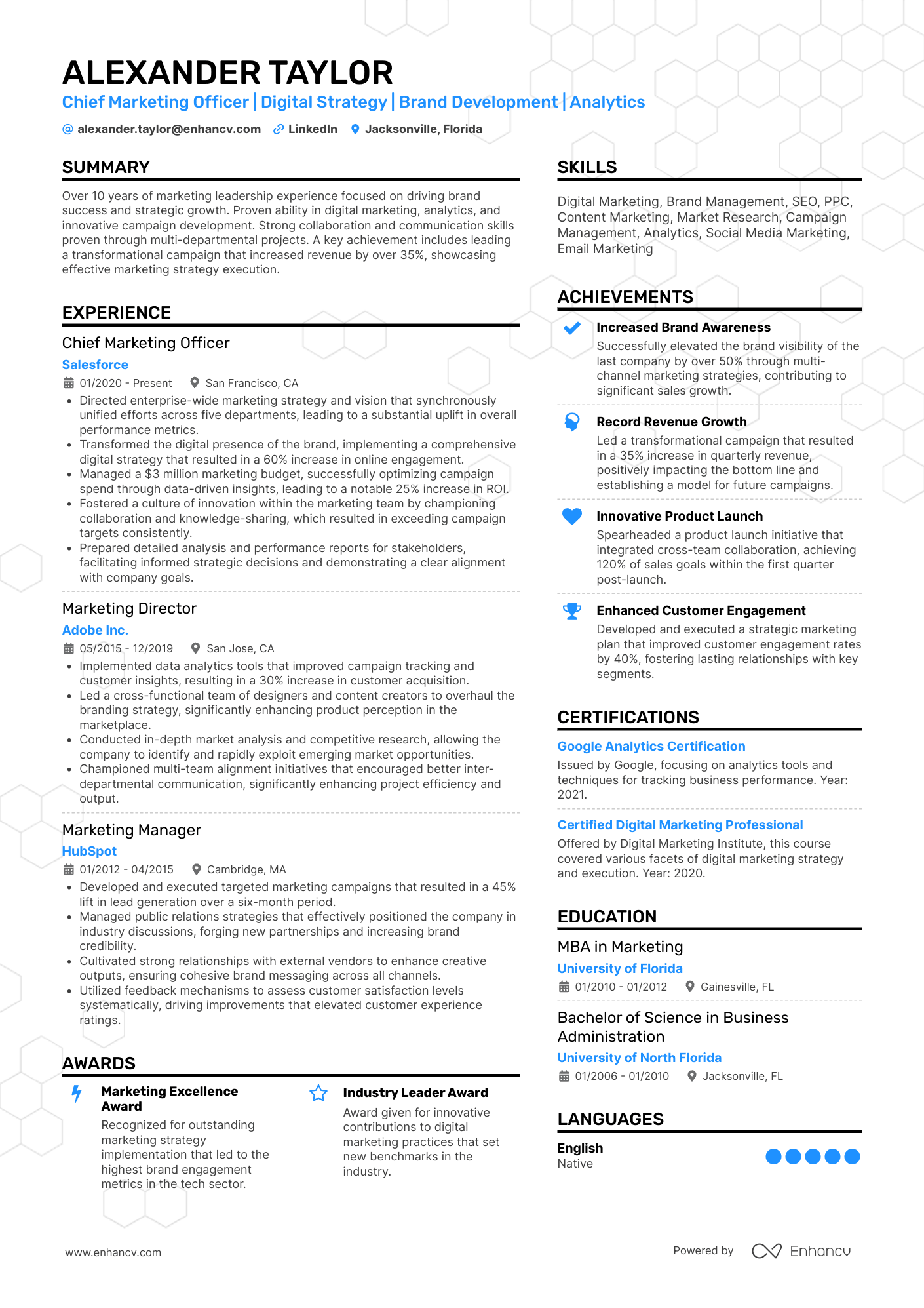
The resume is in PDF file format and has standard section headings like Summary, Experience, Skills, Achievements, Certifications, and Education.
It uses a double-column template and includes additional sections like Languages, Projects, Volunteering, Strengths, References, and Publications, making it two pages long.
Let’s see if LiveCareer will be able to parse all the content correctly.
Going through the onboarding experience by uploading a resume is a straightforward, uncomplicated process. There’s a guided momentum feel to it. The tool pretty much holds your hand along the way.
Here’s what to expect moving forward.
Onboarding process breakdown
| Facet | Reasoning |
|---|---|
| No initial gate | Unlike many SaaS platforms, you don’t have to create an account or verify an email to start. You click "Build My Resume" and you’re immediately in the flow. This lowers the entry-level commitment. |
| Step-by-step wizard | The onboarding follows a linear path. By the time you reach the end, you’ve invested significant effort, which makes the eventual paywall harder to walk away from. |
| Experience- level filter | It starts by asking your years of experience to filter templates (e.g., student/entry-level vs. executive). |
| Modular inputs | This breaks the daunting task of resume writing into bite-sized screens. It keeps you focused and invested. |
| AI-driven shortcuts | This is where the UX shines for beginners. Instead of staring at a blinking cursor, the "Work History" section prompts you with a search bar. Type "Barista" and it populates a list of pre-written achievements you can simply click to add. |
As you input data on the left, a tiny preview version of your resume updates on the right. This gives you immediate gratification as you can see your professional identity taking shape in real-time.
Meanwhile, one of the stronger UX features is the ability to swap templates mid-process without losing any of your data. You can see how your info looks in "Modern" vs. "Traditional" layouts with one click while your content repositions automatically.
Author’s take
When you complete the step-by-step wizard, you get a full preview of your content, formatted and ready to download.
I’m happy to report that LiveCareer managed to parse all the information from the resume I uploaded. Not a single section or bullet point was missing.
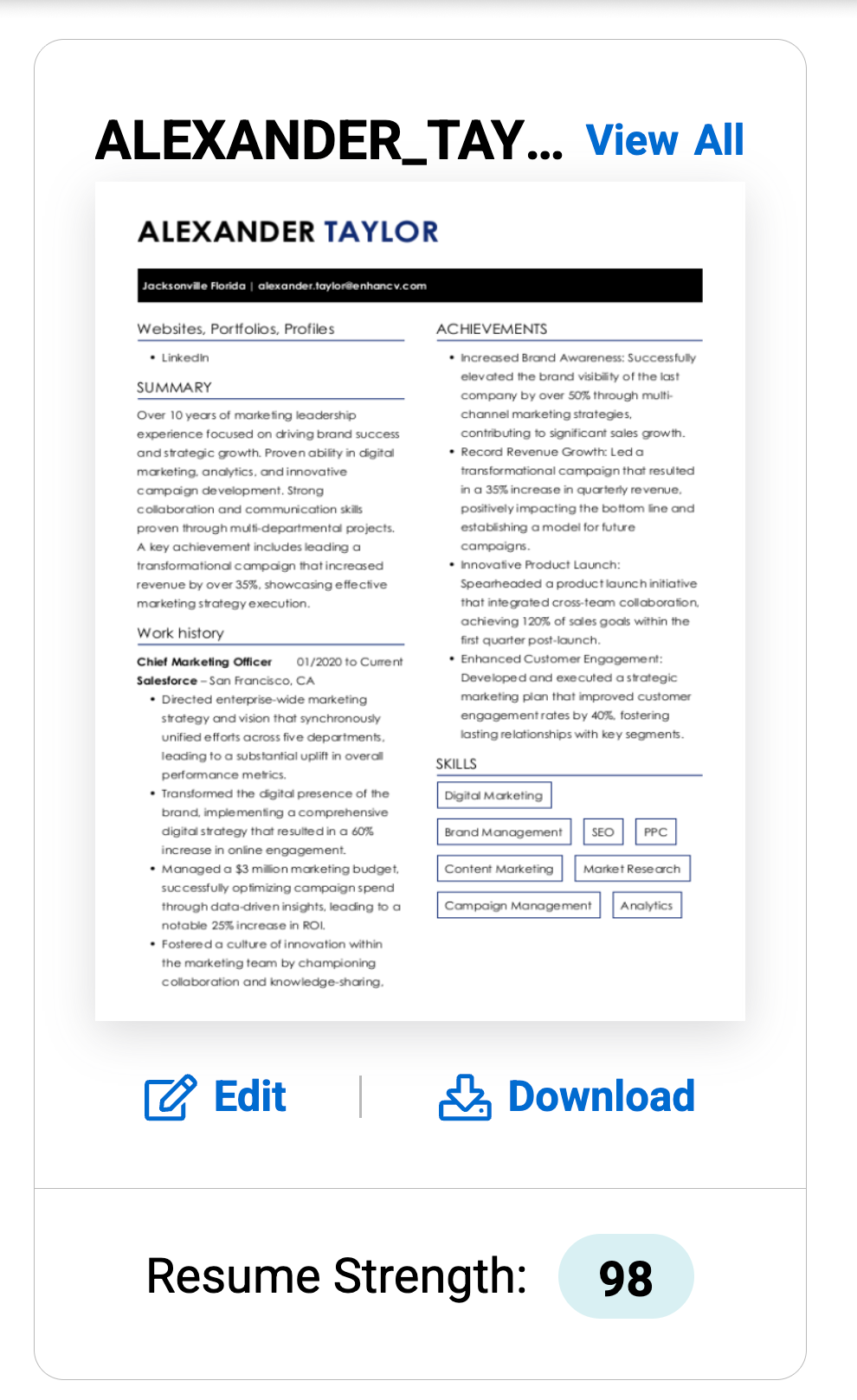
I was even happier to see that LiveCareer gave my resume a score of 98 out of 100. I didn’t use any of the rewriting capabilities to edit the content.
Now let’s move on to the other available resume-building option.
Creating a new resume
When you choose to create a new resume rather than upload, LiveCareer switches from a parser to a step-by-step builder.
Before you type a single word, LiveCareer makes you choose a template. This is a clever UX trick. They want you to see the finished products immediately (in this case, a beautiful document) to keep you motivated.
Meanwhile, the tool asks for your experience level so it can filter out templates that might look too empty (for students) or too cluttered (for executives).
Then you have to commit to filling in your resume content.

Linear questionnaire
LiveCareer uses a strict sequential flow where you fill your content in pre-set fields:
- Contact Information: Standard fields (Name, Email, Phone, etc.).
- Work History: You type a job title, and a sidebar opens with hundreds of pre-written bullet points.
- Education: Simple form-based entry.
- Skills: The AI suggests skills based on the job title you entered in your work history.
- Summary: You pick from a few AI-generated paragraphs based on your history.
There’s a small preview pane that updates as you go, but it’s not as interactive as a true drag-and-drop editor.
Only after completing the wizard are you taken to the full editor where you can finally tweak the resume.
At this point, I noticed some customization limitations. When building from scratch, you’re somewhat locked into the template’s logic.
Meanwhile, you can add custom sections (e.g., "Languages," "Awards"), but you have less pixel-perfect control than you might find in more design-forward tools.
Author’s take

PRO TIP
When building from scratch, account creation is mandatory to save progress. If you close your browser before the final step, your work is gone. Once the account is created, your resume is saved to a dashboard where you can duplicate it in order to make various versions.
As you know, a good resume needs one more thing.
Creating a matching cover letter
Once you finish working on your resume, LiveCareer will prompt you to create a cover letter.
The system automatically suggests the exact template counterpart (same fonts, accent colors, and header style) that matches the resume you built.
Here, I noticed some great utility.
Automated content personalization
The "matching" isn't just visual, it’s functional. The builder pulls core data points from your resume and puts them into the cover letter draft:
- Contact details: Name, phone, and professional links are ported over instantly to the header.
- Role alignment: If you created a resume for a senior project manager role, the cover letter builder automatically sets the tone and suggests body paragraphs tailored to the field.
- Target company: The wizard asks for the specific company and hiring manager's name, then slots them into the correct business-letter format locations.
At the same time, LiveCareer offers some writing assistance.
Here, the cover letter builder uses a modular approach:
- Pre-written paragraphs: Instead of writing from scratch, you choose from three versions of an opening, middle, and closing paragraph.
- Tone adjustment: It offers different angles for the letter—for example, a standard version, a highly enthusiastic version, or a skill-focused version.
- Content sync: The AI suggests inserting specific achievements or skills that were highlighted in the resume to ensure the two documents reinforce each other.
- Sign-off: Provides a dropdown of professional closings (e.g., "Sincerely," "Best Regards," "Respectfully") to ensure the etiquette is correct.
As a tool, LiveCareer understands the importance of visual and informational symmetry. The synergy between the cover letter generator and the resume builder ensures your application looks like a unified brand, speaking with a consistent voice.
Author’s take
ATS ResumeCheck
This is essentially a digital audit that simulates how a machine (and a recruiter) reads your document.
The tool provides a numerical score from 1 to 100. This acts as a psychological hook—if you see a score of 65, then you might feel an urgent need to get to 95 before applying.
Unlike a static PDF grader, LiveCareer’s checker is integrated. If it finds an error, you can click a fix button that takes you directly to the specific field in the builder to correct it.
Here’s a breakdown of what it does.
How the ATS resume checker works
| Crucial checks | Reasoning |
|---|---|
| Typos and grammar | A standard but essential spell-check. |
| File readability | Ensures the fonts and layout won't scramble when parsed by older ATS systems (like Taleo or Workday). |
| Contact information | Verifies that your phone number and email are in a standard format and in a location the ATS can find. |
| Section headings | Flags if you used a non-standard heading (e.g., "Where I've Been") that a bot might not recognize as Work History. |
| Action verbs | It flags passive language and suggests high-impact verbs (e.g., changing "Was responsible for" to "Spearheaded"). |
| Measurable results | The AI scans your bullet points for numbers (%, $, #). If your resume is all duties and no results, it will prompt you to add quantifiable data. |
| Buzzwords | It warns you if you’ve used too many empty words like synergy, team player, or hard worker. |
| Resume length | It calculates word count and page length, warning you if your resume is too long (over two pages) or too short/sparse. |
There’s one more important functionality to be aware of.
Keyword optimization
LiveCareer’s checker is more of a generalist auditor. It suggests keywords based on your job title (e.g., if you’re an accountant, it will tell you to add "GAAP" or "Tax Auditing"), but it doesn't perform a direct comparison against a specific live job ad unless you are using their specific job matching feature.
Templates and design
LiveCareer's design philosophy is "safety-first." It excels at functional, recruiter-approved consistency.
There are between 30 and 60 resume templates (this varies slightly by region, e.g., the UK site often lists more CV-specific styles).
The library is organized into three primary categories:
- Traditional/Classic: Heavily prioritized for conservative industries (law, finance, healthcare). These use standard serif fonts and safe layouts.
- Modern: Focused on white space, sans-serif fonts, and subtle accents. Best for tech and startups.
- Creative: These include small icons, sidebars, or bolder color headers, but they still maintain a professional structure that won't confuse a recruiter.
Personalization and limitations
- Color picker: You can choose from preset professional palettes or use a custom hex-code picker for accent colors (headers, bullet points, lines).
- Fonts: There’s a curated list of professional fonts (like Arial, Georgia, Roboto, and Montserrat).
- Smart matching: When you swap a color or font on the resume, the builder can automatically push those changes to the matching cover letter to ensure your personal brand is unified across all documents.
- Locked-grid design: You can’t drag and drop elements anywhere on the page, which prevents you from breaking the layout but also restricts you.
Pricing
LiveCareer uses a low-entry strategy that is common in the industry but often catches users off guard.
Here are the options.
Paid plans
| Plan | Best for |
|---|---|
| 14-Day Trial ($2.95): Access to all premium features. It is a recurring subscription. If you do not cancel within the 14 days, it automatically converts into a full monthly plan. | Students and first-time job applicants. |
| Monthly full access ($23.95): If the trial isn't canceled, the system bills you for a full month of service. | Power users who are constantly tweaking their resume for different applications. |
| Annual plan ($71.40 per year): Breaks down to roughly $5.95/month. This is paid as a single upfront lump sum. | Those who need long-term access (e.g., freelancers or frequent job-hoppers). |
LiveCareer’s billing has a reputation of being aggressive. Many Trustpilot reviews from 2026 still highlight users being "surprised" by the $23.95 charge after their trial ended.
Public sentiment and customer support
The buzz around LiveCareer is a classic case of a great product with a controversial policy.
The brand maintains a high volume of reviews, but the sentiment is split sharply between product satisfaction and billing frustration.
The positive
Most users (reflected in a 4.3/5 rating on Trustpilot) genuinely love the builder. It’s frequently described as "intuitive," "life-saving for the non-writer," and "professional." It remains a top choice for people who haven't updated a resume in a decade and feel intimidated by the process.
The negative
There’s a significant low-approval vibe regarding their subscription model. Many users label the service a "scam" or "trap" because they didn't realize the $1.95 trial would convert into a $24.00 monthly charge.
Naturally, some users feel tricked and demand a refund. Good thing LiveCareer offers robust support options. There’s a phoneline, email (takes one business day to respond), and live chat.
The responsiveness is high as agents are quick to answer chats and calls during business hours. They’re often praised for being helpful and polite.
Many users report success getting a refund for an accidental monthly charge if they call and are persistent immediately after the charge occurs.
Final verdict on LiveCareer
As a career tool built around resume creation, LiveCareer ticks some essential boxes but creates a few user hurdles as well.
Pros and cons of using this tool
| Pros | Cons |
|---|---|
| Speed and automation: The AI-powered click-to-add bullet points can generate a full draft in under ten minutes. | Aggressive paywall: While you can "build for free," downloading a PDF requires a paid subscription, which isn't always clear at the start. |
| System-safe design: Templates are structurally rigid but highly ATS-compliant. You won’t break the layout or confuse a parsing bot. | Hidden subscription costs: The $2.95 trial automatically converts to a $24/month fee, leading to frequent surprise charge complaints. |
| Matching ecosystem: It generates perfectly matched cover letters and thank-you notes with one click, ensuring a unified personal brand. | Limited creative control: Unlike drag-and-drop builders, you can’t move elements freely. You’re confined to the template’s grid. |
| Comprehensive AI audit: The ResumeCheck tool acts as a trusty advisor, catching passive language and missing metrics before you hit apply. | Template overlap: Because the library is widely used, your resume may look similar to thousands of others in the same industry. |
So, who is LiveCareer for?
Job seekers in conservative fields (finance, law, healthcare), where a safe, standard layout is preferred over creative flair will find this tool satisfactory. Meanwhile, students and entry-level job seekers will appreciate the AI prompting them on what skills they might actually possess.
Meanwhile, if you seek creative freedom, granular control, and the ability to structure complex career narratives, then Enhancv might be the alternative you seek.
What’s different about Enhancv?
- UX optimized for speed: No lengthy onboarding, drag-and-drop section control, instant content tailoring to job ads.
- Versatility: With Enhancv, you have a wider reach. You can build conservative resumes for traditional industries, but you can also resort to more creative applications.
- Build to stand out: The high degree of control allows you to create highly targeted resumes that resonate with employers.
Make one that's truly you.