The internet is full of perfect promises, but in the resume-building world, there’s often a gap between a polished interface and a professional result. Today, we’re diving into MyPerfectResume (MPR) to understand if the platform’s high-speed automation can truly deliver a high-impact document for a modern job seeker.
MyPerfectResume is a flagship product of BOLD LLC—the same powerhouse behind Zety, LiveCareer, ResumeBuilder, and others. They share the same DNA: an efficient onboarding process, a library of nearly identical templates across brands, and a similar subscription model. It’s an ecosystem built for volume, designed to move you from a blank page to a payment screen in the shortest time possible.
I spent a couple of hours working through the platform’s features with a senior-level profile to see if it’s a genuine career partner or just a well-oiled resume factory.

Key takeaways
- The platform’s standout feature is a world-class onboarding flow and a guided-edit interface that eliminates formatting dread for users starting from scratch.
- The writing assistant offers professional phrasing, the most strategic AI features—like specific job tailoring and Smart Apply feedback—remain hidden behind a paywall.
- The builder provides high-level adjustments of margins and fonts, keeping the resume-building process fluid and visually consistent.
- MyPerfectResume functions as an expansive career hub, offering a sophisticated cover letter writing flow and integrated interview preparation tools.
- While a raw text export is free, any professionally formatted PDF requires a $2.95 trial that automatically transitions into a $23.95 monthly subscription unless cancelled.
MyPerfectResume onboarding and templates
The first thing you’ll notice about MyPerfectResume is the speed. I signed up and imported an existing resume—a one-page, single-column document—to see how the engine handles a dense career history.
Here it is:
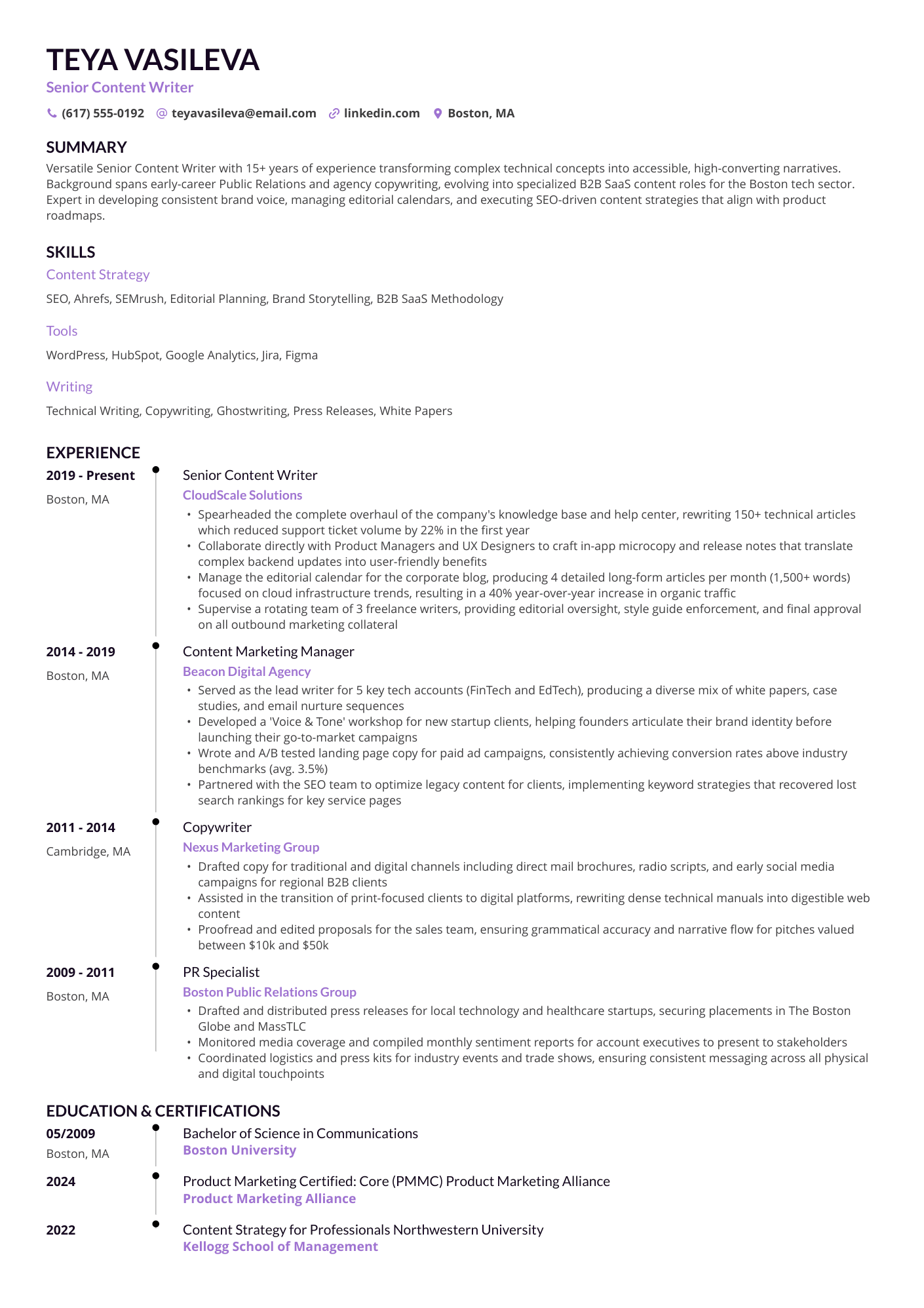
The technology is undeniably slick. Within five seconds, the tool had stripped my 15+ years of experience and presented a clean summary of my trajectory.
From there, I was funneled through a series of experience-level questions that MPR uses to recommend specific templates. Interestingly, these questions felt more like a psychological handshake than a functional necessity.
As a CPRW, I didn't see a difference in how the content was handled regardless of the level I selected. It feels like an "intelligence" layer designed to make the user feel seen and catered to rather than a pivot point for the actual resume logic.
The parser’s accuracy is high, but the real standout in the early stages is the dynamic social proof ticker at the top right. These animated ads cycle through success metrics, assuring you of the builder’s efficiency. Even for a skeptical user, the movement is hard to ignore.
It’s clear who they’re targeting: the stressed job seeker who needs to feel that a quick win is not just possible, but statistically likely.
Templates
The template selection screen is actually quite refreshing. I liked the simplicity of the filters—you can toggle between photo or no-photo and one or two columns without getting bogged down in endless scrolling.
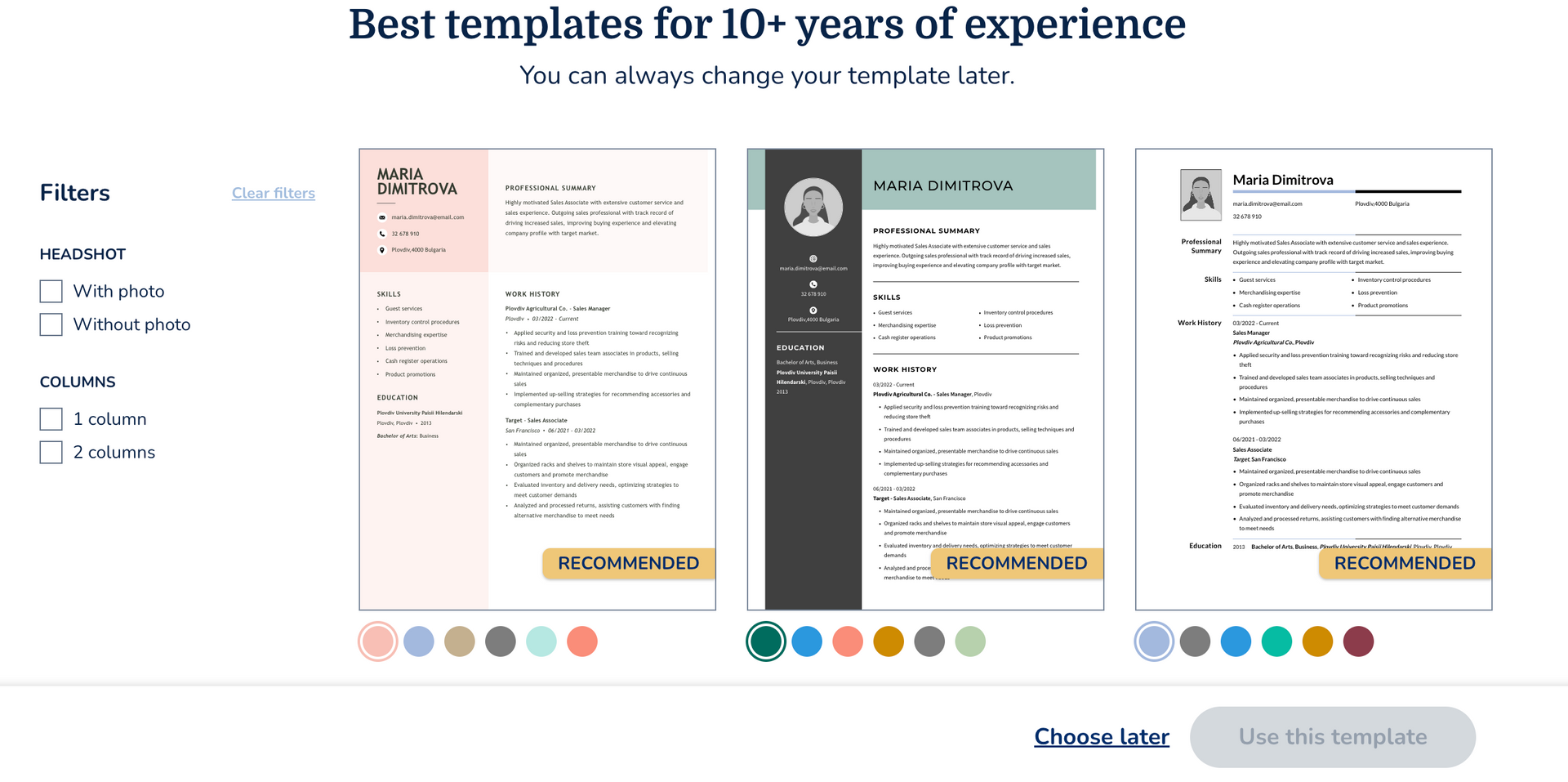
The designs are clean and modern, carrying that signature BOLD uniformity. Personally, I prefer a minimalist approach, so I appreciated not being overwhelmed by a sea of identical choices. The tool presented six recommended templates, each with a variety of color themes. I selected a structured, one-column layout and moved directly into the building process.
MyPerfectResume editor
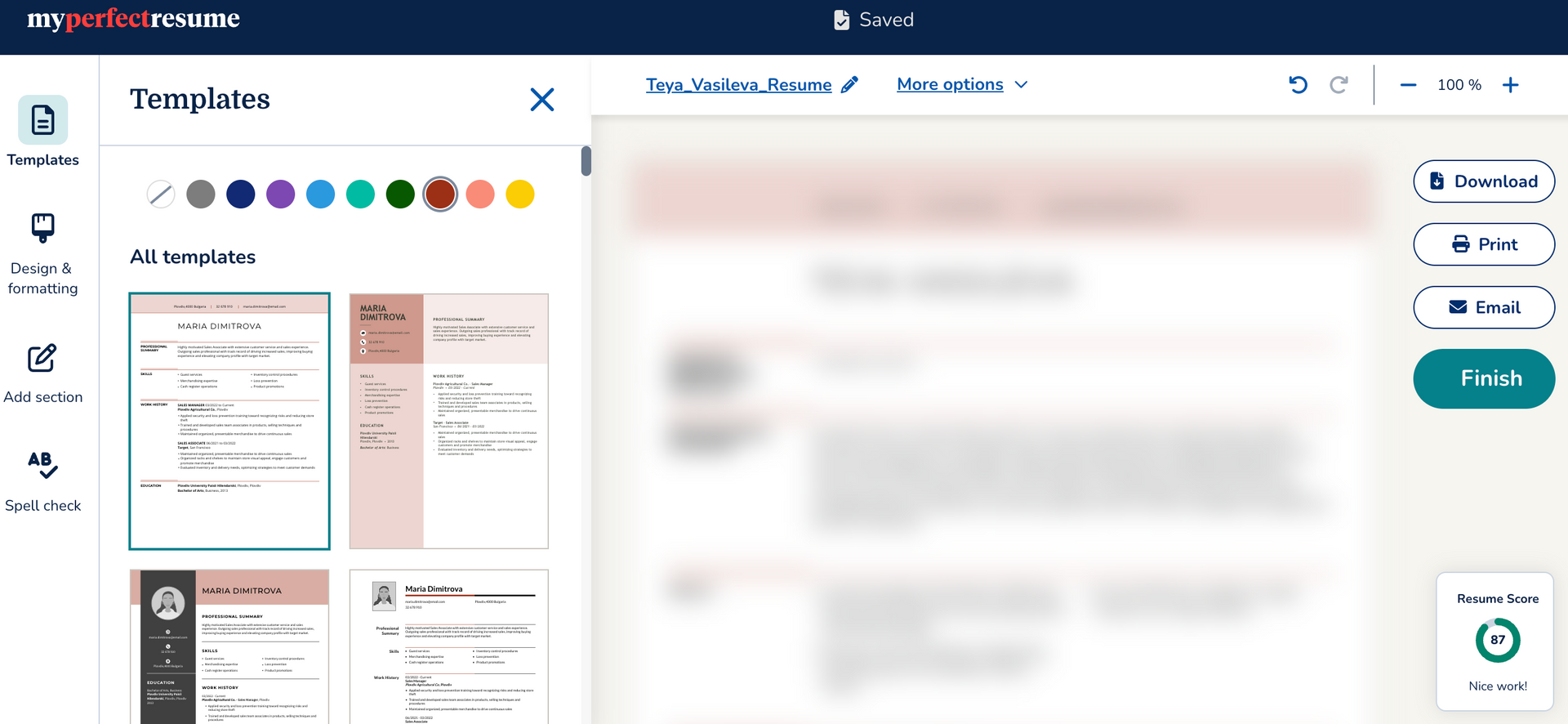
Once you’re in the editor, the experience is fast and fluid. MyPerfectResume uses a guided-edit approach—instead of clicking into a messy canvas, you work through clear, labeled blocks. It’s designed to keep you moving, and for the most part, it succeeds.
Here’s how the formatting and content editing stack up:
- Flexible formatting: You can swap templates on the fly. You can toggle between one-column and two-column layouts or change color themes instantly to see how your data reacts.
- Segmented editing: Clicking into a section opens a focused pop-up window. This is great for avoiding formatting dread, as it prevents you from accidentally dragging a text box into oblivion.
- Design controls: The tool gives you a decent amount of knob-turning power. You can adjust margins, font sizes, line spacing, etc., just like a word-processing program. It’s enough to help you fit that awkward last sentence onto one page, though it lacks the automated, drag-and-drop freedom some users might crave.
- Content assistant: As you type, the tool suggests "expert" phrases based on your job title. For a writer, this is a double-edged sword. It’s excellent for overcoming a blank-page block, but it can lead to a generic-sounding result if you don't customize it. (Learn more about the AI in the next section.)
However, the hand-holding comes with some constraints. While the tool doesn't technically lock you out of adding sections, it does have a very specific idea of where things should go.
For instance, I found the social links logic a bit frustrating. By default, the tool puts your LinkedIn or portfolio links in a separate section. If you only add one URL, the section looks sparse and eats up valuable vertical real estate. I eventually discovered you can move these into the header to save space, but it wasn't immediately obvious.
I also encountered a minor logic loop: after the parser successfully pulled my education history, the editor prompted me to "Add your highest degree" again. For the second time in the process, it felt like MyPerfectResume was prioritizing user data harvesting over a seamless building experience—otherwise, they wouldn't risk breaking the immersion they worked so hard to create.
Author’s take
MyPerfectResume’s AI writing and ATS check
While the builder is efficient, the AI features are where you start to see the difference between a template filler and a strategic career tool. In the work history section, for example, the builder encourages you to "refine" your bullet points.
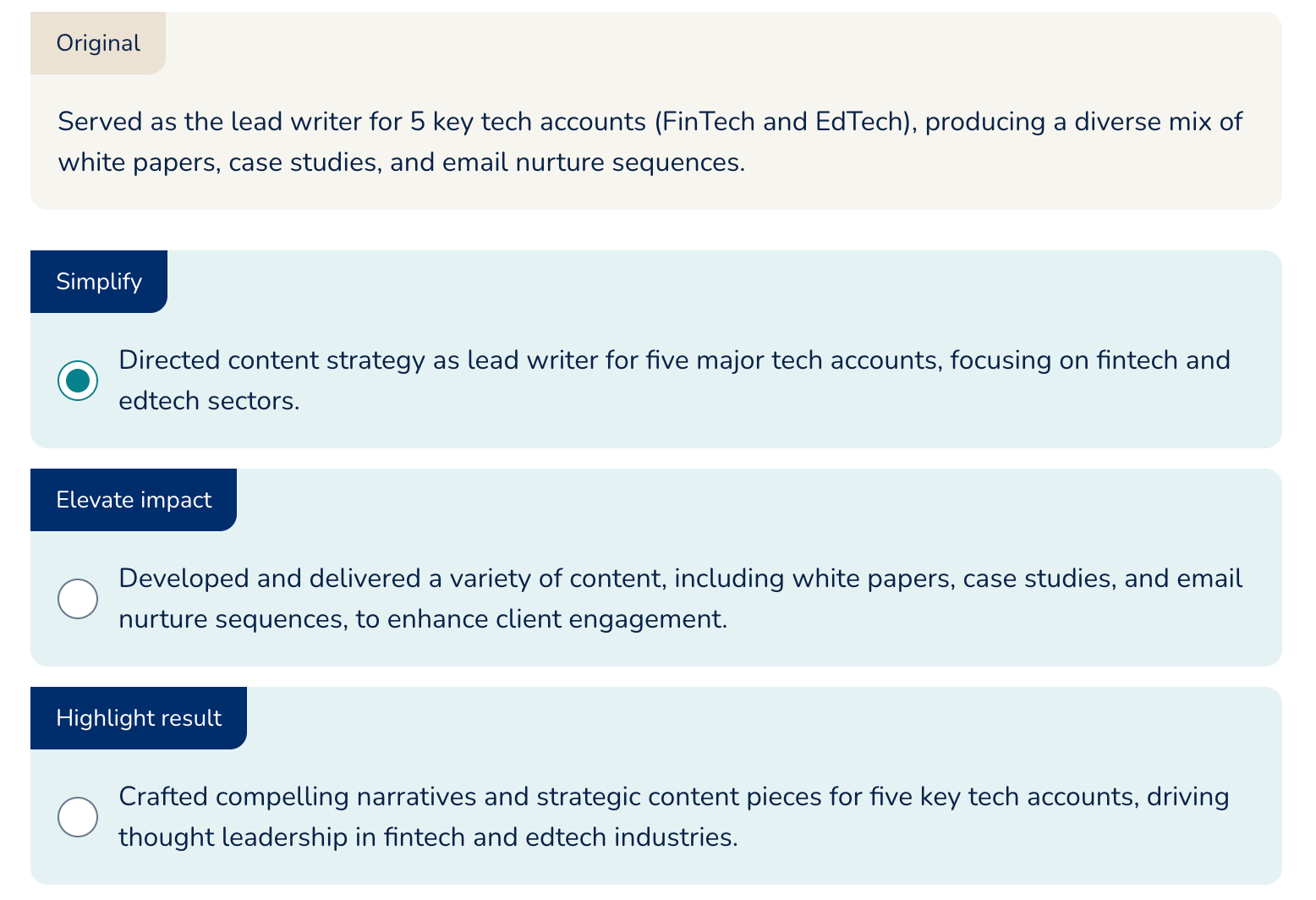
The problem here is that the smart functionality isn't really that smart. A sophisticated AI integration should prompt you to add numbers and metrics to quantify your achievements. Instead, what we get are simply rewritten sentences with no added impact.
As a resume expert, I consider this a serious red flag. Recruiters tend to ignore generic claims, no matter how sharply they are worded.
Here’s what else to expect from the AI suite:
- AI writing assistant: The tool provides ready-to-use content for your experience, skills, and summary. It’s effective at generating professional-sounding phrases, but it fails to tailor that content to a specific role (customization is gated behind a paywall). It feels more like a chatbot tasked with making your bullet points sound professional.
- Resume checker: Smart Apply is MyPerfectResume’s version of a resume checker, scanning for common errors like typos or missing sections. Maybe it’s a helpful safety net, but there’s a catch: you can see your ATS score for free, but you have to upgrade before you can see specific feedback or implement the "Fix It" suggestions.
- Job tailoring: If I’m getting it right, the Feedback feature is what handles tailoring—and you’ll need to pay to see it. This was my biggest disappointment. I’m missing the ability to scan a specific job description and see exactly how I stack up in real-time.
I found the resume score to be a bit… wobbly. At one point, simply renaming my social links section to "Websites" caused my score to plummet from 89 to 70.
While I agree that standard headings are better for ATS parsing, the logic behind such a drastic drop felt vague. It leaves me wondering if the volatility is intentional—a way to nudge users toward an upgrade to "fix" a score that might not have been broken in the first place.
Author’s take
MyPerfectResume career suite and cover letter builder
While many builders treat cover letters and job tracking as afterthoughts, MyPerfectResume’s dashboard feels like a cohesive ecosystem designed to keep you engaged throughout your entire job search.
Dashboard
When you land on your dashboard, you’re greeted by a clean, motivating checklist of four items:
- Download your resume
- Check your score
- Get feedback
- Create a cover letter
I like the UX—it gamifies the process and makes you feel like you’re missing a vital step if you don’t complete the suite. Just be prepared: almost every one of these "next steps" is a nudge toward the paywall.
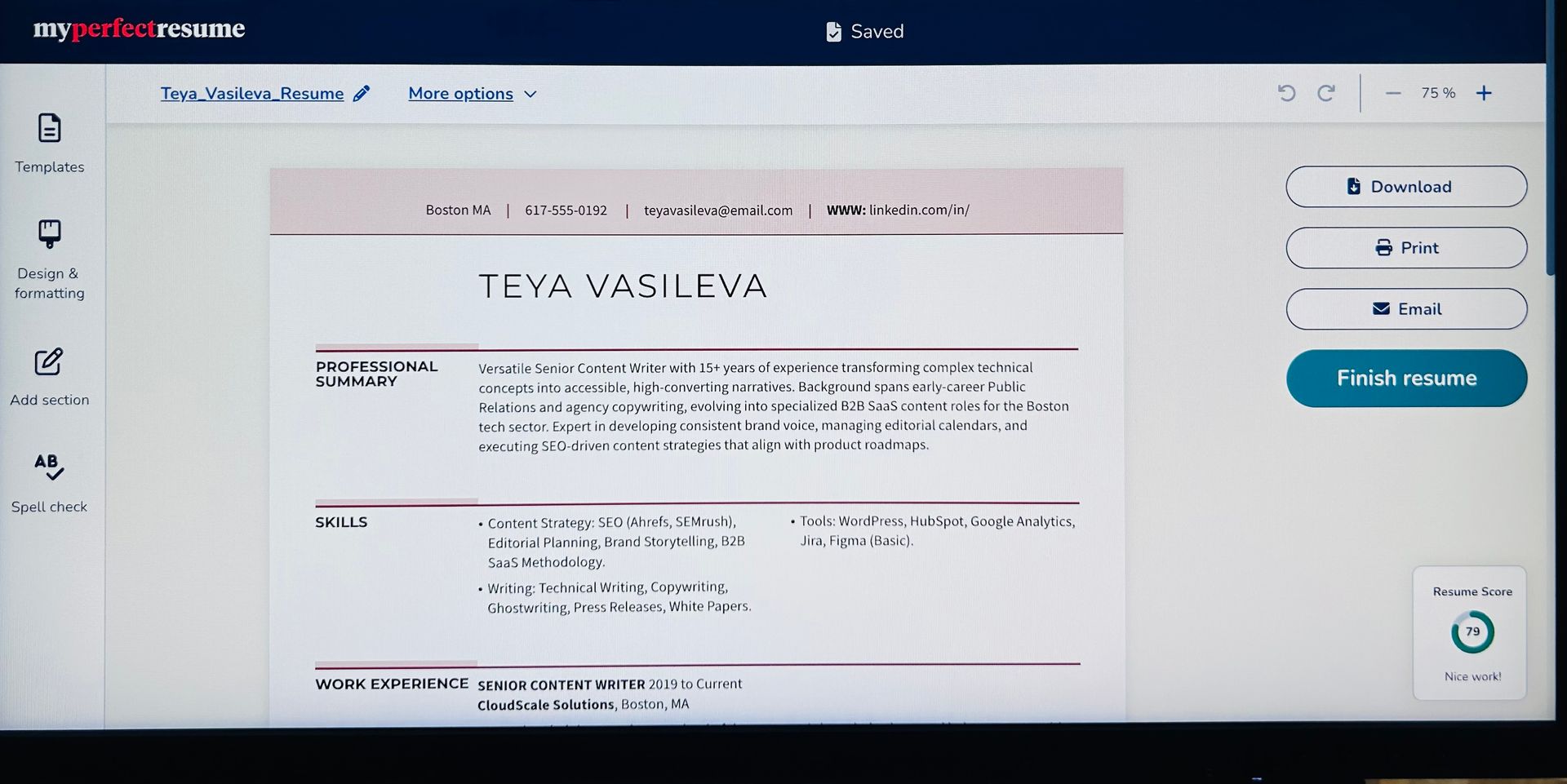
This is the maximum I can show you of my new resume as a free user of MyPerfectResume. Yeah, I don’t like the WWW in the header, either.
Cover letter builder
I was impressed by their cover letter builder. (In fact, they have a separate site for cover letters.) It’s not just a blank text box but a thorough, guided interview. The tool asks about your:
- Years of experience and top strengths
- Specific skills and unique approach to work
- Potential red flags like career gaps, relocation needs, or immediate availability.
It’s one of the most comprehensive flows I’ve seen in a builder. It feels like the tool is truly trying to understand your narrative. The output is polished and professionally structured, though again, you’re in a "look but don't touch" situation until you subscribe. I’d give it a perfect score if it didn't hold your letter hostage at the final second.
Career suite
The dashboard includes several instruments that elevate MyPerfectResume above a basic editor. Beyond the resume, you'll find a Recommended Jobs section, educational webinars (kudos for prioritizing video content here), and interview preparation guides.
For a job seeker who wants a one-stop shop, this dashboard is a strong selling point. It’s easy to work with regardless of your career stage. However, as a senior professional, I found the job recommendations to be a bit hit-or-miss—another sign that the tool’s strength lies in its broad, high-volume appeal rather than niche executive targeting.
MyPerfectResume pricing and subscription model
Let’s be honest: there's no "free" version of MyPerfectResume if you want a PDF.
- The .txt option: You can download your data as a plain text file for free. It’s ugly, unformatted, and practically useless for a direct application.
- 14-day premium access: For $2.95, you get full access for two weeks. It’s a great deal if you only need one resume.
- Auto-renewal: If you don't cancel, you’ll be charged $23.95 every four weeks.
- One-year premium access: You can pay $95.40 up-front and save 69%.
This is the BOLD group’s standard play. It’s a premium-first ecosystem. The value is there if you use the interview prep and job boards included in the dashboard, but if you just wanted a single PDF, that $24 charge can feel like a subscription sting.
MyPerfectResume user reviews
To get a sense of how the average job seeker feels after the "honeymoon phase" of the onboarding, I looked into recent feedback. The sentiment is remarkably consistent: people love the speed, but they struggle with the long-term commitment.
There’s no denying the visual output. Users frequently mention that the resumes look "professional" and "clear-cut," often receiving compliments from recruiters on the streamlined look.
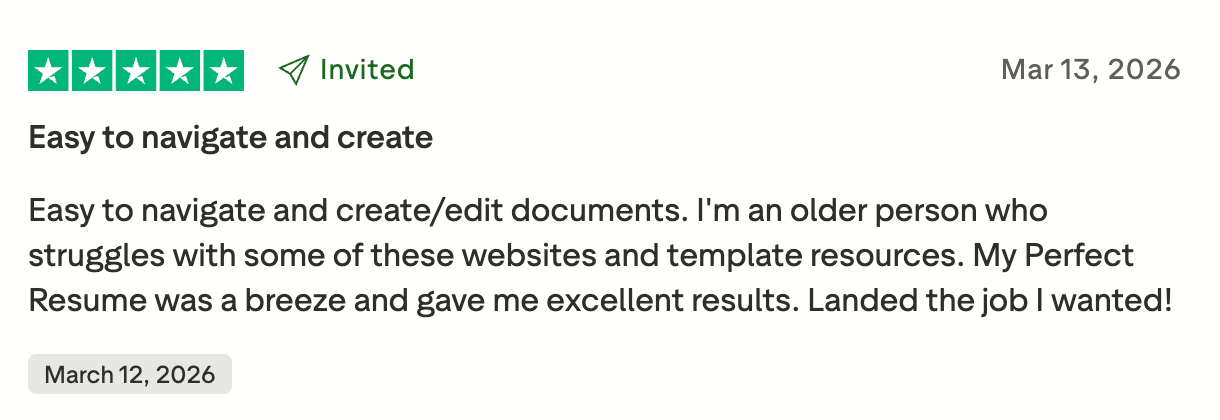
A common theme among even the happiest users is a desire for a "one-time fee." As one reviewer put it, "I don't see myself as a monthly subscriber as I do not see the purpose of it."
(Well, the "purpose" of a subscription is to support you throughout the entire job search. You can’t effectively apply for multiple roles with one generic resume, and in today's market, landing an interview often takes months of iteration.)
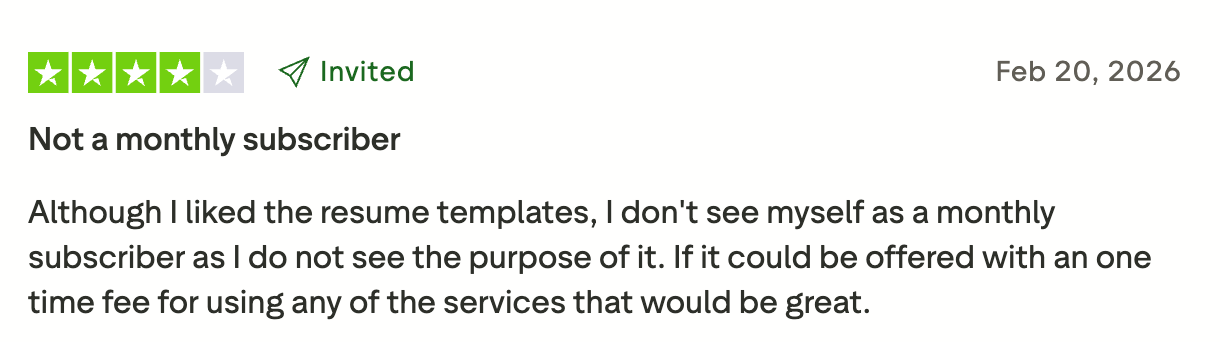
However, those who successfully navigate the paywall often say they would "sign up again" if they ever wanted a quick update in the future.
The user reviews confirm my own findings: MyPerfectResume is a quick-fix tool. It’s great for the person who hasn't touched their resume in a decade and needs a polished document, fast. If you’re a senior leader, you might not be blown away by the resume builder alone, but the value proposition changes when you factor in the career suite and the ability to constantly tweak your narrative as the market shifts.
Final thoughts on MyPerfectResume
After a deep dive into the BOLD engine, it’s clear that MyPerfectResume is a mass-market tool designed to solve the most common problem in job hunting: getting a professional-looking document together in less than an hour.
Here’s the breakdown of the highs and lows:
MyPerfectResume pros and cons
| Pros | Cons |
|---|---|
| Fast onboarding: The 5-second parser and guided wizard are world-class for efficiency—perfect for those starting from scratch. | Superficial AI: The writing assistant focuses on "sounding professional" rather than adding quantifiable impact. |
| Clean, ATS-friendly templates: You get hundreds of polished designs that are virtually guaranteed to pass automated filters. | Ready-to-use content: Thousands of pre-written bullet points help overcome writer’s block, though they can feel a bit generic without manual tweaking. |
| Cover letter builder: Features a professional structure with an impressive level of in-depth customization. | Subscription: The $23.95 auto-renewal feels steep if you only need a resume. |
| Career suite: Having your resume, cover letter, and interview prep in one dashboard is a major convenience. | ATS score: Arbitrary drops in your score for minor heading changes can cause unnecessary anxiety. |
So, who is MyPerfectResume for?
- Entry-to-mid-level professionals: If you want a clean, standard resume and don’t want to mess with formatting, this is a 10/10 choice.
- Time-crunched job seekers: If you have an application due in an hour and are starting from scratch, the speed of MyPerfectResume is great.
- Career switchers: The library of pre-written phrases is helpful for finding the right vocabulary for a new industry.
Who should skip MyPerfectResume?
- Executive and C-suite leadership: If your career spans 15+ years and requires a nuanced narrative rather than a bulleted list, the templates here can feel a bit too restrictive.
- Data-driven specialists: If your impact is measured in $M+ budgets or complex KPIs, you’ll find the pre-written suggestions too generic.
- Design-forward professionals: If you’re in a creative field where your resume acts as a portfolio piece, the standard clean look won't help you stand out.
The senior professional’s alternative
While MyPerfectResume is an excellent resume builder, it lacks the strategic depth required for executive and senior-level roles. If you’re a leader whose value lies in complex projects and specific metrics, you need a tool that functions more like a career architect.
This is where Enhancv excels. It provides a fluid, drag-and-drop environment that lets you tell a narrative, not just fill a template. More importantly, our AI doesn't just rewrite your sentences—it audits them for measurable impact, insisting on the numbers and data that senior recruiters demand.
Enhancv vs. MyPerfectResume
| Feature | MyPerfectResume | Enhancv |
|---|---|---|
| Builder philosophy | A guided, form-based approach that funnels you through sections. High speed, but lower creative control. | A "what you see is what you get" canvas. You click and type directly on the page with full drag-and-drop freedom. |
| AI experience | You can see AI suggestions, but implementing "Smart Apply" feedback is strictly gated behind a payment. | The 7-day trial gives you access to the AI Assistant, letting you audit and rewrite your content before you commit. |
| ATS audit | Scans for errors like typos or missing contact info. | Runs 13 checks covering design, readability, and keyword density to ensure you’re interview-ready. |
| Payment options | One standard subscription price, regardless of how long you need the tool. | Pay for exactly what you need—whether it's a 1-month sprint or a 6-month executive search. |
If you want a tool that prioritizes strategy over speed and impact over convenience, we’ve built Enhancv specifically for you.
Make one that's truly you.