Marketed as “the easiest online resume builder”, Resume Genius promises to quickly take you to a finished PDF ready for submission. It achieves this by combining a guided approach with pre-written/AI-generated content.
Nowadays, most recruiters can spot a generic resume at a glance. Does the automated workflow actually give you an edge when applying for jobs, then? As a resume expert, I’ve put Resume Genius to the test to see if it's really a "genius" shortcut to landing job interviews.

Key takeaways
- Resume Genius guides users step-by-step, but it lacks an automated one-click feature to tailor resumes to specific job descriptions.
- While the resume importer is generally reliable for core sections, it may fail to detect custom or secondary sections.
- The platform leverages a sophisticated mix of OpenAI’s GPT-4 for writing assistance, proprietary NLP for resume checking, and rule-based logic for formatting.
- The template library is intentionally conservative, though this comes at the cost of limited personalization.
- The tool is best suited for students, first-time job seekers, or those in traditional fields who prioritize a guided, error-free experience over creative freedom.
Resume Genius at a glance
The suite of career tools includes:
- The Genius Resume Builder
- AI Cover Letter Generator
- Professional CV Maker
Let’s take a closer look at how they function.
Main features breakdown
| Feature | What it does |
|---|---|
| ATS Resume Checker | Automatic resume parsing and content analysis. |
| Sequential wizard | Step-by-step resume and cover letter guidance. |
| Library of 35 resume templates | Customizable and editable, optimized for ATS. |
| Smart formatting | Automatically adjusts layout and spacing in real-time based on content volume. |
| Resume Summary Generator | Generates various summary suggestions. |
| Bullet Point Generator | Library of pre-written role-specific bullet points. |
| Skills Generator | Suggests various role-relevant soft and hard skills. |
To make all of this possible, Resume Genius uses AI in various ways.

Core AI usage
- ChatGPT integration: OpenAI’s GPT-4 models power the AI Summary Generator and AI Cover Letter.
- Proprietary NLP: For its Resume Checker and Bullet Point Suggestions, it uses custom NLP models trained on an internal database of resumes and job descriptions.
- Rule-based logic: This handles automatic formatting, ensuring that margins, fonts, and layouts remain readable by both humans and machines regardless of how much content users add.
At a glance, Resume Genius presents an impressive software architecture. The AI label isn’t just a gimmick. The tools handle some serious heavy lifting in the form of guidance and writing assistance. Meanwhile, various technical guardrails minimize the room for error.
Author’s take
Now, let’s put all of this to the test.
Onboarding UX
The starting point is the app’s dashboard. Here, you can begin work on your first resume or cover letter. You can either start from scratch or import your current resume. Supported formats include DOC, DOCX, PDF, HTML, RTF, and TXT.
Additionally, there’s a helpful content section linking to blog posts, TikTok shorts, and YouTube videos with resume-building advice. Great for those who need a little extra guidance.
To test the app, I’ve prepared a two-page long, double-column resume with senior-level content.
Here’s a preview.
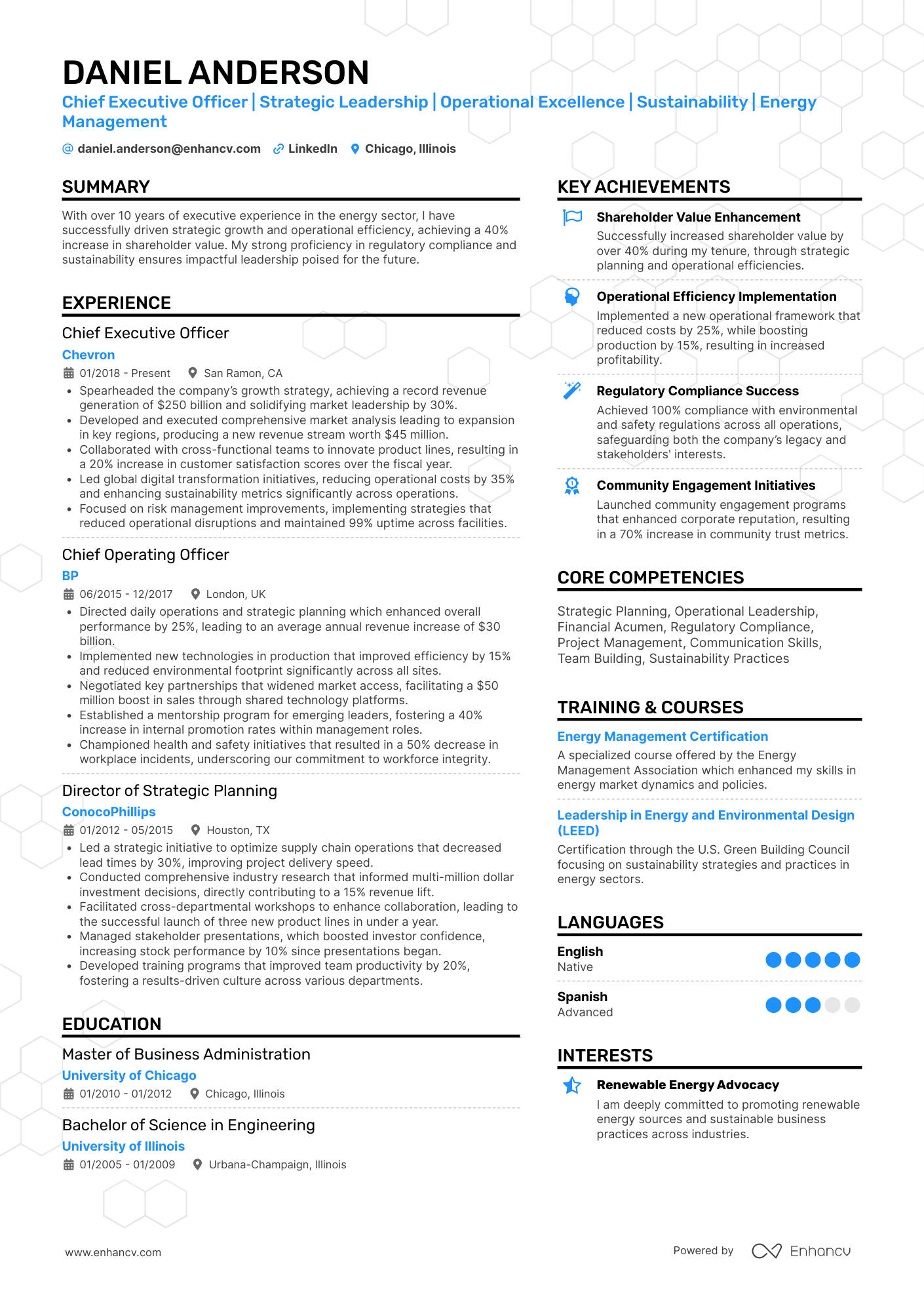
Let’s get to work.
Document upload
After uploading, Resume Genius asks you to select a template.
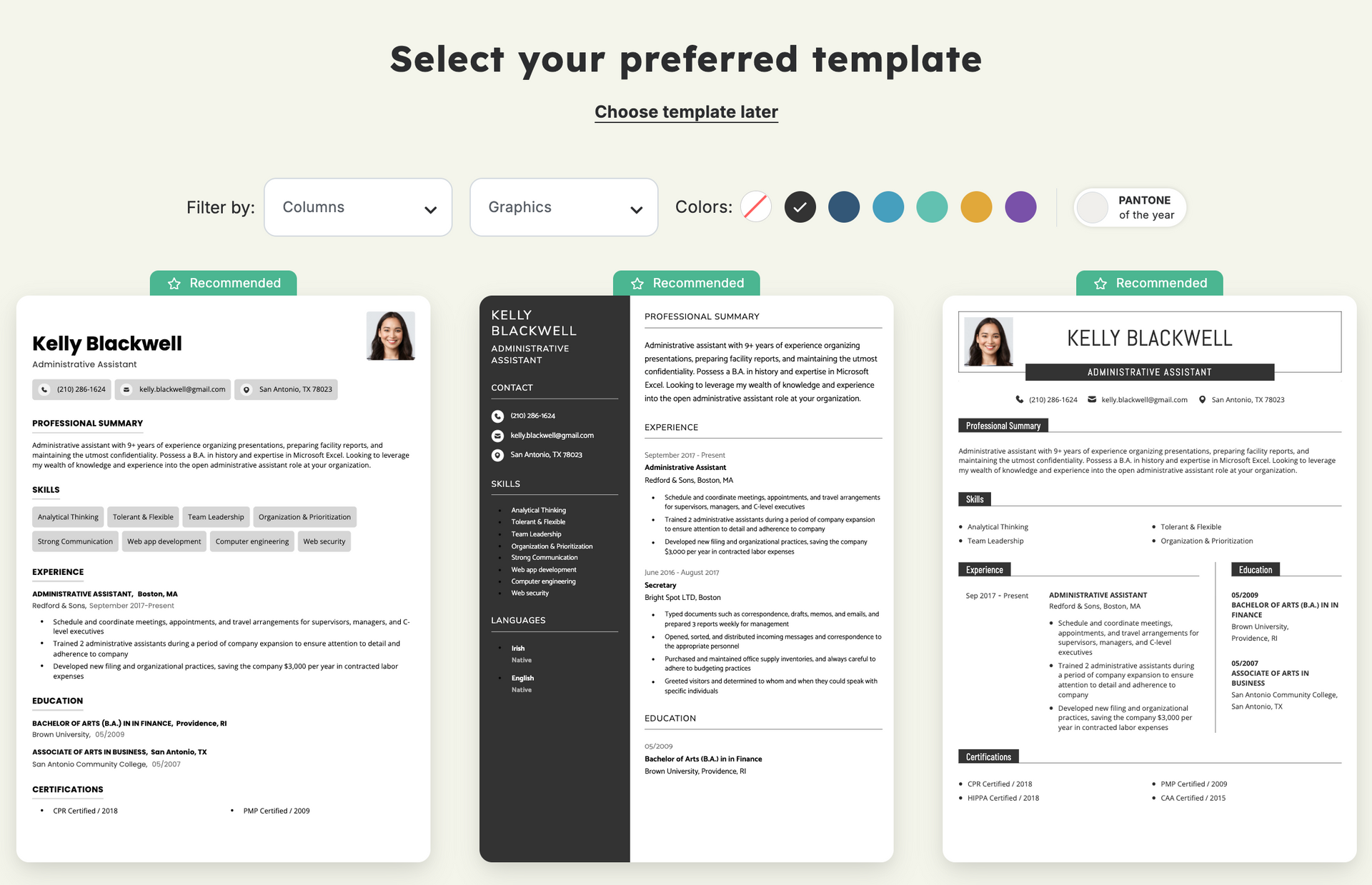
At this step, you can access all available resume templates.
In my case, some were marked as “recommended.” While this is reassuring, I was left wondering what prompted the app to recommend these templates specifically. Was it the volume of the content I uploaded? The years of experience? Or the specific role mentioned in the resume?
The resume templates themselves are clean and professional, effectively utilizing white space and visual hierarchy. They offer a nice variety of single- and double-column options with distinct layouts.
Author’s take
Moving on, I thought it would be interesting to test what would happen if I proceed with a single-column template (since I uploaded a two-column resume). I picked one of the recommended options.
Next, the wizard takes you through each resume section so you can confirm your information.
Here I noticed something concerning. The original resume I uploaded had additional sections on page two, such as Projects, Volunteering, Awards, and Interests.
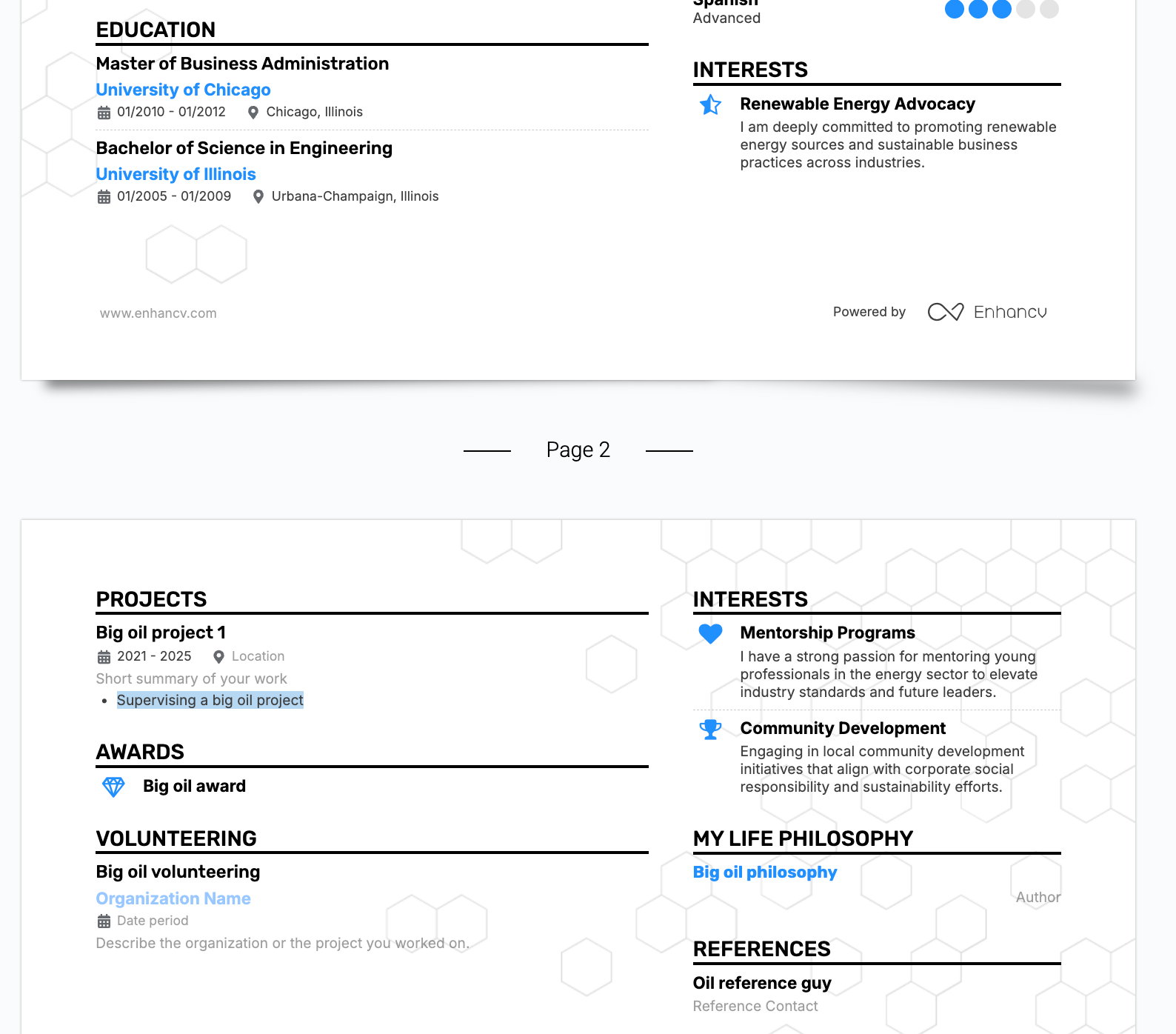
I don’t see them represented here.
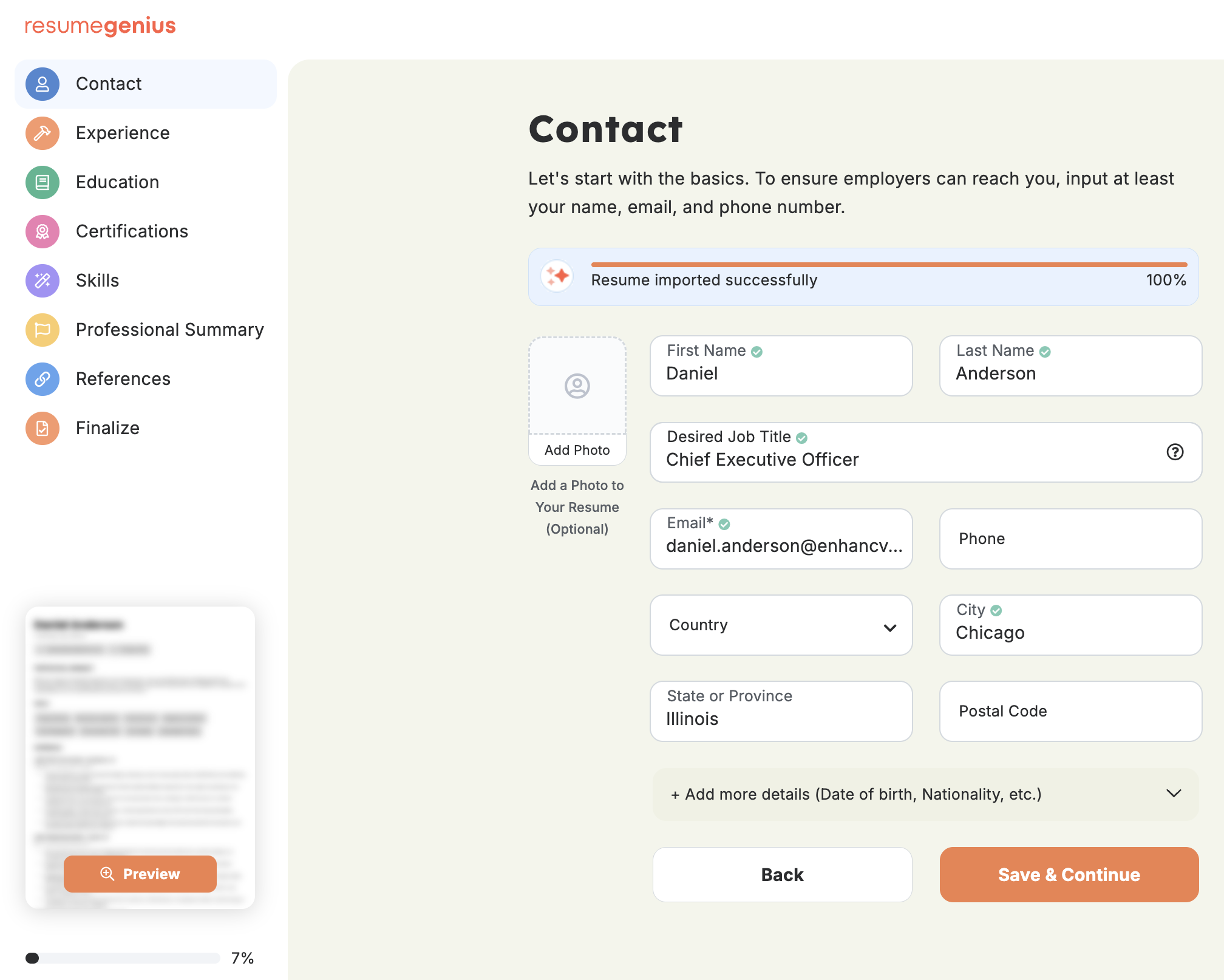
As it turns out, Resume Genius was able to parse most of the content correctly. The only sections missing were Volunteering, Awards, and My Life Philosophy. It’s not like the resume builder doesn’t support custom sections. In this particular case, it just didn’t detect them.
Speaking of resume sections, the builder doesn’t allow you to rearrange content by drag-and-drop.
Resume Genius’ file upload and parsing are mostly reliable. Essential resume sections like Contact, Experience, Skills, and Achievements make it through the onboarding process. Still, some manual verification is necessary to make sure all your content is there.
Another downside is that the builder hides the full-page resume layout until you have completed the entire wizard. Meanwhile, it suffers from outdated functionalities that create user pain points and slow down the resume creation process.
Author’s take
Now let’s take the other onboarding route.
Building a new resume
Here, the builder asks how many years of experience you have and what your level of education is. Then it recommends a bunch of templates. However, if you aren't a resume expert, it isn't always clear how to make the right choice between them.

PRO TIP
The best approach is to align your template with your seniority level and industry standards.
Once you’ve selected the one that suits you best, you’ll start by entering your contact information and then inputting the rest of your content manually.
Here, the AI writing assistance comes to the rescue with:
- Role-specific experience bullet points
- Pre-written skills examples
- AI-generated summaries
The builder guides you along the way with pre-set content fields and pro tips.
Creating a resume from scratch is a smooth, straightforward experience. There’s almost no room for error. The pre-written and AI-generated content is helpful but it does sound a little generic. Definitely take the time to build upon it and add your own quantified achievements.
Author’s take
Speaking of decent preparation, a proper job application needs one more thing.
Creating a cover letter
Here, Resume Genius takes you through some personalization steps.
- Do you have work experience?
- Did you graduate from college?
- What's your field of study or degree?
Then you have the option to upload a resume so the builder can use details from it, or create a cover letter from scratch. I note that it didn’t detect that I’d already uploaded one resume, and built another one manually.
Anyway, I had to once again upload the original resume I’d prepared.
There’s an additional questionnaire, asking for:
- Position title
- Target company
- Job description
- Soft skills
- Hard skills
- Industry
- Years of experience
- Addressing work gaps
Based on all your input, Resume Genius writes the entire cover letter. Reading the one it generated for me, I noticed the content reflects the input from the personalization steps. But the resume it was paired with? Not so much.
In the final step, you can edit the generated content, select a template, and preview the finished cover letter.
Building a cover letter with Resume Genius is a quick and painless process. The content itself does sound a little dry and robotic. Experienced recruiters and HRs will definitely be able to tell it’s AI-generated. Still, it’s a good starting point you can easily edit to sound more like you.
Author’s take
ATS resume check
Circling back to another possible starting point for users, I uploaded my original resume to the ATS Resume Checker.
Here’s what we got.
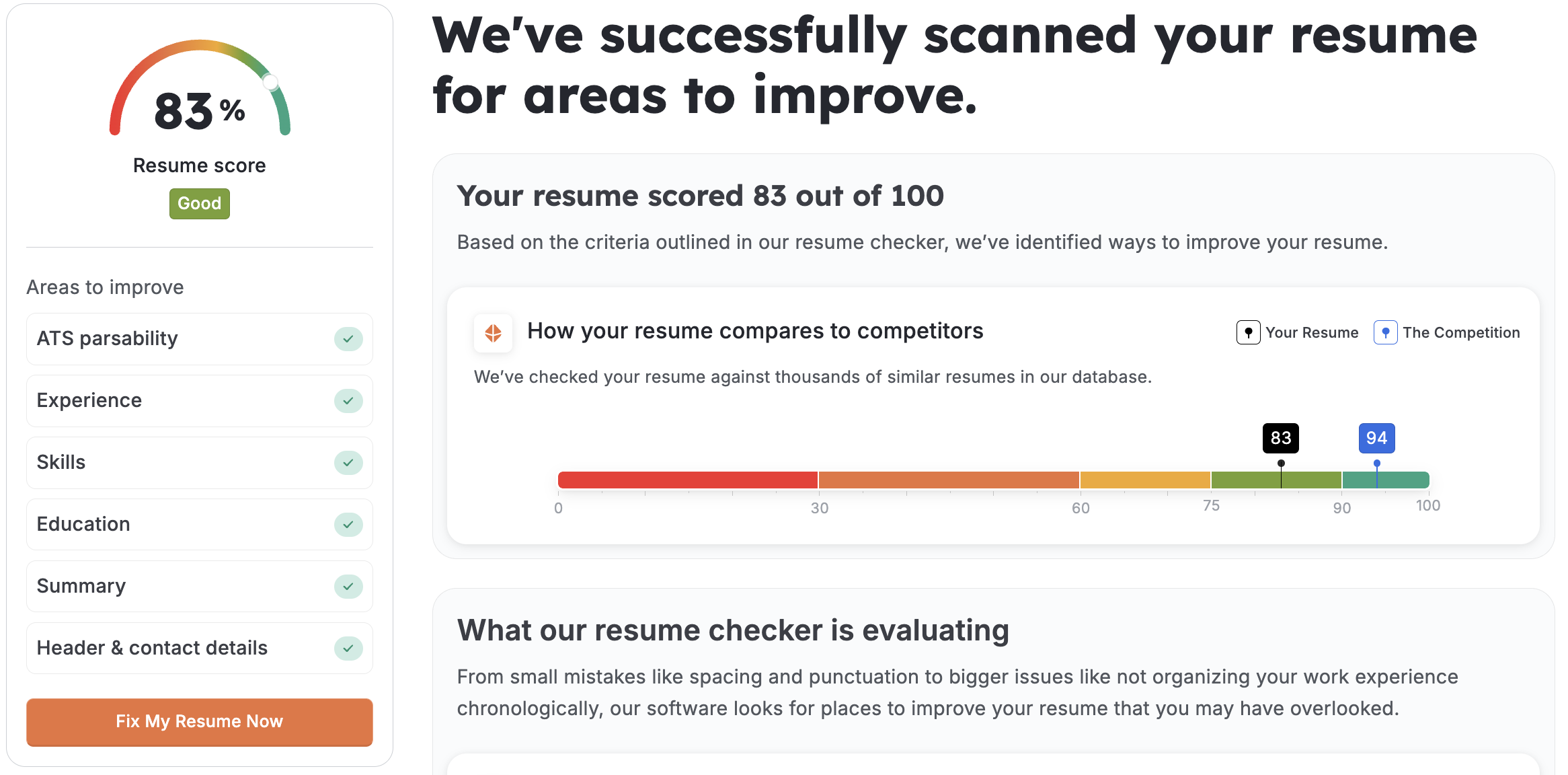
All “areas to improve” got a green checkmark but the verdict is 83 out of 100. The perfect score is but a mirage, yet I persevere in my journey for ATS approval.
Clicking “Fix My Resume Now” takes you to the starting point of the sequential resume-building wizard. Going through the process all over again, Resume Genius didn’t specifically tell me what improvements I need to make to get the ATS score above 90.
PRO TIP
Chasing a perfect 100% ATS score isn’t necessary. Instead, focus on what matters, which is using ATS-friendly resume templates, standard section headings, and tailored content. This way, you ensure that not only your resume will parse correctly, but also get a high relevance score for the roles you’re targeting.
If you’re looking for the ability to see exactly which keywords you're missing from a specific job posting, Resume Genius will likely frustrate you. It doesn’t support automatic tailoring. Essentially, if you want to create a targeted resume with this tool, you’ll have to do it manually.
Author’s take
Design and templates
The best word to describe Resume Genius’s templates is "conservative." They utilize clean typography, high white space, and logical section breaks.

Customization and formatting options
- Swap templates instantly: You can toggle between different font pairings and adjust primary accent colors.
- The builder re-maps content automatically: You can’t manually resize margins, move individual sections outside of the preset order, or adjust the exact line spacing of a single bullet point.
- Resume-matching cover letter design: The editing capability for cover letters is notably more restricted than for resumes, often leading to formatting glitches if you try to add long, complex narratives.
This is a good place to mention that Resume Genius has a separate library of 31 CV templates, following the same design philosophy. As far as functionalities go, the CV Maker is essentially identical to the Genius Resume Builder.
If you're an academic or a doctor, and are expecting a reliable curriculum vitae format here, you're in for a disappointment. It's the same resume builder but for Europeans.
This rigid approach prevents you from making a formatting mistake that could break the layout, but it can be incredibly frustrating for power users who want to fit "just one more line" onto page one. If you seek creative freedom and complete control over your content, then you should seek alternatives.
Author’s take
Pricing
If you want to simply test Resume Genius to see if it's your thing, you can do so for free. You can even build a resume and download it in TXT format. Of course, this strips all formatting. To get the polished PDF or Word document shown in the editor, you must enter a paid tier.
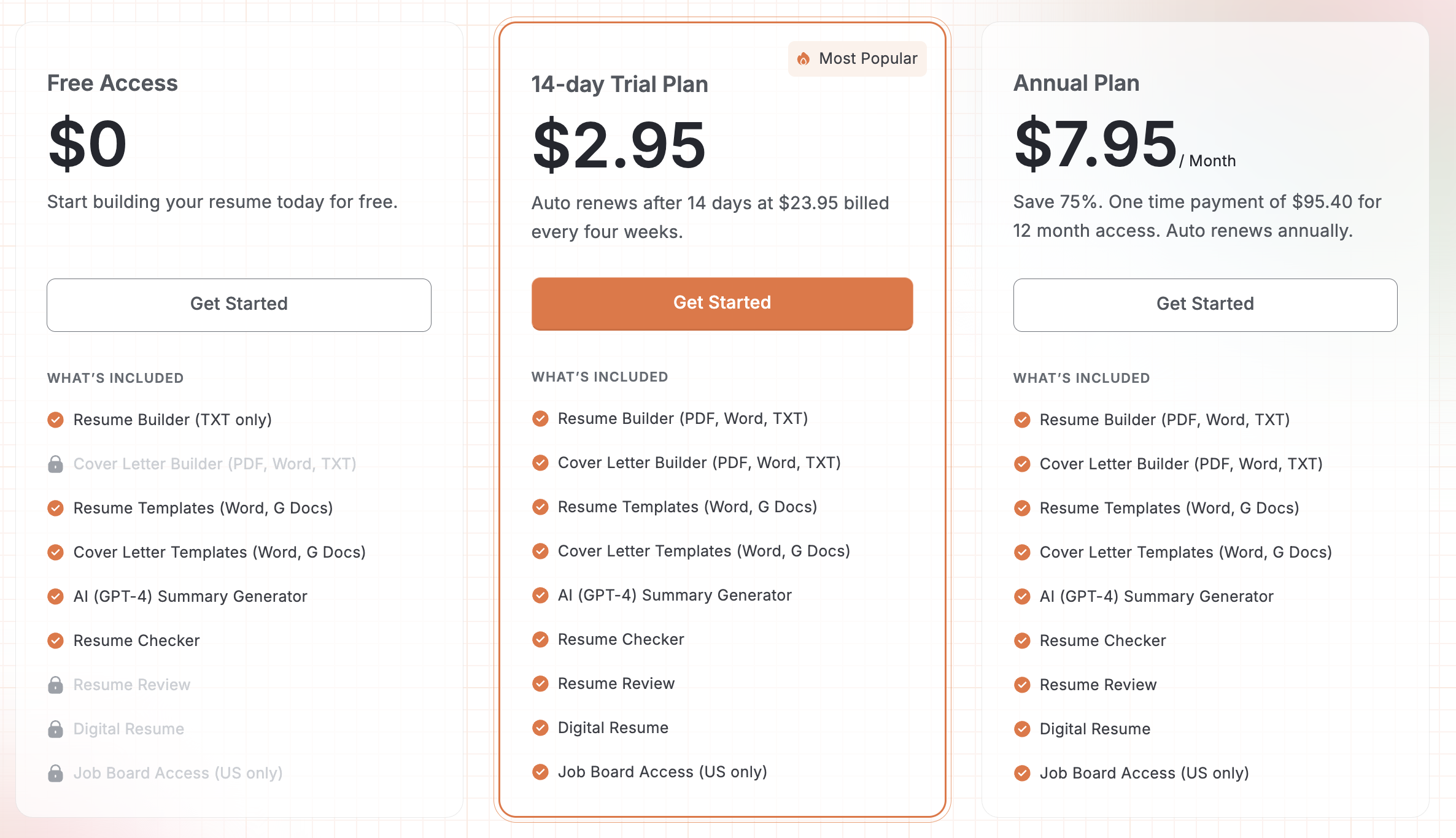
Be mindful of the 14-trial plan for $2.95 as it renews automatically. After that, Resume Genius bills you $23.95 every four weeks.
Another detail to be cautious about is that technically, this isn’t a monthly plan (note that most months are longer than four weeks). If my math is correct, a user might end up being billed 13 times in a year.
Meanwhile, the annual plan is $95.40 (one-time payment).
If you’re considering becoming a paying user, then you need to weigh the options. How quickly do you expect to find employment? Think you can get a job in less than two weeks? You might get away with just paying for the trial plan. Meanwhile, the annual plan becomes financially sensible if it would take you more than four months to land a role.
Author’s take
Public sentiment and customer support
As of February 2026, Resume Genius maintains an impressive 4.5 out of 5 stars from over 44,000 users.
The praise
- Five-star reviews frequently cite the "reader-friendly" interface and the quality of the AI-suggested bullet points.
- Users consistently praise the platform for helping them "find the right words" when they felt stuck.
- Many reviews are left by students or parents helping their children with first-time resumes, highlighting how the "step-by-step" nature of the builder simplifies an otherwise intimidating task.
- Users often mention that the support team was "quick to find the account and fulfill the request," particularly for those who reached out immediately about billing.
The tone shifts dramatically on Reddit (r/resumes, r/Scams), where the conversation focuses on transparency and friction.
The complaints
- A common grievance is the sudden paywall. Users express frustration after spending 30 to 45 minutes building a resume only to discover it cannot be downloaded as a PDF for free.
- Reddit threads are filled with warnings about an "unresponsive" or "invisible" cancellation button. Some users report having to click through four different confirmation screens to successfully finalize a cancellation.
- Others have noted that charges don't appear on the same date each month, making it harder for users to track and dispute recurring fees. (This goes back to the fact that billing happens every four weeks, not monthly.)
It should be mentioned that leaving a positive comment about a product or a brand on Reddit is generally harder. Moderators might see it as a sneaky attempt at promotion, so those are often deleted.
Meanwhile, Resume Genius’s customer support is available and very responsive via phone, email, and live chat. Do bother them if necessary.
Final thoughts about Resume Genius
Here’s what I think are the strongest and weakest points of this career tool.
Pros and cons of using Resume Genius
| Pros | Cons |
|---|---|
| Step-by-step guidance | UX slows down workflow |
| ATS-safe templates | Rigid layouts/formatting restrictions |
| Decent writing assistance | No content tailoring automation |
| Easy first resume creation | Requires manual revisions to update keywords |
| Affordable short-term use | Hard to justify annual plan |
So, who should use Resume Genius?
First-time job seekers and students will find the hand-holding, safety-first experience helpful. Meanwhile, the conservative resume templates suit applicants in traditionally serious fields like law, finance, and healthcare.
And who should skip it?
Users in creative industries might not be happy with the limited personalization. And while the AI/pre-written content is a good starting point, senior leaders may find the phrases too generic for high-level strategic roles that require deeply unique, quantifiable narratives.
If you value speed, versatility, and personalization, then Enhancv’s AI Resume Builder might be the better option for you.
What’s different about Enhancv?
- 7-day free trial: Access the builder’s main features and download a fully formatted resume in PDF, no questions asked.
- Quicker onboarding: There’s no lengthy quizzing and step-by-step content confirmation. You immediately get a full preview of your document.
- One-click tailoring: You can automatically tailor your resume to any job posting. This places the right keywords in your content and improves your role-relevance score.
- Creative freedom: Resume templates range from simple and traditional, to creative and modern. You can add or remove sections, rearrange their order by drag-and-drop, adjust formatting, and even switch backgrounds.
- Support complex narratives: This level of control over your presentation helps you create resumes that reflect the depth of your career. It’s perfect for senior-level professionals and executives with rich backgrounds.
Make one that's truly you.