If you’re looking for a free resume builder review, Kickresume is probably already on your radar. It was rated the best resume builder overall by Forbes, praised for its clean interface and broad feature set.
To see how that recognition holds up in practice, I tested Kickresume hands-on—focusing on its free plan, AI tools, design options, and the limitations that only become clear once you start building a real, job-ready resume.

Key takeaways
- Kickresume is easy to use and well liked, especially for quickly creating a polished-looking resume.
- The platform offers a wide range of templates and AI-assisted features that can speed up resume creation.
- While there is a free plan, most advanced features, customization options, and practical download formats require upgrading to Premium.
- AI tools provide flexibility and control, but results can be inconsistent, and usage limits aren’t always clearly communicated.
- The resume builder works best for straightforward use cases. More experienced users may feel constrained by layout and section limitations.
- Overall, Kickresume is a solid starting point, but understanding its boundaries upfront helps avoid frustration later.
Kickresume onboarding
To use Kickresume’s resume builder, you first need to either log in (with your email, LinkedIn, Facebook, or Apple account) or register. There’s no way to meaningfully explore the tool before signing up, which immediately sets a commitment barrier.
Once logged in, you land on a dashboard that presents a wide range of options right away. The interface feels feature-rich. You have your documents, job openings, and features like “Career Map” and “Interviews,” as well as a list of tools in a carousel at the bottom of the page.
Variety clashes with a feeling of overwhelm, though, especially for first-time users.
Being presented with so many options at once creates the sense that it’s easy to miss an important step or feature.
Creating a resume
Let’s begin making our resume. Kickresume offers multiple ways to start. From the Dashboard, users click “Resume” and choose one of the following options:
- New Resume: Choose a template and build your resume from scratch in the editor.
- New Resume with AI: Enter your name and job title, and Kickresume generates a sample document that you can later edit.
- Import PDF: Upload an existing resume from your computer.
- Use Example: Start from one of Kickresume’s pre-filled resume examples.
Additionally, you’ve got the Import from LinkedIn option button.
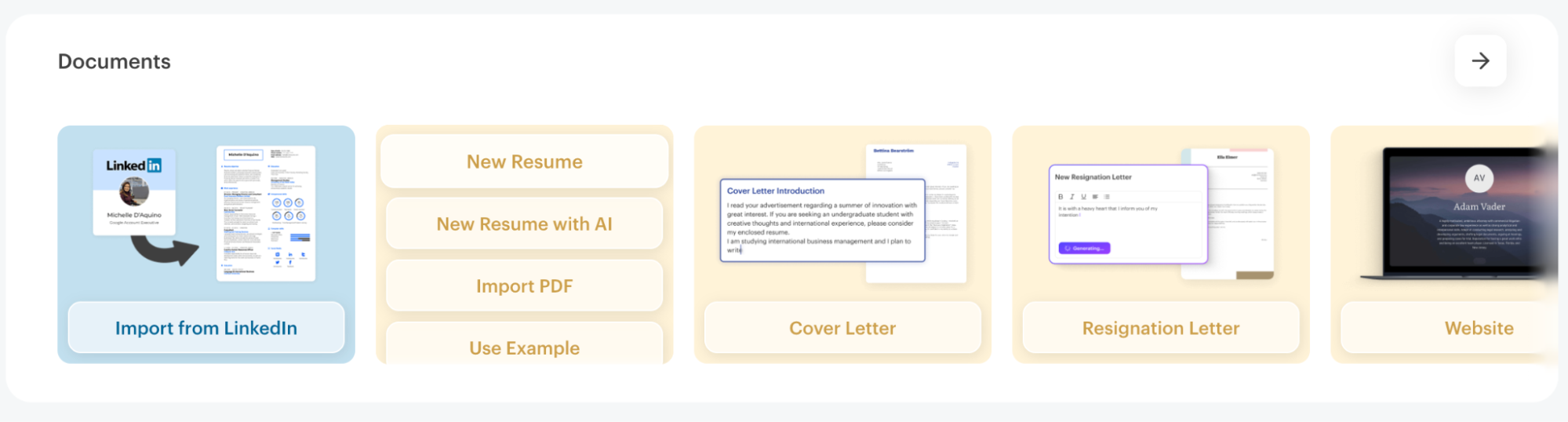
You could also go to the “My Documents” tab from the hamburger menu on your left and choose whichever option suits your needs best.
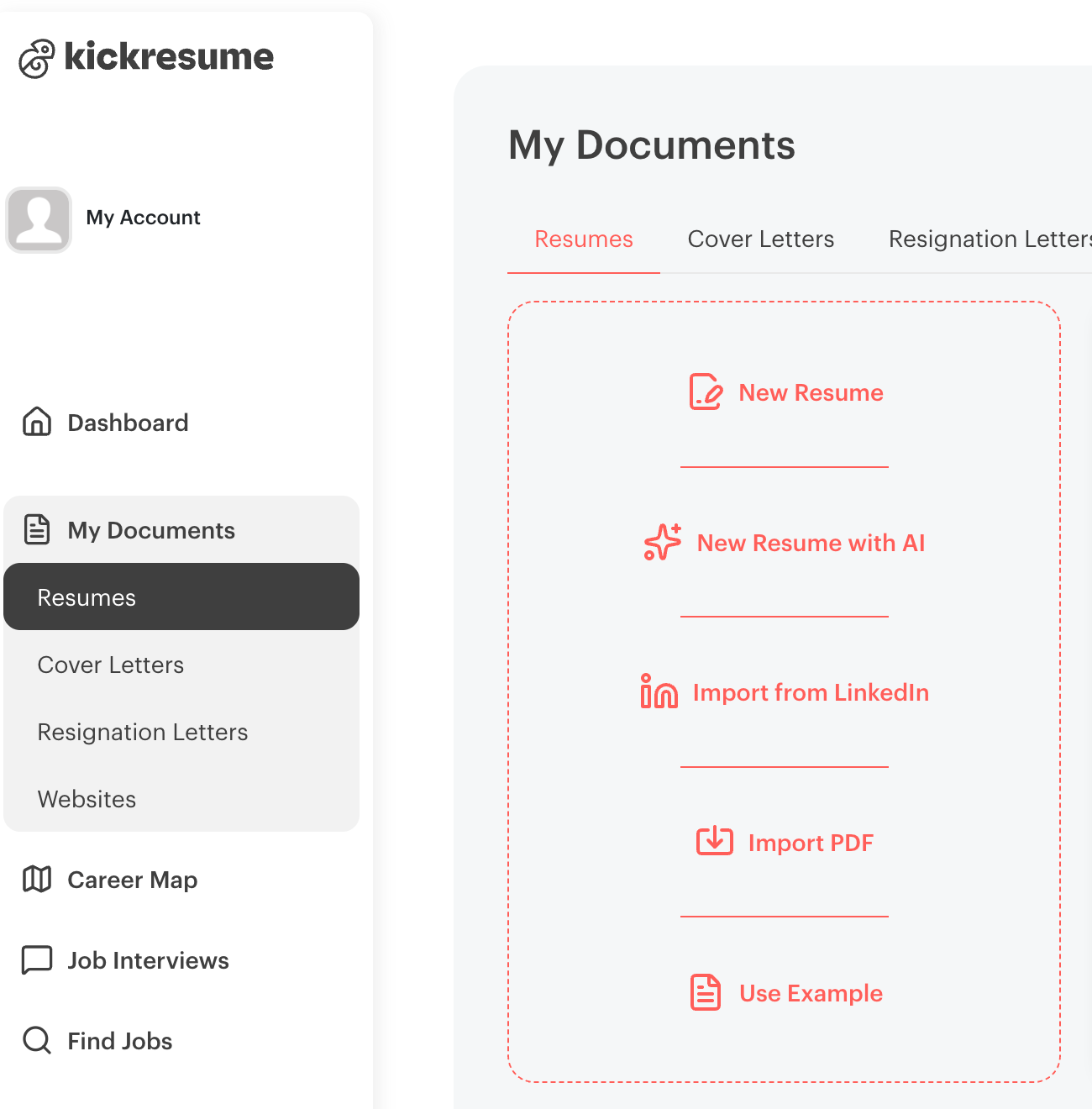
While the flexibility is impressive, there’s no clear recommendation for which path a new user should take, which can make the first step feel less guided than expected.
The resume-building experience
Once you move past the initial setup, Kickresume’s resume builder brings together template selection, content editing, and design customization in a single flow. This is where the product feels the most hands-on—and where its limitations are the most noticeable.
Kickresume’s template library
Choosing the option “New Resume” takes you to Kickresume’s template library. Templates can be filtered by profession, although the same designs are repeated across multiple industries. Most templates are marked as premium, with only a handful available for free. The free templates tend to be very basic in comparison to the premium ones.
Without a dedicated page for the resume builder, the experience feels fragmented. Being presented with so many options at once creates the sense that it’s easy to miss an important step or feature.
After selecting a free template—“White,” from the Marketing and PR category—the editor opens with a notification stating that the resume uses one premium feature.
Now I’m confused—the template itself was presented as free?
You can easily see which premium feature is being used—in my case, it was the font. But if a template is advertised for free, why does it include a premium feature? Either it’s an oversight or a marketing trick to get you to convert to premium. As a user, I’m annoyed at both scenarios.
While Kickresume is (mostly) transparent about which features are premium, that transparency often comes only after the user runs into a limitation.
Editing your content
The resume editor allows you to fill in your information step by step, but customization is more limited than expected.
For example, section titles can’t be renamed. This would mean the “Profile” section can’t be changed to “Summary,” which may feel restrictive to users who want to tailor their resume structure. Similarly, while you can add a “Custom” section, you can’t rename it—at least on the free plan, which makes the final resume look awkward and generic.
On the free plan, you can only add two work experience entries. Adding a third requires upgrading to Premium. The Education section follows the same logic and limitations. You can evade this obstacle by importing your resume to the builder.
However, when you attempt to download the resume later, Kickresume still recognizes these sections as premium features and restricts export options accordingly. This creates an odd dynamic where the builder allows more content than it ultimately lets you use unless you pay.
The Skills section lets you list skills and rate proficiency using sliders. Beyond that, many additional sections are locked behind the premium plan, including:
- Achievements
- Awards
- Certificates
- Goals
- Graphs
- Hobbies
- Projects
While Kickresume is upfront about which sections are paid, the result is that free resumes can feel sparse and overly constrained.
Design and styling experience
Once content is in place, you can move to the Design tab. From here, you can change the template—either manually or through the “Randomize” button, but this comes with a risk. Switching templates may move you to a premium design, and you have to click on a template to figure out if it’s premium or free.
Design customization options include:
- colors
- headline capitalization (interestingly, this doesn’t capitalize your name)
- font type and size
- line spacing
- page format (A4 or Letter)
- page numbers
- date and address formatting.
Backgrounds are handled similarly. Although several options appear available, only the “None (i.e., “No background”) is actually free, which you only discover through trial and error.
Overall, there’s a fair choice between templates, but I wouldn’t use most of them in a professional setting without some tweaking of the colors or fonts. Moreover, templates such as “Postcard” start as double-column on the first page, then the second column remains empty on the second. Not a good experience, especially for a premium design.
Kickresume’s AI
Kickresume’s AI writer is available in several key resume sections and is one of the builder’s stronger features. Unlike some tools that apply AI in a single, generic way, Kickresume gives users a relatively high degree of control over how the content is generated.
You can provide custom instructions (effectively prompting the AI), choose from multiple tones of voice, and decide whether the output should be structured as bullet points, paragraphs, or a hybrid of both. This makes the AI feel more assistive than prescriptive.
Kickresume’s AI Writing Capabilities
| Section | AI |
|---|---|
| Profile | Generates or rewrites a professional summary based on user input. Allows custom instructions, tone selection (casual, balanced, corporate, results-oriented), and choice of structure. |
| Work Experience | Generates or rewrites experience descriptions using AI. Users can guide the output with prompts, choose tone of voice, and format the content as bullets, paragraphs, or a structured mix. |
| Education | Uses the same AI rewriting and generation options as the Experience section, including tone, structure, and custom instructions. |
| Skills | Generates a list of skills based on the job position you enter, helping users align their skill set with the target role. |
Lack of transparency around AI limits
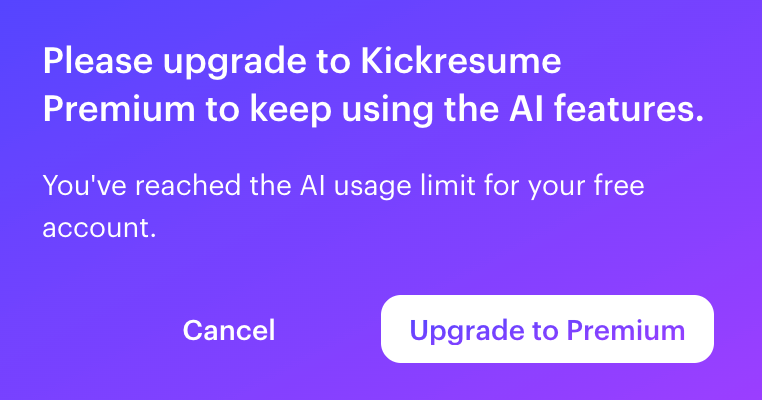
At a certain point, however, the platform notified me that I’ve reached the AI usage limit for my free account—without any prior warning. What’s unclear to me is how this limit is calculated and which AI-powered features are affected once it’s reached.
In my case, the AI writer in the Skills section became a premium feature once the limit was hit. At this point, it seems I can only add two skills if I want to keep the entire section free, and that’s not really usable.
It’s also not immediately obvious whether other AI-assisted sections are restricted at that point. The lack of transparency makes it difficult to understand what remains usable on the free plan and what doesn’t.
Besides, with a Skills section of two skills available in total, a free resume is effectively reduced to just three components:
- Profile
- Work Experience
- Education
This significantly limits the usefulness of the free plan, especially given that skills are a core element of most modern resumes.
Resume Tailoring (Beta)
Kickresume also offers a Resume Tailoring feature (currently in Beta). Users can paste in a job description, and the AI generates an optimized version of their resume tailored to that specific role.
In theory, this makes it easier to align your experience and skills with the job requirements. In practice, results may vary, and as with other AI-generated content, careful review is essential to ensure accuracy and avoid unintended changes. Personally, I was happy with the result.
ATS score and “Improve” feature
The “Improve” tab provides an ATS score for your resume. When I uploaded my resume and used the “White” template with no premium features, my document received:
- An overall score of 42,
- A design score of 20 out of 100.
When attempting to access a more detailed analysis, I was prompted to upgrade to Premium.
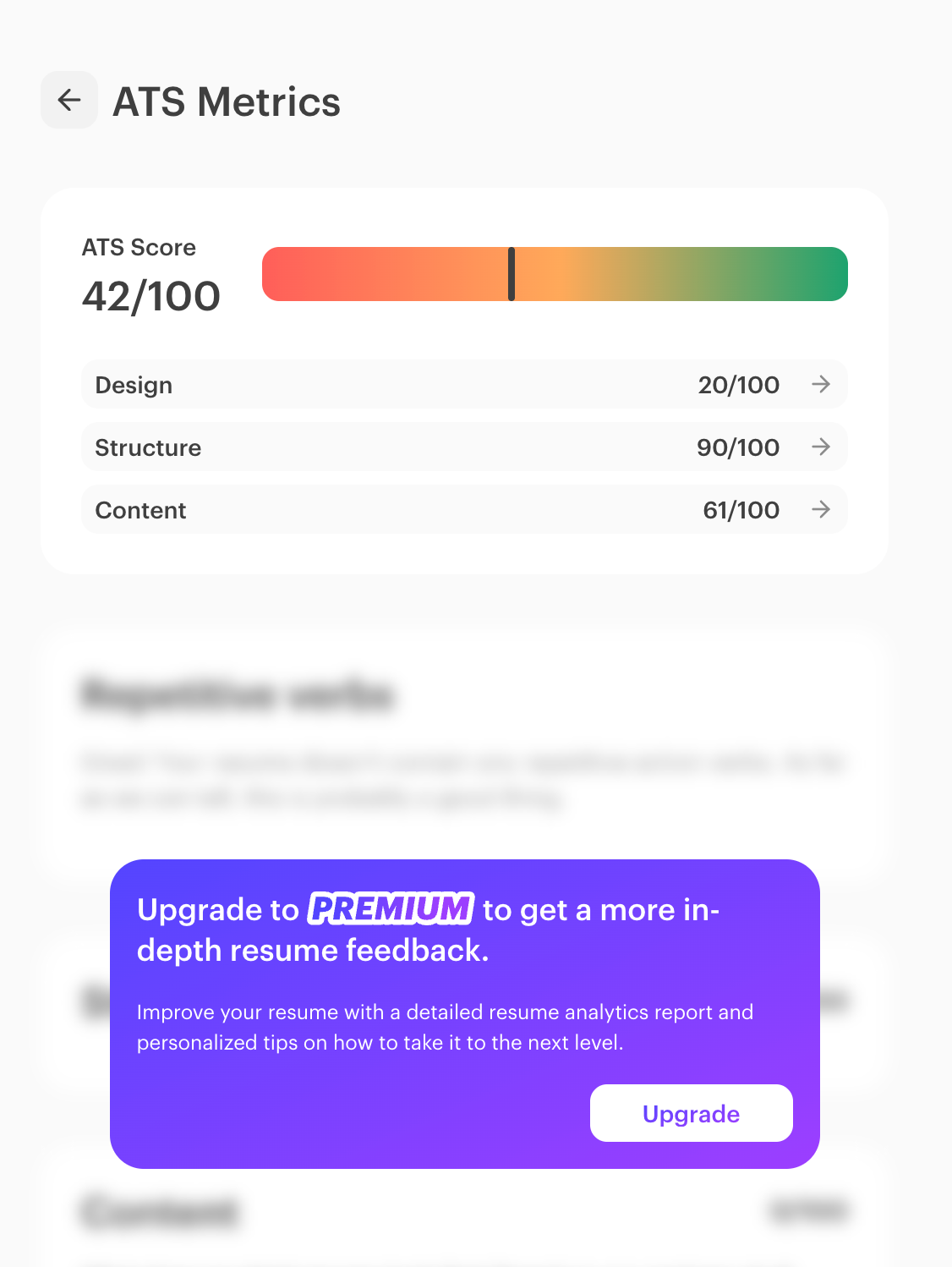
What’s particularly puzzling is that switching to a premium template doesn’t improve the design score—it actually lowers it. By making the simple change of switching to “Puddle,” my overall score is lowered to 33, and my design score is now a mere 5.
This hardly makes any sense, and regardless of the changes made, the score may be intentionally capped unless you upgrade.
As a result, the ATS scoring feature feels less like a helpful diagnostic tool and more like an upsell mechanism, making it largely unusable in practice.
Proofreading and translation features
Kickresume also offers proofreading and translation services.
- Proofreading is advertised as being done by humans and takes approximately two business days. This feels reasonable for a paid service, but not ideal if you’re in a hurry.
- Translation uses AI and completes in under a minute, although the number of supported languages is limited to six.
While the translation itself is fast, it isn’t immediately clear that this feature is premium. That only becomes apparent at the download stage, at which point there’s no option to revert to the previous version of the resume. To avoid paying, you need to restart the entire resume creation process.
Download and sharing options
The final step is “Download & Share,” where most limitations of the free plan become fully visible.
Here are the options available and what they provide:
#1 Download a preview
- Includes only the first page of your resume
- Watermark-free
- PNG format (not PDF), not useful for actual job applications
#2 Export text only
- Download a text-only DOCX file
- Includes a Kickresume trademark
- Only usable for copy-pasting your text into another format
#3 Upgrade to Premium
- Download a full PDF
- Save the resume to the cloud
- Send it to an email
Kickresume also allows you to share a link to your resume for peer review or post it directly to platforms like Facebook, X, Telegram, and WhatsApp.
Kickresume’s pricing
At first glance, Kickresume appears generous with its free offering. In practice, the free plan is best suited for testing the builder, while meaningful customization and usable exports sit behind a premium subscription.
Here are the options available:
Pricing structure
| Tier | Price | Key Features |
|---|---|---|
| Free | $0 | Limited access to basic templates and sections. Resume building is possible, but customization is restricted and practical download formats are limited. Many advanced features (AI usage, sections, design options, ATS tools) are locked or capped. |
| Premium (Monthly) | ~24$/month | Full access to all resume and cover letter templates, design options, AI writing tools, ATS checker, LinkedIn & PDF import, and export to PDF. Includes priority support and a 14-day money-back guarantee. |
| Premium (Quarterly) | ~$18 / month (billed quarterly) | Same features as the monthly plan at a lower effective monthly cost, requiring a longer commitment. |
| Premium (Yearly) | ~$8 / month (billed annually) | Full Premium access at the lowest monthly price, but requires paying upfront for a year. |

PRO TIP
Kickresume offers a special program for students and teachers that temporarily unlocks full premium access for free. After verifying student or teacher status, users can enjoy up to 6 months of premium features at no cost. This includes all templates, design options, AI tools, ATS checker, imports, and downloads normally reserved for paid plans.
In practice, Kickresume’s pricing rewards users who commit early. Those who already know they’ll need Premium—or qualify for the student offer—are likely to get solid value, while casual users may find the free plan too restrictive to be useful on its own.
What users say about Kickresume
I wanted to see whether my experience was just a personal gripe or something other users were running into as well, so I spent some time going through reviews and forum threads.
Overall, Kickresume is very well liked. On Trustpilot, most users praise how easy the builder is to use and how quickly it helps them put together a professional-looking resume. Many say they come back to the tool again and again and even recommend it to friends, especially if they want something that works without much setup.
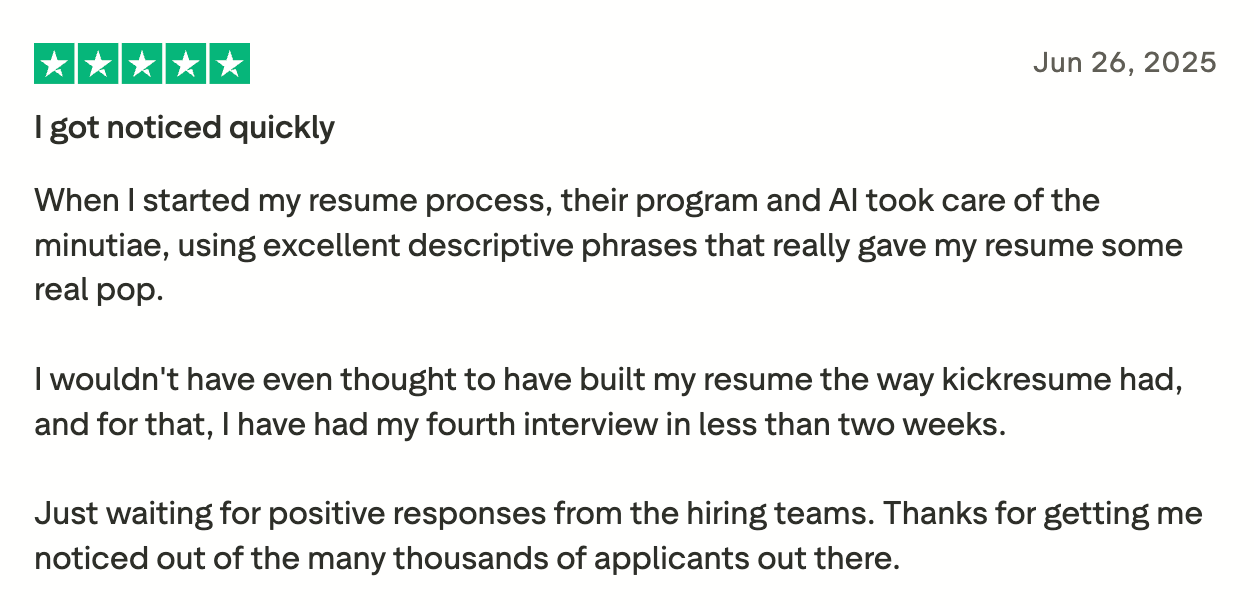
That said, not all feedback is glowing—and some of the criticism closely mirrors the issues uncovered during hands-on testing.
Some users raise trust and transparency concerns, particularly around billing and refunds, saying they canceled within the advertised window but still struggled to get a refund or received unclear responses from support.
Others point out issues with content handling—especially around AI suggestions, which many say don’t work particularly well, leading them to rely on ChatGPT instead. Translation quality is also mentioned as inconsistent, often requiring manual cleanup.
What does Reddit say?
On Reddit, the tone is generally positive as well, but more cautious. Some users question the authenticity of overwhelmingly positive posts and wonder whether certain reviews are incentivized.
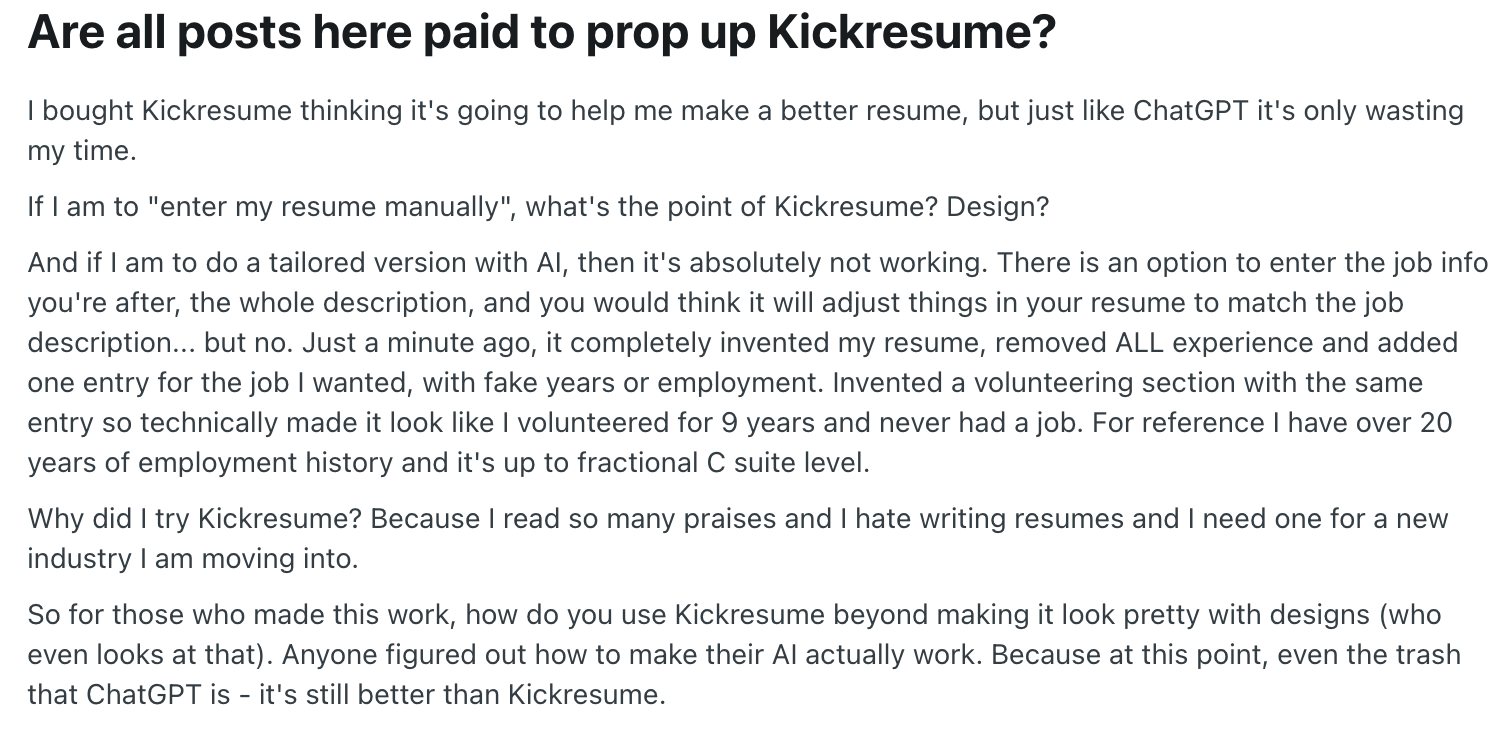
Taken together, user feedback suggests that Kickresume works best as a fast, design-focused builder.
Kickresume vs. Enhancv
Kickresume offers a wide range of features and multiple ways to get started, which makes it appealing to users who want flexibility and AI-assisted writing early on. Its AI tools are configurable, and the platform supports several resume creation paths, including imports and examples.
Enhancv takes a different approach. The resume builder lives on a dedicated, separate page, clearly positioned as the core experience. While Enhancv does offer additional features, they are intentionally kept out of the builder flow, allowing users to focus entirely on creating their resume without distractions.

What stands out about Enhancv’s Resume Builder
- A dedicated, distraction-free builder page: The resume builder lives on its own page, separate from other features, so users can focus entirely on building their resume without navigating a crowded interface.
- No signup required to try the builder: Users can start experimenting with the resume builder before creating an account, lowering the barrier to entry and making the experience more approachable.
- Full access during the 7-day trial: While Enhancv doesn’t offer a permanent free plan, the 7-day trial unlocks all builder capabilities. Even outside the trial, the free sections are sufficient to create a strong, job-ready resume.
- Clear expectations around limitations: Since premium features are clearly marked with an icon, users aren’t surprised by late-stage restrictions or unclear feature caps while building their resume.
- A free resume checker: Enhancv’s Resume Checker is available for free, allowing users to assess their resume without hitting a paywall—unlike Kickresume’s checker, which is largely gated behind Premium.
- Designed for experienced professionals: Enhancv is widely used by experienced professionals, senior leaders, and executives who need more control over structure and positioning. Its flexible section editing, performance-driven bullet suggestions, layout customization, and emphasis on achievements make it particularly well suited for complex career histories.
By comparison, Kickresume’s free experience is more constrained. While it allows resume downloads, the available formats—such as PNG previews or watermarked DOCX files—aren’t particularly useful for real job applications. Several limitations only surface late in the process, and some restrictions aren’t clearly communicated upfront.
Overall, Kickresume provides flexibility and a broad feature set, but Enhancv’s resume builder feels more intentional, transparent, and easier to trust from the very first interaction.
PRO TIP
And if you want to use a truly free resume builder, try Resume Mentor.
Final verdict
Kickresume is a popular, easy-to-use resume builder that delivers quick, visually appealing results and works well for straightforward use cases. It’s best for entry-level candidates as well as people who’ve been out of the job hunt for some time. Its versatility, examples, prompts, and templates make it approachable even if you haven’t written a resume in a while.
However, its value as a free resume builder is limited. Customization and usable download formats are locked behind Premium, and some of the builder’s restrictions only become clear late in the process.
In contrast, Enhancv offers a more focused and transparent builder experience. With a dedicated builder page, no signup required to try it, and a 7-day trial that unlocks all features, Enhancv feels easier to trust and more predictable from start to finish.
Is your resume good enough?
Drop your resume here or choose a file. PDF & DOCX only. Max 2MB file size.
Make one that's truly you.