

When you apply through JazzHR, you're usually applying to a small company. That single fact shapes everything about how your resume gets handled, and it's the part most "beat the ATS" advice gets wrong.
JazzHR is the applicant tracking system built for small and mid-sized businesses, not the enterprise giants. Often there's no dedicated recruiting team on the other side, just one hiring manager, an office manager, or the owner working through applications between everything else they do.
So the system is built to be simple: parse your resume, flag the obvious mismatches, help a busy non-specialist spot strong candidates, and get out of the way. There's no mysterious algorithm deciding your fate. This guide walks through what JazzHR does with your resume and the one file mistake that sinks more applications than any formatting choice.

Key takeaways
- JazzHR is the small-business ATS, part of the Employ Inc. family alongside Lever and Jobvite, often reviewed by a non-specialist rather than a recruiting team.
- It parses your resume into a profile and keeps your original document for a person to open and read.
- The big trap: JazzHR doesn't run OCR, so an image-only resume with no text layer parses into empty fields. Send real, selectable text.
- Early filtering comes from knockout questions, where a disqualifying answer can flag or auto-reject you, not from your layout.
- TalentFit is JazzHR's AI feature that scores your fit against the job and summarizes what you have and what you lack. It helps a person prioritize—it doesn't decide.
- Match the role, keep the file clean, and confirm it parses with the Resume Checker before you apply.
What JazzHR is and why the small-business part matters
JJazzHR is recruiting software made for small and mid-sized companies to post jobs, collect applications, screen candidates, and move everyone through a hiring pipeline. It's part of the Employ Inc. family of recruiting tools, alongside Lever and Jobvite.
The small-business focus is the thing to hold onto. At a big company running an enterprise ATS, a trained recruiting team knows how to read a parsed profile and give a real resume a second look. At a small company on JazzHR, the person reviewing you may be doing it for the first time this year, between running payroll and answering customer emails.
That cuts both ways for you: the review is often more human and forgiving, but it's also faster and less patient with anything that makes your resume hard to read. A clean, skimmable resume matters more here, not less.
You'll meet JazzHR when an application runs on a JazzHR-hosted careers page, frequently an applytojob.com address. When you apply, your application lands in that company's JazzHR account for whoever's hiring to work through.
For a wider view of how any applicant tracking system fits together, start with our guide to what an ATS is and how it works. This article specifically tackles JazzHR.
What does JazzHR do with your resume?
JazzHR turns your file into a candidate profile, pulling out your work history, education, and resume skills so a recruiter can search and filter. It also keeps your original resume as a document a person can open and read. So two versions of you exist in the system: the parsed profile that powers search and your actual file that a human eventually opens.
That second version is why JazzHR is friendlier than its reputation. Your careful resume formatting does reach a person intact. But the parsed profile is what shows up in searches and filters, so if the parse comes through wrong, you can be overlooked before anyone opens your file. Which brings us to the mistake that matters most.
The file trap that sinks more applications than formatting
Here's the one most people miss. JazzHR doesn't run optical character recognition. JazzHR doesn't run OCR on your resume, so it relies on your file already containing real, selectable text. A resume that's an image with no text layer, a photo of a printed page, or an image-only PDF comes through as an empty profile: no work history, no skills, nothing to search.
Most modern scanners do embed a text layer, so many scanned PDFs parse fine, but the safest move is to export straight from MS Word or Google Docs so you never have to wonder.
This is a bigger risk than any column count or resume template choice, and it's invisible from your side. The upload succeeds. The confirmation email arrives. And the profile behind it is blank.

Pro tip
Two silent failure modes to rule out before you apply. First, if you must use a scanned file, confirm it has a real text layer (many scanners add one automatically)—when in doubt, export straight from Word or Google Docs instead of scanning.
Second, keep the file under 5 MB, because JazzHR drops resumes over that cap while still accepting the application, leaving your profile with no resume attached.
To check your file is real text, open the PDF and try to select a line with your cursor. If it highlights as text, you're fine. If it selects like an image, it will parse to nothing.
JazzHR accepts several resume formats: .doc, .docx, .pdf, .odt, .rtf, and .txt, and parses a Word .docx most cleanly, with a text-based PDF exported from Word a solid second choice. When in doubt, send the DOCX. It's the format least likely to surprise you.
For the wider question of which to send, see our guide on whether a resume should be a PDF or Word doc.
TalentFit: JazzHR's AI and what it actually does
TalentFit is JazzHR's AI matching feature, added to help recruiters work through high volumes of applicants. It reads your resume against the job description and reports how well you fit, calling out your strengths and the gaps a recruiter should dig into.
In JazzHR's product, it labels candidates with fit tiers and summarizes, in plain language, what you have and what you're missing for the role.
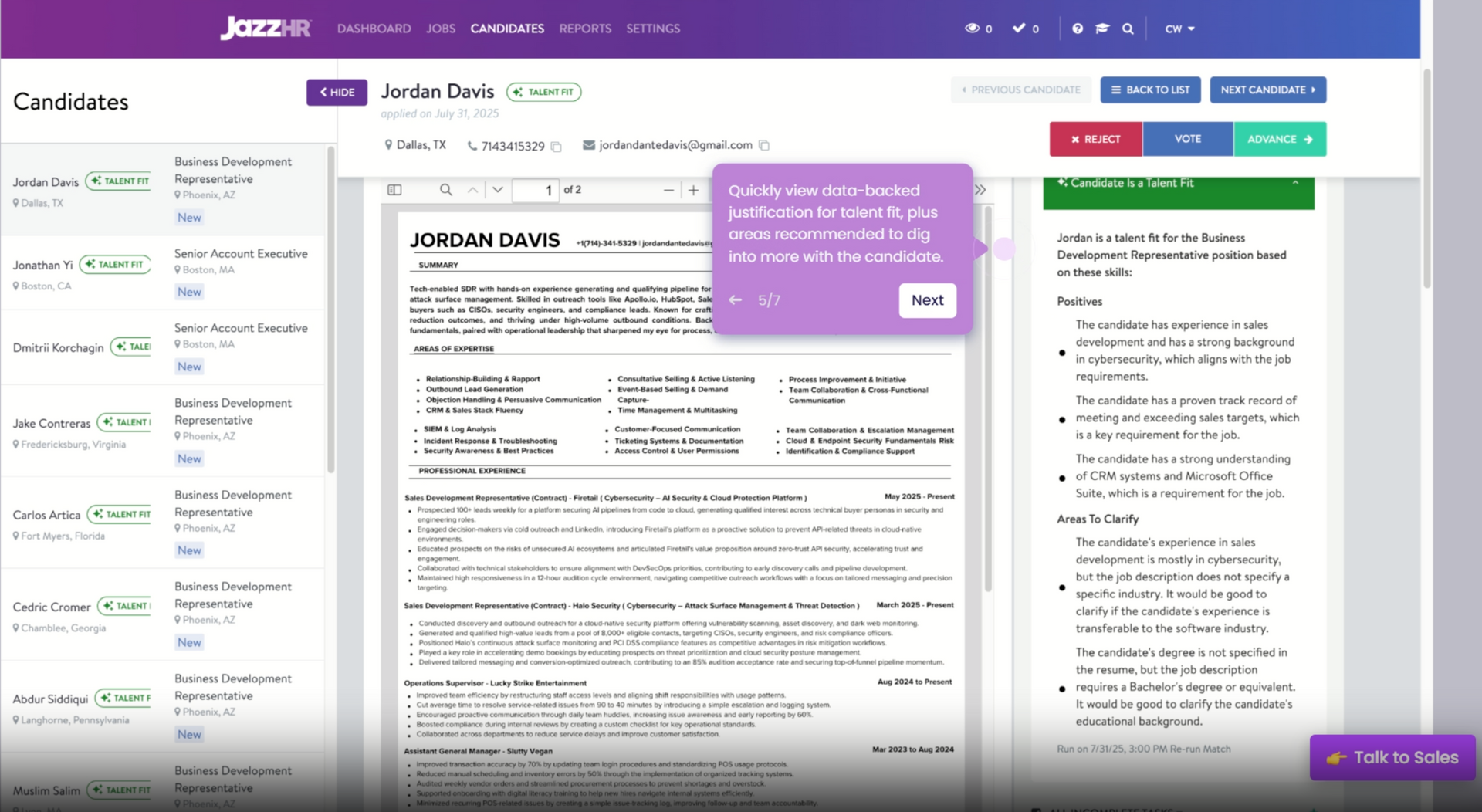
The key detail is what TalentFit does with that read and what it doesn't. It produces a summary and a fit signal to help a busy person prioritize a stack of resumes. It does not advance or reject you on its own. A person still votes, moves you to the next stage, or passes.

How TalentFit reads you
Your resume + the job description = a fit summary (strengths, gaps, and a fit tier) for a recruiter to act on
No auto-advance. No auto-reject. TalentFit surfaces and summarizes so a person can prioritize, then that person decides. The way to score well is to match the role's requirements with clear, relevant content the AI can tie back to the job description.
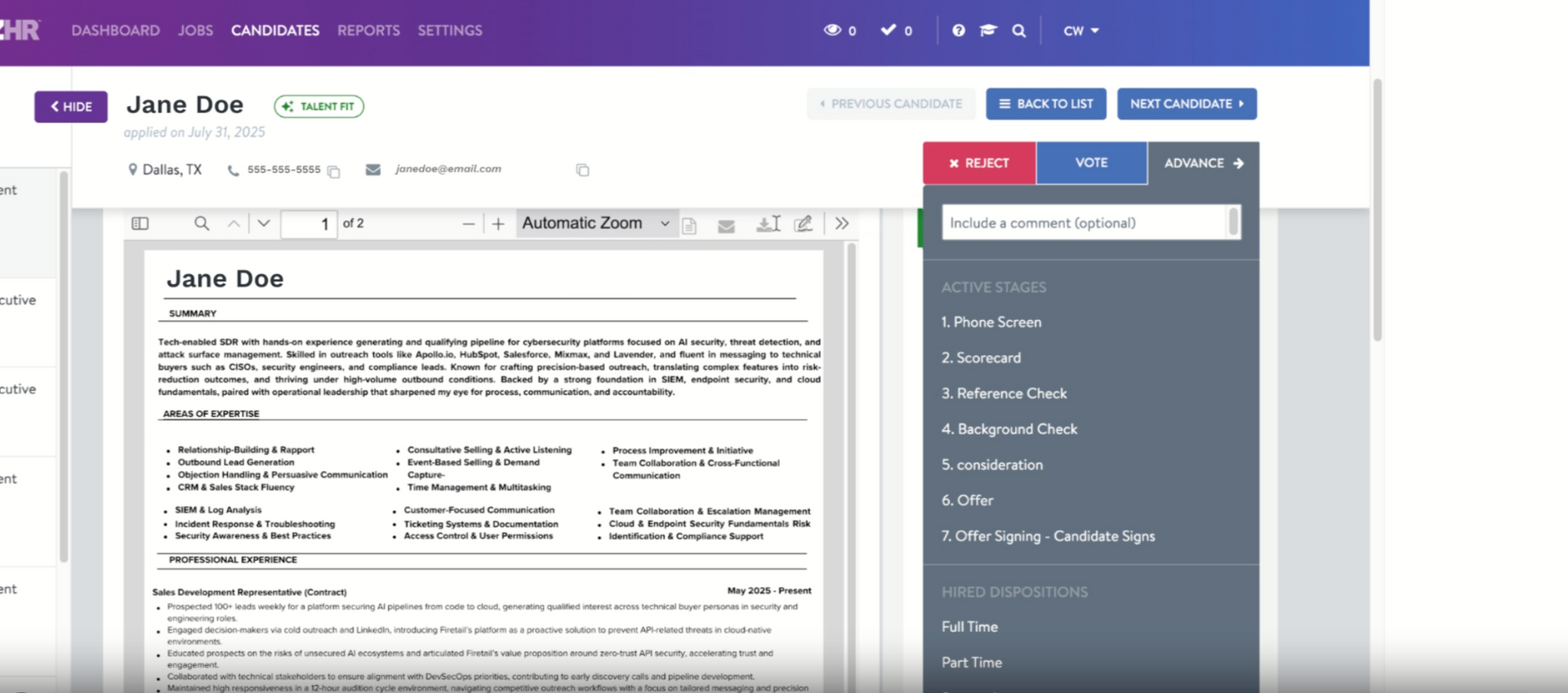
One nuance worth knowing: TalentFit is a paid-tier feature, so plenty of the smallest employers on JazzHR's entry plan don't run AI scoring at all. When they do, it's a prioritization aid for a human, not a gate. Either way, the move is the same: a targeted resume that mirrors the posting.
Knockout questions: the real early filter
If JazzHR filters you out fast, the cause is almost always a knockout question, not your resume. JazzHR lets an employer mark certain application answers as disqualifying, so answering a baseline qualification the wrong way flags you, and an employer can go one step further and auto-reject those candidates into a Not Hired stage.
These cover genuine non-negotiables like work authorization or a required certification.
So the instant rejection that feels like a robot judging your template is usually a screening answer instead. Read those questions carefully, answer them honestly, and make sure you actually meet the hard requirements before anything else.

What the numbers say about ATS rejection
- 88% — executives who admit qualified candidates get screened out for missing exact job requirements (Harvard Business School and Accenture, 2,275 executives).
- 92% — recruiters (23 of 25 we interviewed) whose systems leave formatting alone.
- 98% vs. 95% — parse accuracy of two-column versus single-column resumes across the ATS parsers we tested.
How to make your resume work in JazzHR
Most of this comes down to a clean file and a real match to the role. If you're building from scratch, our full guide on how to write a resume covers it end to end.
Here's what's relevant for JazzHR:
- Send real, selectable text. This is the big one. No OCR means an image-only file with no text layer parses into nothing, so export from Word or Google Docs rather than uploading a photo or image-only PDF.
- Send a Word file when you can. JazzHR parses DOCX most cleanly, and a text-based PDF is the next best thing. Keep it under 5 MB.
- Match the role's requirements. Mirror the skills and keywords from the posting where they fit you, since TalentFit compares your resume to the job description. Pull the language straight from finding keywords in the job description, and lead with the hard skills the role names.
- Answer the screening questions accurately. Knockout answers drive the early filtering, so treat them as part of your application.
- Use standard section headings. Plain labels like "Experience" and "Education" help the parser sort your content, and help a non-specialist skim it fast. Clear resume sections do double duty here.
For the full build, read our guide on how to create an ATS-friendly resume. For the columns question specifically, see whether two-column resumes are ATS-friendly.
Myths about JazzHR
"TalentFit auto-rejects me." TalentFit scores and summarizes your fit to help a person prioritize, and a person decides. The feature that can auto-reject is a knockout question, and it acts on your answer, not your layout.
"A two-column resume breaks in JazzHR." JazzHR parses your resume into a profile and keeps your document for a person to read, so column count is rarely the issue. Across the ATS parsers we tested, two-column resumes scored 98% versus 95% for single-column on parse accuracy.
The real killer is an image-only file with no text layer, not a second column. Keep the text selectable.
"I need a special resume just for JazzHR." One clean, well-matched resume works across JazzHR and every other system.
Where JazzHR fits among other ATS
JazzHR pairs a straightforward small-business ATS with an AI matching feature in TalentFit, so it spans both ATS generations. It parses your resume like Greenhouse and Taleo, and it scores fit with AI like newer systems such as Ashby and iCIMS. In every model, the software reads and surfaces, and a person decides.
So you don't need a different resume per system. Build one clean, well-matched file, tailor the content to each role, and it travels across all of them. If you want to check the result before you apply, run yours through a free ATS resume scanner first.
Is your resume good enough?
Drop your resume here or choose a file. PDF & DOCX only. Max 2MB file size.
Frequently asked questions
The questions job seekers ask most once they realize a small company is screening them through JazzHR.
Does JazzHR use AI?
JazzHR uses AI in its TalentFit feature, which reads your resume against the job description and scores how well you match, with a summary of your strengths and gaps. It helps a person prioritize, and a human makes the call. Not every employer runs it, since it's a paid-tier feature.
Does JazzHR automatically reject resumes?
JazzHR can auto-reject, but on your answers to knockout questions, not your formatting. If an employer enables it, a disqualifying answer moves you to a Not Hired stage.
Can JazzHR read a PDF?
JazzHR reads a text-based PDF, as long as the text is selectable rather than an image, since it doesn't run OCR to add a text layer. A Word .docx parses most cleanly. JazzHR also accepts .doc, .odt, .rtf, and .txt resumes, each up to 5 MB.
Why does a scanned resume fail in JazzHR?
Because JazzHR doesn't run OCR to add a text layer, it can only read text that's already in your file. A scan or photo with no embedded text layer comes through as an empty profile, even though the upload succeeds.
Many modern scanners do add a text layer automatically, so some scanned PDFs parse fine, but exporting straight from Word or Google Docs removes the guesswork.
Does JazzHR give my resume a score?
JazzHR's TalentFit gives an AI fit score against the role and summarizes what you have and what you lack. It's a tool to help a person prioritize, not a final decision.
Can JazzHR read a two-column resume?
A well-built two-column resume reaches JazzHR fine, because it parses your text into a profile and keeps your document for a person to read. Keep the text real and selectable, and column count is rarely what breaks the read.
What is TalentFit?
TalentFit is JazzHR's AI matching feature. It compares your resume to the job description, scores your fit, and highlights your strengths and the areas a recruiter should explore, which speeds up screening for high-volume roles.
Why did I get rejected from a JazzHR job so fast?
A fast rejection usually means you missed a knockout requirement, like work authorization or a required certification, rather than a problem with your layout. It's worth learning how to respond to a rejection email and keeping the door open.
How do I know a company uses JazzHR?
The application often runs on a JazzHR-hosted careers page, frequently an applytojob.com address. The fix is the same regardless: a clean, well-matched resume in selectable text.
The bottom line on JazzHR
JazzHR is friendlier than its AI marketing makes it sound, because on the other side is usually a busy person at a small company, not a faceless algorithm. It reads your resume against the job, keeps your real document for that person, and uses TalentFit to help them prioritize, not to replace them.
So send a clean file with real, selectable text, match the role, and answer the screening questions straight. The decision is still a human's.
JazzHR is a parse, screen, and match tool, not a gatekeeper. The one thing that trips people up isn't formatting, it's uploading an image-only file with no text the parser can read. Send real text, match the role, and you're in front of the person who actually decides.
Author's Take
Make one that's truly you.