

iCIMS is one of the most widely used enterprise applicant tracking systems, built around what iCIMS calls the Talent Cloud. It parses your resume into a searchable profile, ranks your fit with an AI score it calls Role Fit, shows recruiters your actual document, and leaves the decision to a person.
More than 4,400 companies across 200 countries use it, including a quarter of the Fortune 500.
iCIMS sits between two generations of ATS. It parses your resume into fields like the older systems, and it adds an AI fit ranking like the newer ones. Most "beat the ATS" advice misses both, so this guide explains how iCIMS actually handles your resume, step by step, and what to do at each stage.

Key takeaways
- iCIMS parses your resume into a searchable candidate profile and keeps your original document for recruiters to read.
- Early filtering comes from screening questions with disqualification criteria, not from your formatting.
- iCIMS ranks your fit with a score it calls Role Fit, part of its Coalesce AI suite, which it frames as a tool to support a recruiter's decision, not make it.
- iCIMS can redact personal details to reduce bias, and its AI is certified against TrustArc's Responsible AI framework.
- It accepts DOCX, PDF, RTF, and TXT files, and a lean, text-based file parses most cleanly.
- Match the role's requirements, and confirm your file parses with the Resume Checker before you apply.
What iCIMS is
iCIMS is enterprise recruiting software used by large employers and high-volume hiring teams to post jobs, collect applications through branded career portals, screen candidates, and track everyone through the pipeline.
It integrates with more than 800 partner technologies, so an employer's iCIMS setup often connects to job boards, background checks, and assessment tools you'll meet along the way.
You'll recognize it when an application runs on an icims.com address or asks you to create a candidate account. When you apply, your application lands in that employer's iCIMS account for its recruiters to work through.
For a wider view of how any applicant tracking system fits together, start with our guide to what an ATS is and how it works. Let's zoom into iCIMS, now.
How iCIMS handles your application, step by step
Four stages, in order, each doing a separate job.
1. You apply through an iCIMS career portal
You create a candidate account, upload your resume, and answer the job's questions. Those questions matter more than most applicants realize, which is the next stage. Since you're building a profile that a recruiter will search, it pays to treat the account as an extension of your resume rather than a form to rush.
2. iCIMS parses your resume into a profile, and keeps your document
iCIMS turns your file into a structured, searchable candidate profile, pulling out your contact details, work history, education, and skills so recruiters can search the database. It also keeps your original resume as a document a recruiter can open and read.
So the parser wants your titles, companies, dates, and skills in places it can recognize. Clear, standard resume sections give it clean fields, while a heading hidden in a graphic gives it nothing to store.
3. Screening questions filter early
When you apply, you answer screening questions, and iCIMS scores your answers. A question can be configured with disqualification criteria, marked with an asterisk, so a wrong answer on a non-negotiable requirement can filter you out right away. These cover things like work authorization, location, or a required license.
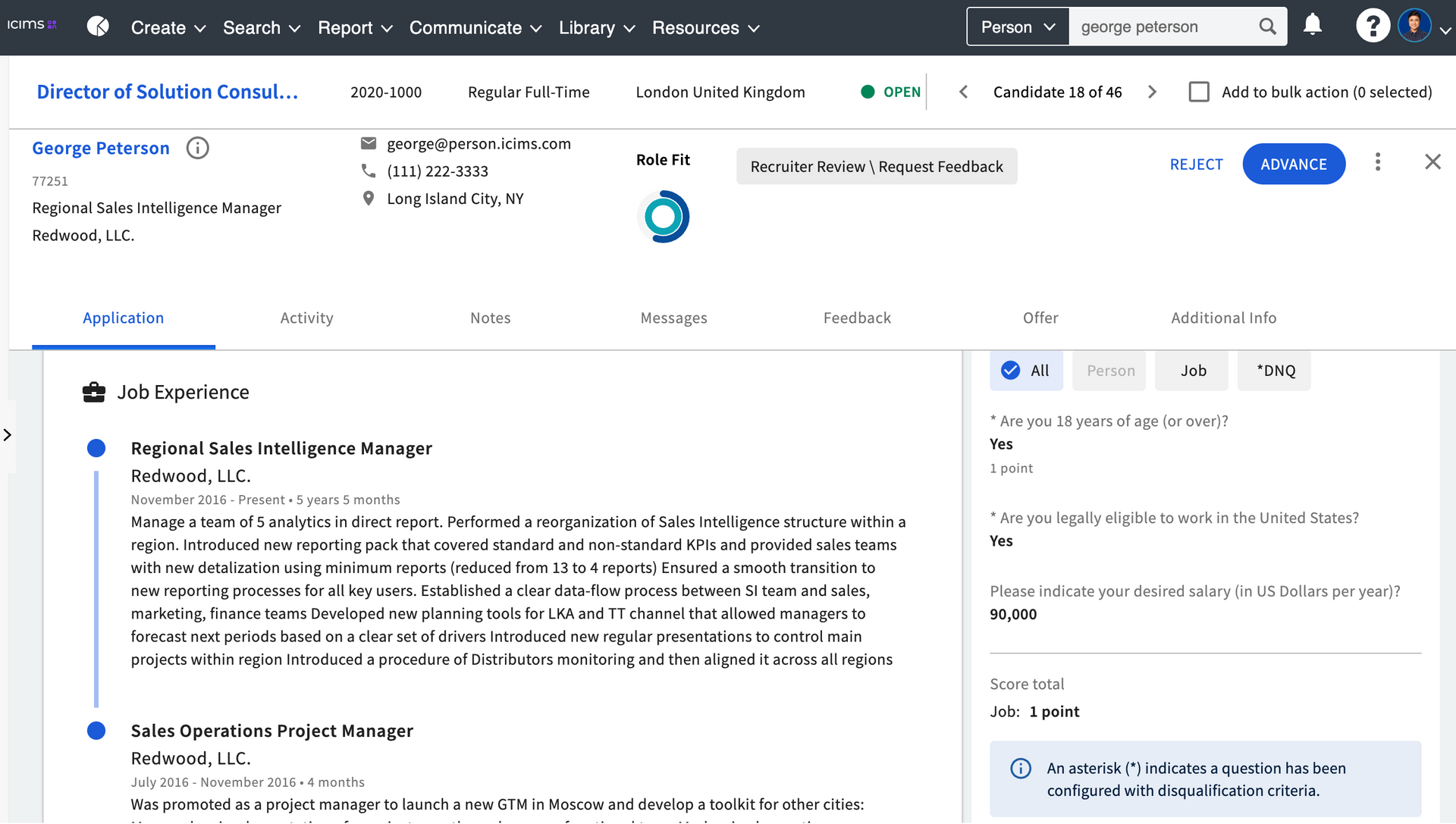
4. Role Fit ranks you, and a human decides
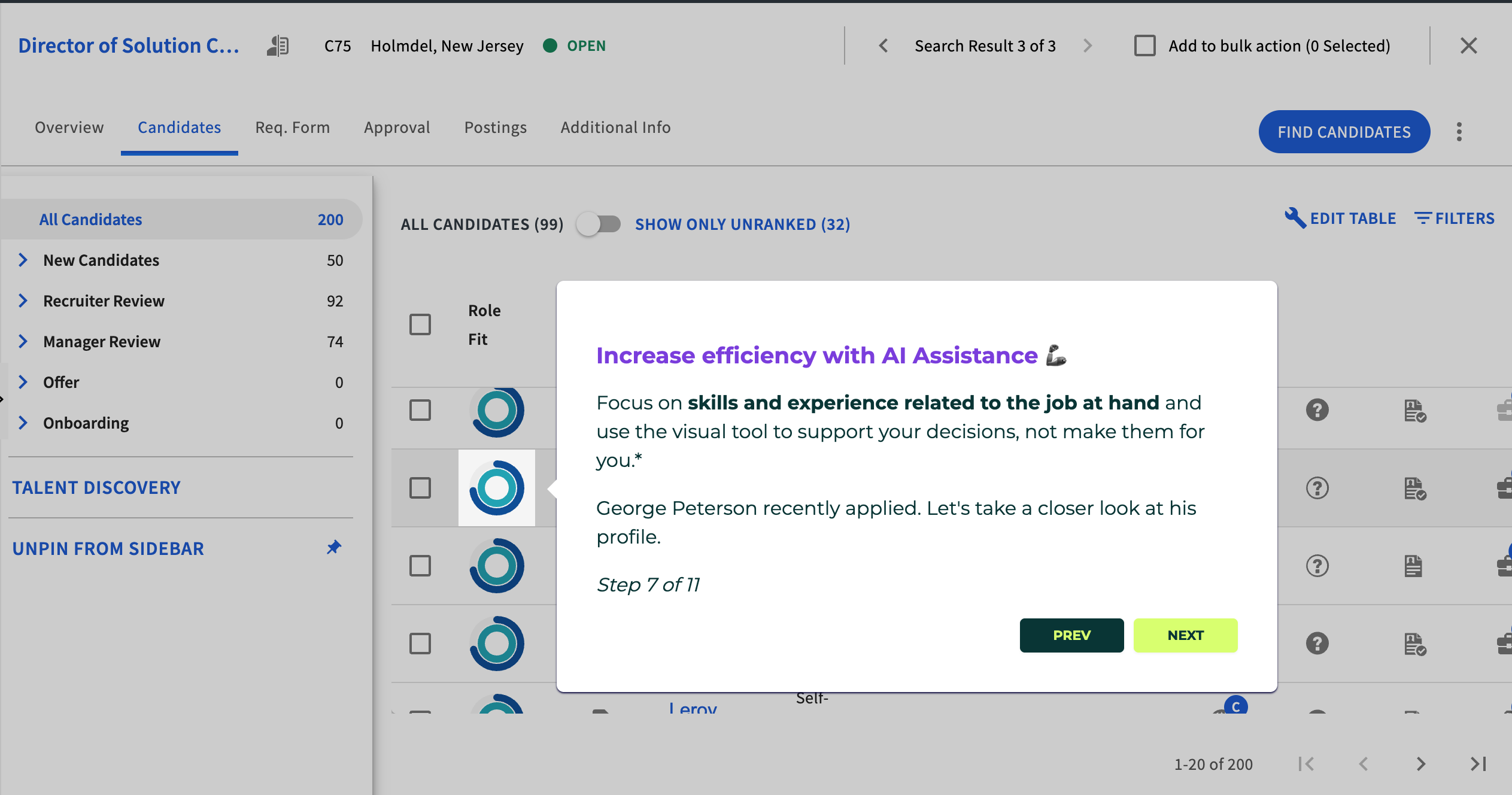
iCIMS scores how well you match a role with an AI ranking it calls Role Fit, then groups candidates into tiers so recruiters can see the strongest matches first. A recruiter reviews your profile and your document, then advances or rejects you.
What's specific to iCIMS: Role Fit and responsible AI
iCIMS frames its AI, part of the Coalesce AI suite, as an assistant rather than a judge. The Role Fit score you'll see next to a candidate surfaces and ranks; it doesn't decide. In iCIMS's own materials, recruiters stay in control of how much the AI does, reviewing its recommendations and guiding the outcome at every step, and a person still makes the call.

How Role Fit ranks you
Your skills and experience + the role's requirements = a Role Fit ranking, grouped into tiers (a recruiter still decides)
The ranking orders the review queue. It does not advance or reject you. A recruiter reads your profile and your actual document before anything happens.
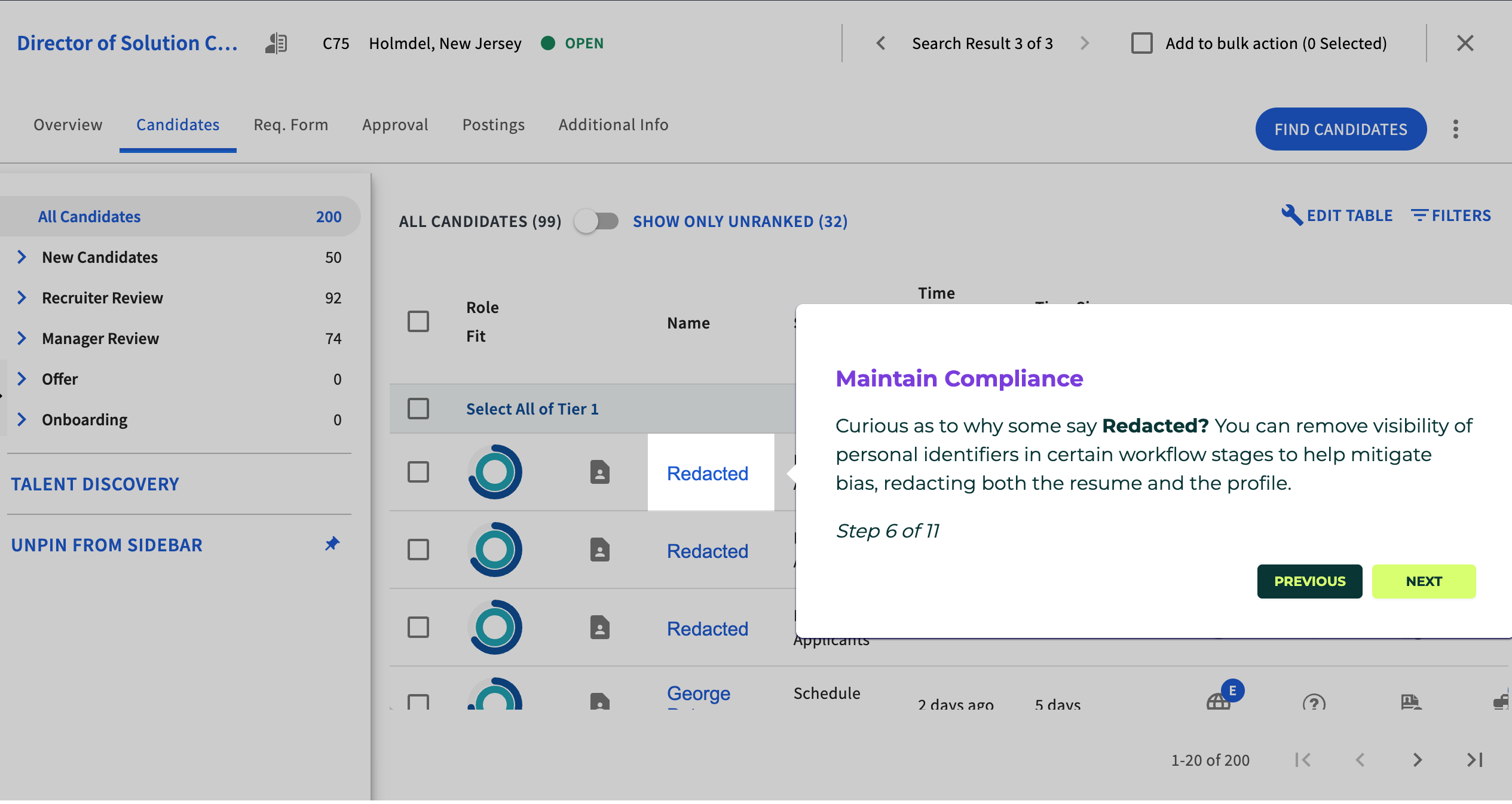
iCIMS also lets an employer redact personal identifiers from your resume and profile at certain stages, which it offers to help reduce bias in the review. The score is built from your skills and experience against the role, not from who you are.
iCIMS's AI practices are certified against TrustArc's Responsible AI Assessment, holding the TRUSTe Responsible AI Certification, and the platform supports global standards including GDPR and CCPA. The certification covers fairness, transparency, and managed bias risk, with human-led decision-making built in.
Does iCIMS auto-reject your resume?
iCIMS rarely rejects on its own, and almost never for how your resume looks. The early filter is your screening answers, where a disqualification criterion can exit you. The Role Fit ranking surfaces and orders candidates, but iCIMS frames it as decision support, so a recruiter advances or rejects you.
What actually screens qualified people out is the match to the role's stated requirements.

What the numbers say about ATS rejection
- 88% — executives who admit qualified candidates get screened out for missing exact job requirements (Harvard Business School and Accenture, 2,275 executives).
- 92% — recruiters (23 of 25 we interviewed) whose systems leave formatting alone.
- 98% vs. 95% — parse accuracy of two-column versus single-column resumes across the ATS parsers we tested.
The way to advance in iCIMS is to meet the requirements on paper and answer the screening questions honestly. That comes down to a targeted resume that mirrors the role, not a design trick.
How to make your resume work in iCIMS
iCIMS rewards a clean, well-matched resume. If you're starting from scratch, our full guide on how to write a resume covers the build end to end.
Here's a short checklist for iCIMS:
- Use real, selectable text. iCIMS parses your experience and education into a profile, so keep everything as text the parser can read rather than an image.
- Use standard section headings. Plain labels like "Experience" and "Education" help the parser sort your content into the right fields.
- Match the role's requirements. Mirror the skills, titles, and keywords from the posting where they fit you, since recruiters search and the AI ranks on exactly those. Pull the language straight from finding keywords in the job description.
- Weight your hardest skills. Name the hard skills on your resume the posting calls for, since those are what the ranking and the recruiter search both look for.
- Answer the screening questions accurately. They drive the early filtering, so treat them as part of your application, not a formality.
- Keep the file lean. A text-based DOCX or PDF without heavy graphics uploads cleanly and parses better.

Pro tip
iCIMS keeps your original document and a parsed profile, and recruiters search the profile. So after you upload, check that your profile fields match your resume. If the parser drops a title or a date, a keyword search may never surface you, even with a perfect document attached.
For the full build, read our guide on how to create an ATS-friendly resume. For the columns question specifically, see whether two-column resumes are ATS-friendly.
Is your resume good enough?
Drop your resume here or choose a file. PDF & DOCX only. Max 2MB file size.
Myths about iCIMS
Three claims come up in every thread about iCIMS, and none of them survive contact with its own documentation.
"iCIMS auto-rejects me with AI." The Role Fit ranking surfaces and orders candidates, and iCIMS frames it as decision support. The early filter is your screening answers, and a recruiter makes the call. Neither one is an automatic formatting rejection.
"A two-column resume breaks in iCIMS." iCIMS parses your resume into a profile and keeps your document for the recruiter to read, so column count is rarely the issue. Across the ATS parsers we tested, two-column resumes scored 98% versus 95% for single-column on parse accuracy. Keep the text real and selectable.
"I need a special resume just for iCIMS." One clean, well-matched resume works across iCIMS and every other system.
What iCIMS manages behind the scenes
Reading resumes is one piece of a bigger tool. iCIMS's own materials show the full set of jobs it runs for a hiring team:
- Applicant tracking that parses, stores, and searches every candidate profile.
- Candidate relationship management that sources and nurtures talent pipelines.
- Employer branding and career sites that publish the jobs you apply to.
- Text and email engagement that keeps candidates informed through the process.
- Onboarding that moves a hired candidate into the company.
Your resume review is a small slice of a system built to run the whole hiring process. The gatekeeper image misses most of what iCIMS is for.
Where iCIMS fits with every other ATS
iCIMS is a hybrid of the two ATS generations. It parses your resume into fields like Greenhouse and Taleo, and it adds an AI fit ranking like the newer AI-native systems such as Ashby. In every model, the software reads, surfaces, and ranks, and a person decides.
So you don't need a different resume per system. Build one clean, well-matched file, tailor the content to each role, and it travels across all of them. If you want to check the result before you apply, run yours through a free ATS resume scanner first.
Frequently asked questions
Quick answers to what job seekers ask most about applying through iCIMS.
Can iCIMS read a PDF?
iCIMS reads a text-based PDF without trouble, as long as the text is selectable rather than saved as an image. It also accepts DOCX, RTF, and TXT files, and a clean DOCX parses very reliably. Whether you send a resume in PDF or Word, a text-based file is the safe choice.
Does iCIMS automatically reject resumes?
iCIMS rarely rejects on its own, and almost never for formatting. Early rejections come from screening questions with disqualification criteria, and a recruiter makes the decision after that.
Does iCIMS give my resume a score?
iCIMS ranks how well you match a role with a score it calls Role Fit, part of its Coalesce AI suite, and it groups candidates into tiers. iCIMS frames that ranking as a tool to support a recruiter's decision rather than to make it.
Can iCIMS read a two-column resume?
A well-built two-column resume reaches iCIMS fine, because it parses your text into a profile and also keeps your document for a recruiter to read. Keep the text real and selectable, and column count is rarely what breaks the read.
What file formats does iCIMS accept?
iCIMS accepts DOCX, PDF, RTF, and TXT files. Size limits vary by employer, often a few megabytes, so a lean, text-based file is the safe choice and parses most cleanly.
Why did I get rejected from an iCIMS job so fast?
A fast rejection usually means you missed a screening requirement, like work authorization or a required certification, rather than a problem with your layout. It's worth learning how to respond to a rejection email and keeping the door open.
Does iCIMS use AI?
iCIMS uses AI, branded Coalesce AI, for candidate ranking and matching. Its Role Fit score rates your skills and experience against the role. iCIMS frames it as decision support and can redact personal identifiers to reduce bias, so a person still decides.
Is iCIMS's AI certified or audited?
Yes. iCIMS's AI practices are certified against TrustArc's Responsible AI Assessment and hold the TRUSTe Responsible AI Certification, which covers fairness, transparency, and managed bias risk, alongside GDPR and CCPA support.
Does iCIMS hide my personal information?
iCIMS lets an employer redact personal identifiers from your resume and profile at certain stages, a step it offers to help reduce bias in the review.
How do I know a company uses iCIMS?
The application URL often shows it, since iCIMS career portals usually run on an icims.com address. The fix is the same regardless: a clean, well-matched resume and accurate screening answers.
The bottom line on iCIMS
iCIMS looks like a lot of machinery, but the moving parts are friendlier than they seem. It reads your resume into a profile, keeps your real document for a recruiter, and treats its AI ranking as a hint, not a verdict. So match the role, answer the screening questions straight, and keep your file clean. A person is still the one deciding.
iCIMS is a parse, search, and rank tool, not a gatekeeper. Match the role's requirements, answer the questions honestly, keep your file clean, and you put yourself in front of the people who actually decide.
Author's Take
Make one that's truly you.