

Taleo is one of the oldest and most widely deployed applicant tracking systems, owned by Oracle and used across large corporations and the public sector. It parses your resume into fields, ranks you through a process Oracle calls ACE prescreening (its name for flagging the strongest candidates for a role), and hands the decision to a recruiter.
Taleo has a reputation for rejecting resumes, and that reputation makes many applicants nervous. Oracle's own documentation tells a calmer story. Taleo's filtering and ranking run on your answers to the job's required and asset criteria, not on how your resume looks.
This guide explains how Taleo handles your application, step by step, and what to do at each stage.

Key takeaways
- Taleo parses your resume into structured fields, then stores you in a database recruiters search.
- Early rejection comes from disqualification questions on a role's minimum requirements, which can end an application instantly, rather than from your formatting.
- Taleo flags its strongest applicants as ACE candidates based on required and asset criteria, with optional weighting to rank the assets, not on your design.
- Oracle's default file limit is 1 MB per attachment with a 5 MB ceiling, so a lean, text-based resume clears it comfortably.
- Oracle is steering employers from Taleo to Oracle Recruiting, so expect to meet both systems during a job search.
- One clean, well-matched resume works across Taleo and every other ATS. Confirm your file parses cleanly with the Resume Checker before you apply.
What is Taleo?
Taleo is enterprise recruiting software from Oracle. Large employers, government agencies, and high-volume hiring teams use it to post jobs, collect applications through branded career sections, screen candidates against defined criteria, and track everyone through the pipeline.
It comes in two flavors: Taleo Enterprise Edition, the heavyweight system big companies run, and Taleo Business Edition for smaller teams. The long application flows with account creation belong to Enterprise, which is the one this guide covers.
You'll recognize it when an application sends you to a taleo.net web address or asks you to create an account before you can apply. When you submit, your application lands in that employer's Taleo database for its recruiters to work through.
For the wider picture of how any applicant tracking system fits together, start with our guide to what an ATS is and how it works. The following article focuses on Taleo specifically.
How does Taleo handle your application?
Four stages, in order, each doing a separate job.
1. You apply through a Taleo career section
You create a candidate account, upload your resume, and answer the job's questions. Taleo is also known for asking you to re-enter your work history into profile fields even after you upload, so plan for that step rather than abandoning the application halfway.
2. Taleo parses your resume into fields
Taleo turns your file into structured data. During the apply flow, its resume parsing extracts key data elements and uses them to populate the application fields automatically, things like your contact details, work experience, and education.
Oracle's career section documentation notes the parsing runs on a third-party partner service delivered as-is, which is exactly why Taleo asks you to confirm the fields afterward.

What Taleo pulls from your resume
Contact:      name, email, phone
Work history: job title, company, location, start/end dates (per role)
Education:    degree, institution, graduation date
Skills:       individual skill terms it recognizes
Source: Oracle Taleo resume parsing documentation. This is the data your resume becomes.
Read that list closely, because it tells you what to optimize for. The parser wants your titles, companies, dates, and education under headings it recognizes. Standard section labels give it clean fields. A heading buried in a graphic gives it nothing to store.
3. Recruiters search the candidate pool
Once you're stored, recruiters search the database by keyword, title, and skill, and they filter on the answers you gave. Strong, relevant content surfaces you. Vague content buries you, even when you're qualified.
4. ACE prescreening ranks you, and a human decides
Taleo scores your application against the job's criteria through ACE prescreening, sorts candidates by how many requirements and assets they meet, and presents that order to a recruiter. A person reviews the shortlist and makes the call.
What's specific to Taleo: ACE prescreening
ACE prescreening is how Taleo decides which candidates rise to the top of a recruiter's list. ACE is Taleo's label for its strongest applicants, the ones it flags as the best match for a role, and ACE prescreening is the scoring step that finds them.
Oracle's documentation explains that the prescreening section of a job can hold three things: disqualification questions, competencies, and questions. Together these are called ACE prescreening, and they let the system flag the top candidates for a role.
Every criterion is set as either required or asset. A required criterion is a true minimum: miss it, and the system records you as not meeting the job's requirements. An asset is Oracle's term for the nice-to-have qualifications that separate a minimally qualified candidate from an ideal one.
Recruiters can also add weight, a point value on specific assets, so the system ranks candidates who hold the most important extras higher. Those points roll up into the "Result" percentage recruiters see next to your name.
How Taleo flags an ACE candidate
All required criteria met + assets met (weighted points → Result %) = ACE candidate
Miss a required criterion and no asset can compensate. Meet them all, and every asset you can honestly claim pushes your result higher.
Competencies capture the proficiency level and years of experience a role needs. A recruiter sets a minimum proficiency (None, Beginner, Intermediate, Advanced, or Expert) and minimum experience (from less than a year to five years or more) for each one.
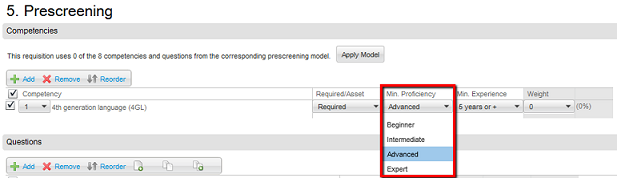
Taleo then flags ACE candidates, the people who meet every required criterion plus assets, and shows recruiters a Requirements column, an Assets Met count, and a Result percentage to sort everyone else.
Recruiters can filter the list to ACE candidates only, to everyone who meets the required criteria, or to a percentage range, and an ACE alert emails the hiring team when a top candidate applies.
Oracle's documentation bases all of this filtering on your responses to the prescreening questions and competencies, not on your resume's content or layout. Many applicants picture Taleo assigning their resume a secret design score, but the real score comes from how you answer the role's criteria.
How does Taleo filter applications early?
If Taleo rejects an application quickly, the cause is almost always a disqualification question. Oracle defines these as single-answer questions covering a job's minimum requirements, and a candidate who misses the required answer can be exited from the application process on the spot.
These cover the non-negotiables, things like work authorization, location, or a required license.
This matches what we found outside Taleo too. In our interviews with 25 U.S. recruiters, 23 (92%) said their systems leave formatting alone. The instant rejection that feels like a robot judging your template is usually a disqualification answer instead.
So read the screening questions carefully, answer them honestly, and meet the hard requirements before you worry about anything else.
Does Taleo score your resume?
Taleo does produce a ranking, so it's fair to say it scores you. What matters is what that score measures. The ACE result is built from your answers to the required and asset criteria and your stated competencies, not from how your resume is designed or parsed. Improve your match to the role's criteria and your result climbs.
What actually screens qualified people out is the gap between their profile and the role's stated requirements. In Harvard Business School and Accenture's study of 2,275 executives, 88% admitted that qualified candidates get screened out for missing the job's exact requirements.
Taleo's ACE model puts that logic on screen, so the way to advance is to meet the criteria on paper.

What the numbers say about ATS rejection
- 92% — Recruiters (23 of 25 we interviewed) whose systems leave formatting alone.
- 88% — Executives who admit qualified candidates get screened out for missing exact job requirements.
- 98% vs. 95% — Parse accuracy of two-column versus single-column resumes across the ATS parsers we tested.
What are Taleo's file limits?
Taleo's attachment settings live in one place for the whole suite, and Oracle's current documentation sets the default at 1 MB per file, 10 files per candidate, with a hard ceiling of 5 MB per file. Employers can only change those limits through an Oracle service request, so most run the defaults.
The format filter defaults to accepting any file type, and when an employer restricts it, the allowed list covers Word (.doc and .docx), PDF, rich text, plain text, HTML, OpenOffice, and even WordPerfect. Taleo also scans uploads and blocks macros by default, one more reason a plain, text-based file is the safe choice.
A standard text-based resume PDF lands far under 1 MB, so the size limit only bites image-heavy files. Keep your resume lean and text-based, and it uploads cleanly, parses better, and clears every employer's configuration.
Is Taleo going away?
Slowly, and it matters for your job search. Oracle still ships Taleo Enterprise releases, yet its own Taleo page now leads with an invitation to move to Oracle Recruiting, the hiring module inside Oracle Cloud HCM. Large employers have been migrating for years.
For you, the practical effect is URL recognition, and the same clean, well-matched resume works in both systems.
A taleo.net address means classic Taleo, and everything in this guide applies directly. An oraclecloud.com careers address means the employer moved to Oracle Recruiting, a different system with the same fundamentals: structured fields, screening questions, and a recruiter making the call.
How do you make your resume work in Taleo?
Taleo rewards a clean, well-matched resume and an honest profile.
A short checklist:
- Use real, selectable text: Taleo stores your experience and education as fields, so keep everything as text the parser can read rather than an image.
- Use standard section headings. Plain labels like "Experience" and "Education" help the parser find where each section starts.
- Match the role's criteria: Mirror the required and asset qualifications from the posting where they fit you, since the ACE result is built on exactly those.
- Answer the screening questions accurately: Disqualification questions drive the early filtering, so treat them as part of your application, not a formality.
- Keep the file lean: The default limit is 1 MB per attachment, and a text-based resume without heavy graphics uploads cleanly and parses better.
- Fill in the profile fields too: Taleo's parser is a third-party service that auto-fills your application as a starting point, so complete those fields rather than relying on the upload alone.

Pro tip
Recruiters search Taleo's database fields, not your attachment. After the parser auto-fills your profile, fix every title, date, and skill it got wrong before you submit. Ten extra minutes here decides whether keyword searches ever surface you.
For the full build, read our guide on how to create an ATS-friendly resume. For the columns question specifically, see whether two-column resumes are ATS-friendly.
Is your resume good enough?
Drop your resume here or choose a file. PDF & DOCX only. Max 2MB file size.
Myths about Taleo
Three claims come up in every thread about Taleo, and none of them survive contact with Oracle's own docs.
"Taleo scores my resume and auto-rejects me." The ACE result is built from your answers to the role's required and asset criteria, and the early filter is your disqualification answers. Neither one is an automatic formatting rejection.
"A two-column resume breaks in Taleo." Taleo parses your resume into fields. Across the ATS parsers we tested, two-column resumes scored 98% versus 95% for single-column on parse accuracy, so a well-built layout reads fine. Keep the text real and selectable, and when in doubt, run it through a parse check first.
"I need a special resume just for Taleo." One clean, well-matched resume works across Taleo and every other system.

What Taleo manages behind the scenes
Reading resumes is one piece of a bigger tool. Oracle's documentation shows the full set of objects Taleo manages for a hiring team:
- Requisitions that define a role, its criteria, and its prescreening questions.
- Career sections that publish branded job sites where candidates apply.
- Question and competency libraries that hiring teams reuse across roles.
- Candidate files that hold every applicant's profile, answers, and attachments.
- Onboarding flows that move a hired candidate into the company.
Your resume search is a small slice of a system built to run the whole hiring process. The gatekeeper image misses most of what Taleo is for.
Where does Taleo fit among other ATS?
Taleo is one of several systems you'll meet, alongside Greenhouse, Workday, iCIMS, and Lever. They differ in interface and in how each employer configures the filters. Under the hood, they do the same core job: parse your resume into data, let recruiters search and rank, and hand the decision to a person.
So you don't need a different resume per system. Build one clean, well-matched file, tailor the content to each role, and it travels across all of them.
Frequently asked questions
The questions that come up every time someone spots a taleo.net application link.
Can Taleo read a PDF?
Taleo reads a text-based PDF without trouble, as long as the text is selectable rather than saved as an image. Keep the file under the 1 MB default attachment limit, which any lean, text-based resume clears easily.
Does Taleo automatically reject resumes?
Taleo rarely rejects on its own and almost never for formatting. Early rejections come from disqualification questions on the role's minimum requirements, where a wrong answer can exit you from the process right away.
Does Taleo give my resume a score?
Taleo ranks you through ACE prescreening, so there is a score, but it is built from your answers to the required and asset criteria rather than your resume's design. Match the criteria and your result rises.
What is the file size limit in Taleo?
Oracle's documentation sets the default at 1 MB per attachment and 10 attachments per candidate, with a 5 MB per-file ceiling that only an Oracle service request can change. A text-based resume sits far below all of those numbers.
Why did I get rejected from a Taleo job so fast?
A fast rejection usually means you missed a disqualification requirement, like work authorization or a required certification, rather than a problem with your layout.
Can Taleo read a two-column resume?
A well-built two-column resume parses fine. Taleo stores your resume into fields, and in our testing, two-column layouts came through as cleanly as single-column. Keep the text real and selectable, and the column count is rarely what breaks the read.
Why does Taleo make me re-enter my resume?
Taleo's parser auto-fills the application fields from your upload, then asks you to confirm or complete them. The parsing runs on a third-party service, so filling those fields in fully gives recruiters clean data to search.
Does Taleo use AI?
Taleo's core prescreening runs on rules you can see: required and asset criteria, competencies, and disqualification questions. The ranking is a structured calculation against those criteria rather than a black box, and Oracle's newer AI investment lives in Oracle Recruiting, its successor system.
How do I know a company uses Taleo?
The application URL often shows it, since Taleo career sections usually run on a taleo.net address. An oraclecloud.com careers address means the employer moved to Oracle Recruiting instead. The fix is the same regardless: a clean, well-matched resume and accurate screening answers.
Is Taleo being replaced?
Oracle still supports Taleo and ships updates, and it openly encourages employers to migrate to Oracle Recruiting inside Oracle Cloud HCM. Expect to meet both during a job search, and the same clean, well-matched resume works in each.
How long does my profile stay in Taleo?
Your candidate account and profile often stay in the employer's Taleo database for a long time, so a complete profile can resurface when a new role opens.
The bottom line on Taleo
Taleo looks intimidating because it's old and asks for a lot of detail. The mechanics are friendlier than the reputation. You're ranked by how well you answer the role's criteria, not by your fonts. So meet the requirements, answer the screening questions straight, and keep your file lean. There's no robot to outsmart.
Taleo is a parse-and-prescreen tool, not a gatekeeper. Match the role's criteria, answer the questions honestly, keep your file clean, and you put yourself in front of the people who actually decide.
Author's Take
Make one that's truly you.