Choosing a resume builder comes down to one question: does the tool actually help you create something that lands interviews?
BeamJobs positions itself as a fast, AI-powered resume builder with 2,000+ resume examples and a simple, guided experience. It promises an easy way to build a professional resume without overthinking formatting or wording.
The real test is what the experience feels like once you start using it. We tested BeamJobs from start to finish, from the first click to the moment you try to download your resume.

Key takeaways
- BeamJobs is easy to start using, with no sign-up required upfront.
- The builder relies heavily on pre-filled content, which speeds things up but can feel generic.
- Customization is limited, with only nine templates and minimal control over layout, fonts, and colors.
- The "2,000+ resume examples" are mostly variations of the same templates with different content.
- There's no free download, and BeamJobs only reveals pricing at the final step.
- The $0.99 offer is a trial that renews at $34.99 every four weeks, and the full cost is easy to miss.
Already have a resume? Before you rebuild it from scratch in any tool, see how it scores.
Is your resume good enough?
Drop your resume here or choose a file. PDF & DOCX only. Max 2MB file size.
Building a resume
BeamJobs makes a strong first impression: you can start building right away, without creating an account.
That low-friction start is one of its best UX decisions. But once you move past the template picker, the experience starts to feel more pre-assembled than personalized.
It's fast because most of the work is already done
After you choose a template, BeamJobs walks you through five steps:
- Contact
- Work experience
- Education
- Skills
- Professional summary
Most of these sections are already filled in for you. That speeds things up, but it also means you're not really starting from scratch. You're editing a sample resume and deleting someone else's details as you go.
The first friction shows up early
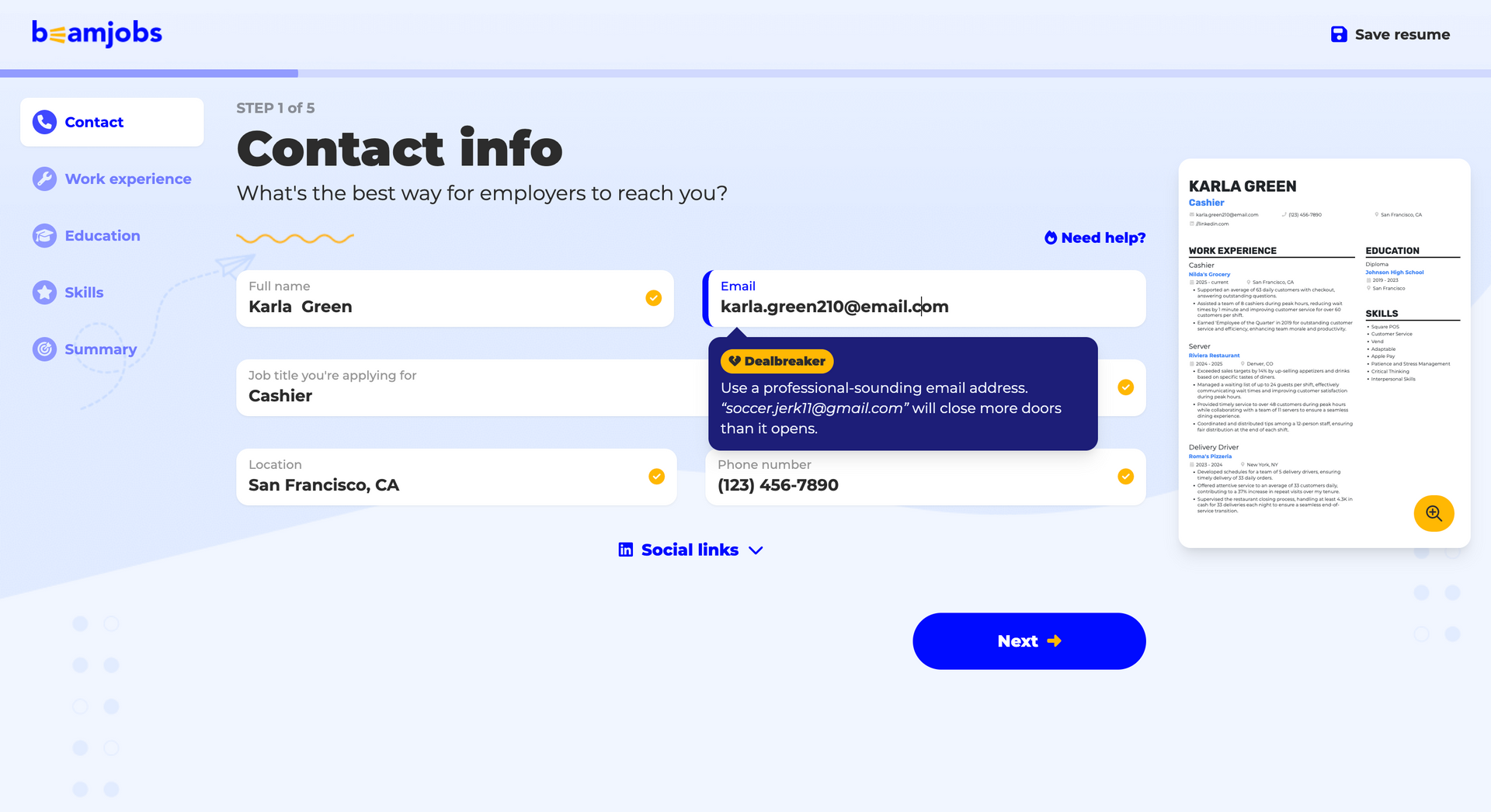
The contact step looks simple, but it's more awkward than it should be.
You have to delete each pre-filled detail manually, one field at a time. The tooltip for the email field is labeled "Dealbreaker." It's meant to signal importance, but it feels oddly dramatic.
Small UX choices like this don't ruin the experience, but they do make the builder feel less polished than the homepage suggests.
The guidance is useful, but the builder does too much for you
The same pre-filled pattern continues in work experience, education, and skills. It keeps things moving, but it also makes the resume feel generic unless you spend time rewriting almost everything.
There are still a few genuinely helpful touches:
- The Skills rundown suggests which skills to add.
- The Professional summary step offers a suggested summary and explains why it works.
That guidance helps beginners, especially anyone who needs extra help with how to list skills on a resume. The summary step is where beginners struggle most, and writing a resume summary is worth reading before you accept what BeamJobs suggests.
The editor tries to coach you, but the feedback feels noisy
Once you reach the main editor, BeamJobs starts rating your bullet points, marking some as strong. Others come with suggestions, examples, and rewrite prompts that push you toward stronger resume action verbs. A few also nudge you to add numbers, which is worth doing, since measurable results are what matter to a recruiter.
In theory, this is one of the builder's most helpful features, and BeamJobs runs the same bullet-by-bullet scoring inside its separate ATS checker. In practice, the feedback feels uneven. Some prompts are useful, while others come with pop-ups and animations that distract more than they inform.
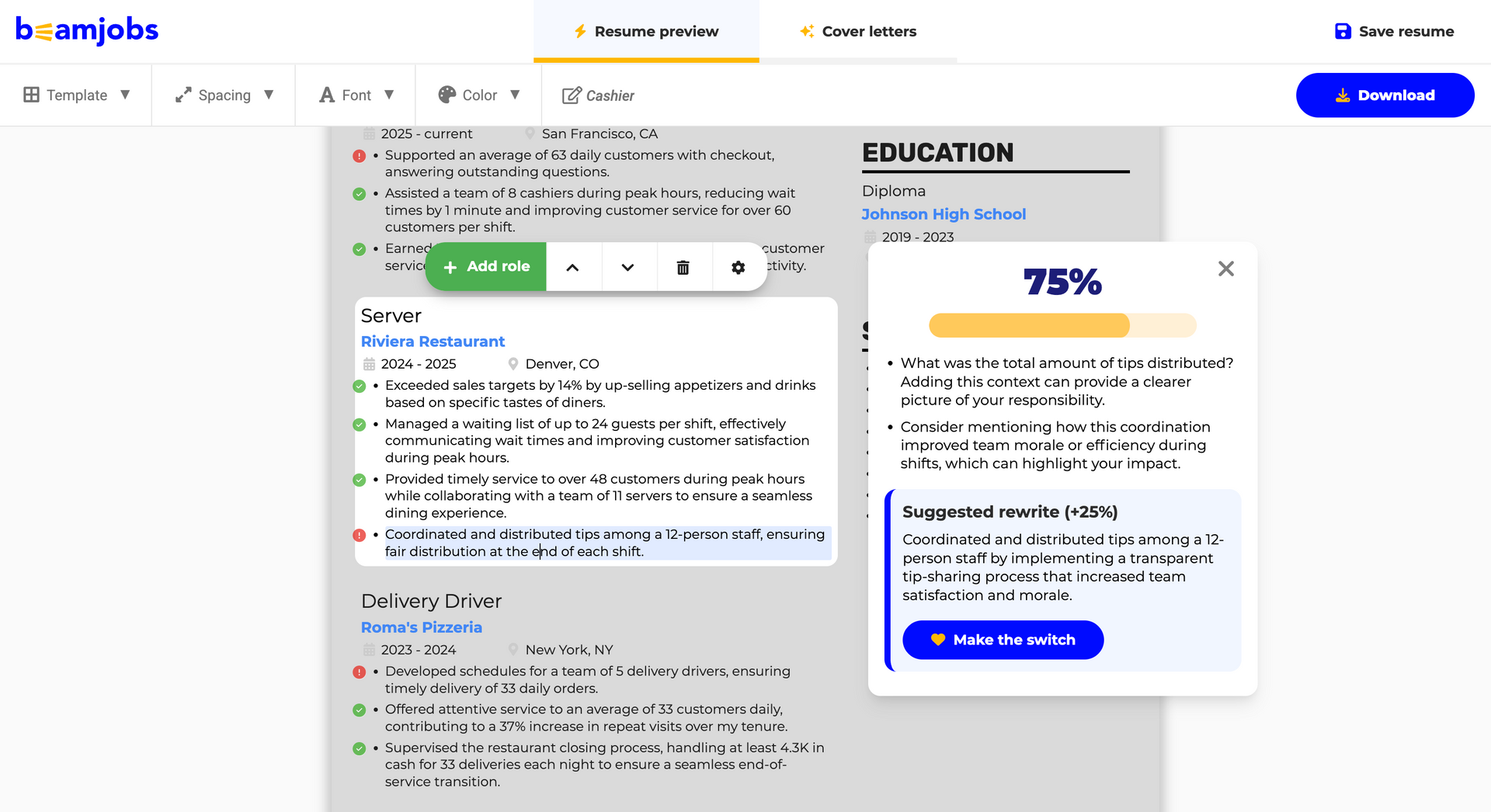
So what's actually missing here? The job description. BeamJobs never asks for one, which means nothing you write gets checked against the posting you're targeting. You can score 100% in their editor and still send a resume that misses what the job asked for, and even the ATS checker runs that same scoring.
Author’s take
If BeamJobs' suggestions still leave you unsure about your summary, run it through Enhancv's ATS checker for feedback on clarity, keywords, and impact.
Check your resume summary or objective
Drop your resume here or choose a file.
PDF & DOCX only. Max 2MB file size.
Now that you've seen how BeamJobs guides the writing, let's look at how much freedom it gives you over the design.
Customization and templates
This is where BeamJobs starts to feel much more limited.
At first glance, the builder gives you template and styling controls through a few simple drop-downs. But once you start clicking around, the customization turns out to be narrow.
The template selection looks bigger than it is
BeamJobs gives you only nine templates to work with. That keeps the choice simple, but it also means there isn't much range in layout or styling. It also puts the "2,000+ resume examples" claim in perspective: those examples run on the same nine templates, so what changes between them is the wording, not the design.
The template gallery doesn't help much either. In the drop-down, the previews look blurry, and the template you're currently using isn't clearly marked. Even a basic action like checking what's selected feels less polished than it should.
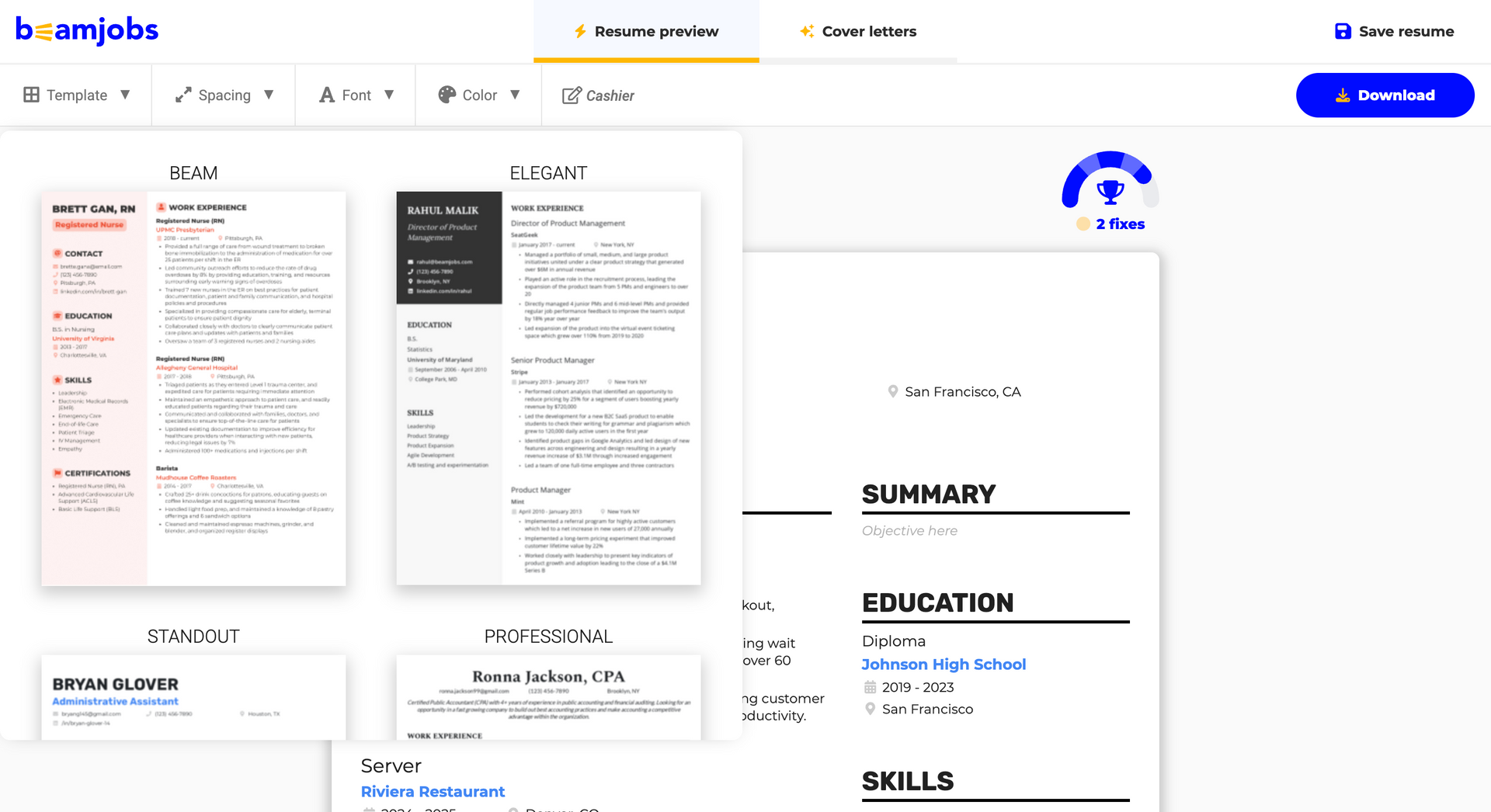
Switching templates feels riskier than it should
If you click on another template, BeamJobs changes it right away. There's no confirmation step, and more importantly, no undo.
That makes experimentation feel unnecessarily risky. A builder should make it easy to compare options, not make you worry about every click.
With such a small template library, the lack of an undo button stands out even more. When there are only a few designs to test, switching between them should feel effortless.
The controls are there, but they’re basic
BeamJobs does let you adjust some styling, but the choices stay limited:
- Fonts: Only 6 options.
- Colors: Only 18 preset accent colors.
- Spacing: Basic controls for page margins and vertical spacing.
There's no custom color picker, no body-text color control, and no way to change the background of the side column. If you had a specific resume color in mind, you may not find it in the presets. So the builder offers some flexibility, but stays inside a tight box.
Layout changes come with restrictions
You can rearrange sections, which is useful in theory. But the resume layout doesn't always behave the way you'd expect.
At first, it seems like some sections can't move between columns. In practice, BeamJobs only blocks a move when it would leave one column empty. That's more understandable, but it still makes the layout feel controlled by the tool rather than by you.
Overall, BeamJobs gives you enough control for small tweaks, but not enough to tailor the resume to the job you're targeting.
With the design limits clear, the next question is what BeamJobs costs, and that answer arrives later than you'd expect.
So how much of this resume is actually yours? The words, mostly. The design, barely. Nine templates, six fonts, 18 preset colors, and no undo when you want to compare two templates. You can rewrite every line, but the look stays roughly where BeamJobs put it.
Author’s take
Pricing and paywall
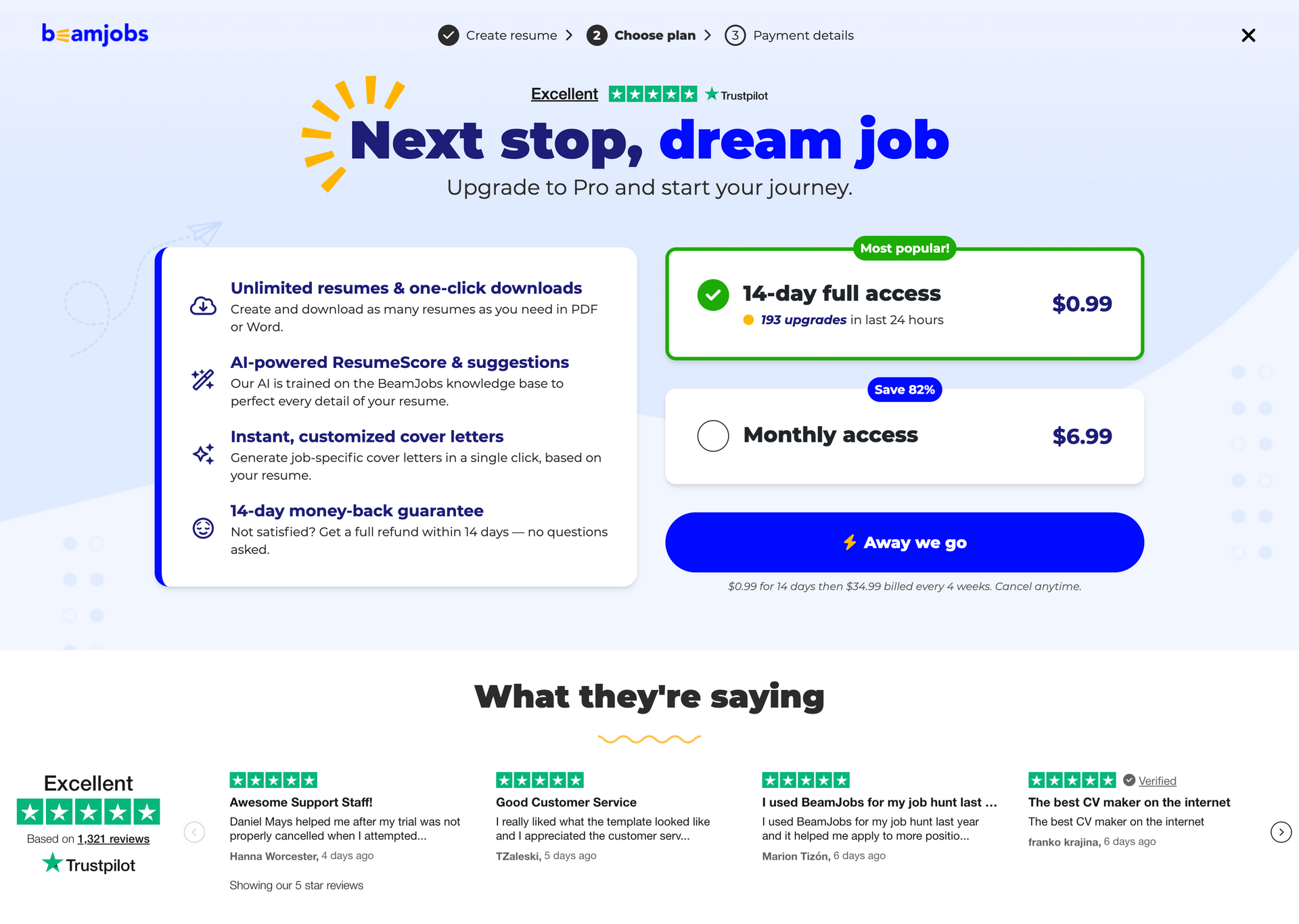
BeamJobs doesn't show pricing upfront. There's no pricing page in the main flow, so the cost only shows up when you try a key action like Download, Save resume, or Add section.
At that point, BeamJobs asks you to create an account and shows a paid offer: $0.99 for 14 days, then $34.99 billed every four weeks. Those were the prices at the time of testing in August 2026, and BeamJobs may have changed them since.
BeamJobs pros and cons
Here's a side-by-side of what BeamJobs does well and where it falls short:
What works and what doesn't at a glance
| Pros | Cons |
|---|---|
| No sign-up to start, so you can test the builder before committing anything. | Only nine templates, with blurry previews and no marker for the one you're using. |
| Pre-filled sections get you to a first draft fast. | Switching templates has no confirmation step and no undo. |
| The Skills rundown suggests which skills to add. | Six fonts, 18 preset accent colors, no custom color picker, no body-text color control. |
| The Professional summary step suggests a summary and explains why it works. | Pre-filled content means you're editing someone else's resume rather than writing your own. |
| Bullet-point feedback flags weak lines with examples and rewrite prompts. | Feedback quality is uneven, and some prompts arrive with pop-ups that distract more than they inform. |
| The $0.99 trial is real and gives you 14 days of full access. | No pricing page in the main flow, so the cost only appears at download. |
| The ATS checker's per-bullet feedback is specific, with a score, named weaknesses, and a suggested rewrite you can accept in one click. | The ATS checker grades your bullets rather than checking whether the resume parses, and never asks for the job you're targeting. |
| The trial renews at $34.99 every four weeks, and that's easy to miss. |
Author’s take
After testing BeamJobs end to end, one thing stands out: the start feels free, and the cost only appears once you're already invested.
You build a full resume, edit every section, and work through bullet-point feedback before anything hints at a price. Then the paywall lands at the final step, right when you go to download. Because there's no pricing page in the main flow, it's easy to reach that screen with no idea what you're about to pay.
The trial is real and the builder does what it promises. What bothers me is the gap between how free the experience feels and what it actually costs. Wide enough to leave a bad taste, especially if you only notice the $34.99 renewal once the trial has ended.
BeamJobs isn't a scam. But the gap between how free it feels and what it actually costs is wide enough to leave a bad taste.
Author’s take
Final verdict
BeamJobs works best for beginners who want a resume done quickly. The pre-filled sections, skill suggestions, and bullet-point feedback give first-time job seekers a structured starting point, and the no-signup start makes it easy to try.
It's a weaker fit if you want control or transparency. The nine templates, limited styling, missing undo, and hidden pricing all get in the way once you care about shaping the resume or knowing what you'll pay.
Enhancv is built for the opposite priorities, and it's the best overall resume builder for 2026. You get control over layout and content, AI feedback tied to the job you're targeting, and Enhancv's pricing upfront. For a wider view, see our roundup of the best resume builders.
Remember, whichever tool you choose, give the content more of your time than the template. That's the part a recruiter reads first.
BeamJobs FAQ
Before you decide, here are the questions that come up most often about BeamJobs.
Is BeamJobs legit?
Yes, BeamJobs is a real resume builder, the $0.99 trial charges what it says, and the tool works as described. The problem is transparency, not legitimacy. There's no pricing page in the main flow, so most people don't see the $34.99 renewal until they reach the download step.
Is BeamJobs worth it?
That depends on how much control you want. For a first resume built quickly, the pre-filled sections and bullet-point feedback are genuinely useful. If you want to shape the layout, write your own content, or tailor the resume to a specific posting, you'll run into the limits of nine templates and basic styling controls.
Is BeamJobs free?
No. You can build a full resume without paying, but downloading it requires a paid plan. The entry point is $0.99 for 14 days, which renews at $34.99 every four weeks.
Does BeamJobs have an ATS resume checker?
BeamJobs has a tool it calls an ATS checker, but what it does is grade your bullet points. You upload a resume, pick a template, then work through the same five sections as the builder.
On work experience it marks each bullet with a check or an x. The summary line only says how many fixes are needed, so you have to click for the actual feedback.
That feedback is specific. One of our bullets scored 75%, with notes to swap a weak opening verb and to quantify the improvement in customer satisfaction. You can accept the suggested rewrite in one click.
It's useful content coaching. It isn't a parsing check, though, and it never asks for the job you're targeting. If parsing is your worry, our research on ATS myths covers what actually affects it.
Does BeamJobs write cover letters?
Yes, BeamJobs has a cover letter generator alongside the resume builder, and it's part of Pro. The paywall lists "instant, customized cover letters" as one of four Pro features, so cover letters sit behind the same $0.99 trial and $34.99 renewal as the resume. What the screen doesn't say is whether there's a cap on how many you can generate.
What are the best BeamJobs alternatives?
If the template range or the late paywall is your sticking point, it's worth looking at tools that show pricing upfront and tailor content to a specific job ad. Our ranked comparison of resume builders covers six of them, tested head to head by 150 senior professionals.
Related reviews
Comparing builders? Read our Canva resume builder review, our hands-on Zety review, and our Resume Genius review.
Make one that's truly you.