Tailor Your CV to the Job Description. Land the Interview.
Enhancv matches your CV to the job advert and tells you which keywords to add for the ATS.
- Done in seconds, not hours
- Built only from your real experience: the AI doesn’t invent any
- Optimised for the ATS, written for the recruiter
One-Click Resume Tailor
Upload resume & paste job ad
Click to upload or drag & drop
PDF or DOCX
We never share your data with 3rd parties or use it for AI model training.
CV tailoring · noun
What is CV tailoring?
CV tailoring is the process of adjusting your CV to the specific requirements of the job you’re applying for. You mirror the advert’s language, reorder your bullet points by relevance and cut anything that doesn’t serve this role. Your CV then reads as if it was written for this job.
You already have the experience, but your CV doesn’t speak the language of the job advert. Enhancv’s CV tailoring analyses the advert, mirrors its wording, reorders your bullet points by relevance and cuts what doesn’t serve this role. The result reads like a CV written for this job, because it was.
Based on published recruiter research. Enhancv CV statistics report
Tailor your CV to the job description
Recruiters are short on time. Enhancv interviewed hiring managers about roles that attract 200 or 2,000 applications. The answer was clear: the CVs that clearly match the job description get read first, and most carefully.
An ATS helps them handle that volume. It scans for keywords, scores how well your CV fits the role and sorts the pile. Whether it rejects automatically or only ranks, you want to sit at the top of the ‘yes’ pile.
Enhancv shows you exactly where your CV falls short of the job advert, before you apply.
Add the job
Paste a job advert into Enhancv’s CV tailoring tool, or import one from Enhancv’s job board. The advert is picked up automatically, saved to your job tracker and used for an ATS check of your CV.
See your ATS score
Enhancv scores your CV against the advert and tells you how to tailor it. The guidance covers file format and template, experience, skills, education, contact header, grammar and punctuation.
Get exact tailoring guidance
Enhancv breaks down how to tailor your CV for the most impact. The ATS check looks for quantified achievements, the skills the advert asks for and grammar errors. The checklist updates in real time as you edit.
Speed up CV tailoring with AI
Three hours. That’s how long tailoring a CV by hand can take for a single job. Apply for ten and do the maths.
Enhancv keeps a master CV with everything you’ve ever added: every job, skill and achievement. When a role catches your eye, paste in the advert and the AI rewrites your CV in seconds.
Because it works from your real experience, it doesn’t invent experience you don’t have. Your credibility stays intact, and you skip the tedious part.
Get an ATS-friendly CV
Every CV you build in Enhancv uses an ATS-friendly CV format, in one column or two. Almost all modern ATS read both, so the column count is your choice.
What trips up an ATS is bad file structure, not the number of columns. Think sections that split mid-page, text the parser can’t break down and formatting that looks fine to you but reads as gibberish to a machine.
- No section is split across columns, so the left-to-right reading order stays coherent for any parser.
- Standard section headings (‘Work experience’, ‘Education’, ‘Skills’) that most ATS recognise.
- No text inside images or graphics. Every word on the page stays readable for the software.
Enhancv is the best overall CV builder
Enhancv is made by a team of engineers and Certified Professional Resume Writers (CPRWs). Every CV template is tested against the most widely used applicant tracking systems to make sure the text parses correctly.
In 2026, Enhancv spent four months and over US$100,000 on anonymised reviews. Users compared it with five well-known CV builders, including resume.io, and preferred Enhancv to all five.
See how the tools fit together in the full list of Enhancv features.
AI Assistant
Enhancv’s AI runs on several of the best models available: OpenAI, Claude, Gemini and DeepSeek, hosted in the EU. A proprietary system picks the right model for each task. You don’t have to manage any of it.
The difference comes from what’s built on top, not from the model underneath. That means three years of AI development, ten years of professional CV writing and prompts built with Certified Professional Resume Writers. You can tailor your CV with ChatGPT, of course, but the result won’t be as strong.
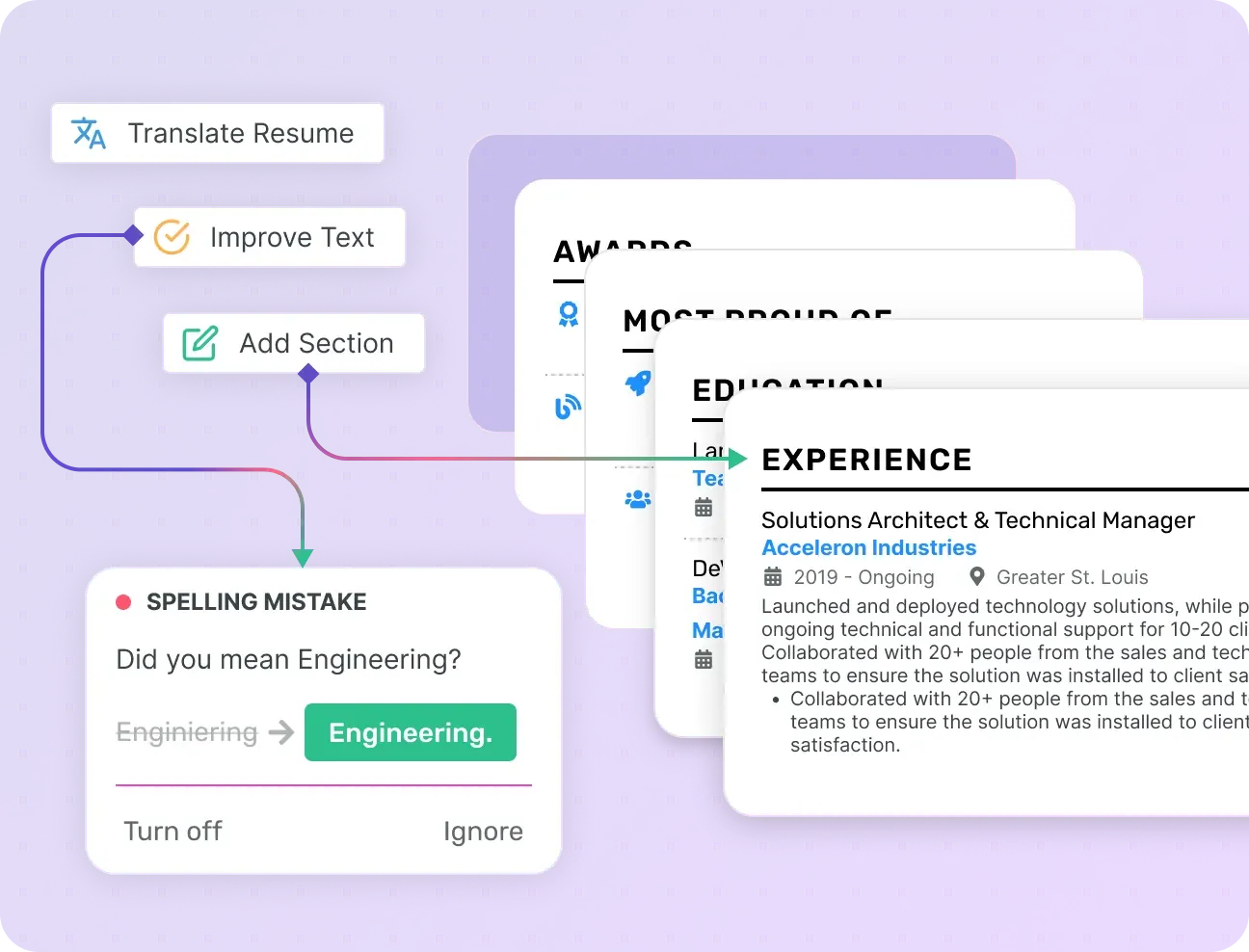
The AI Assistant works through your draft and flags what’s worth improving: weak bullet points, vague phrasing, a personal statement that doesn’t land. It rewrites and suggests alternatives inline as you edit. You decide what stays, and every suggestion is one click to apply and one click to undo.
CV Checker
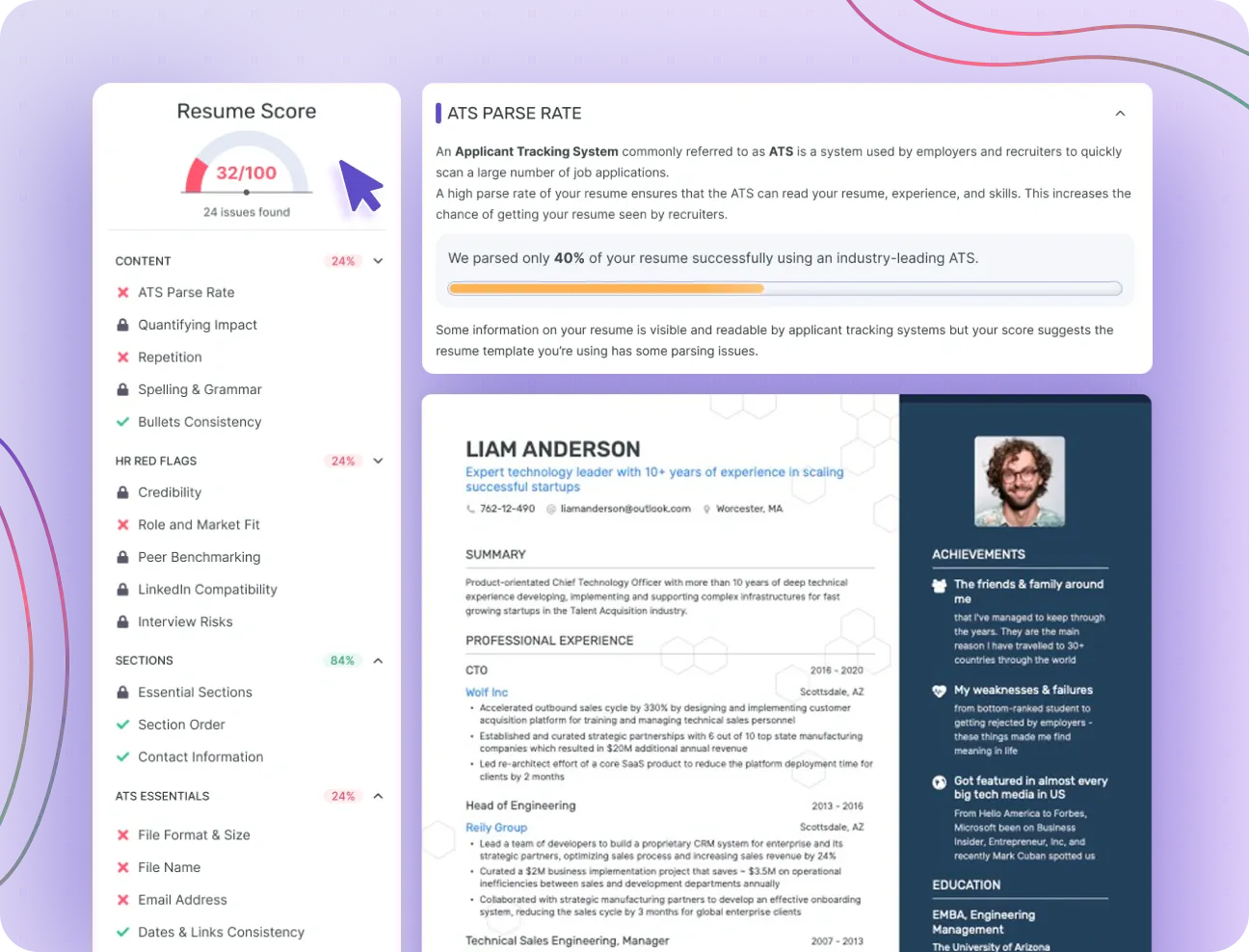
Enhancv’s CV Checker runs 27 checks across 7 categories, from content and structure to grammar. It works on any CV, not only those built in Enhancv.
Beyond ATS compatibility, it analyses your career progression, the evidence behind your skills and your leadership signals. It also flags what could expose you to bias, such as age or employment gaps, before a recruiter reads your CV.
For director-level and executive roles, the depth of the check matters even more. It surfaces the keywords senior hiring managers look for and shows where your CV undersells you.
Job Board
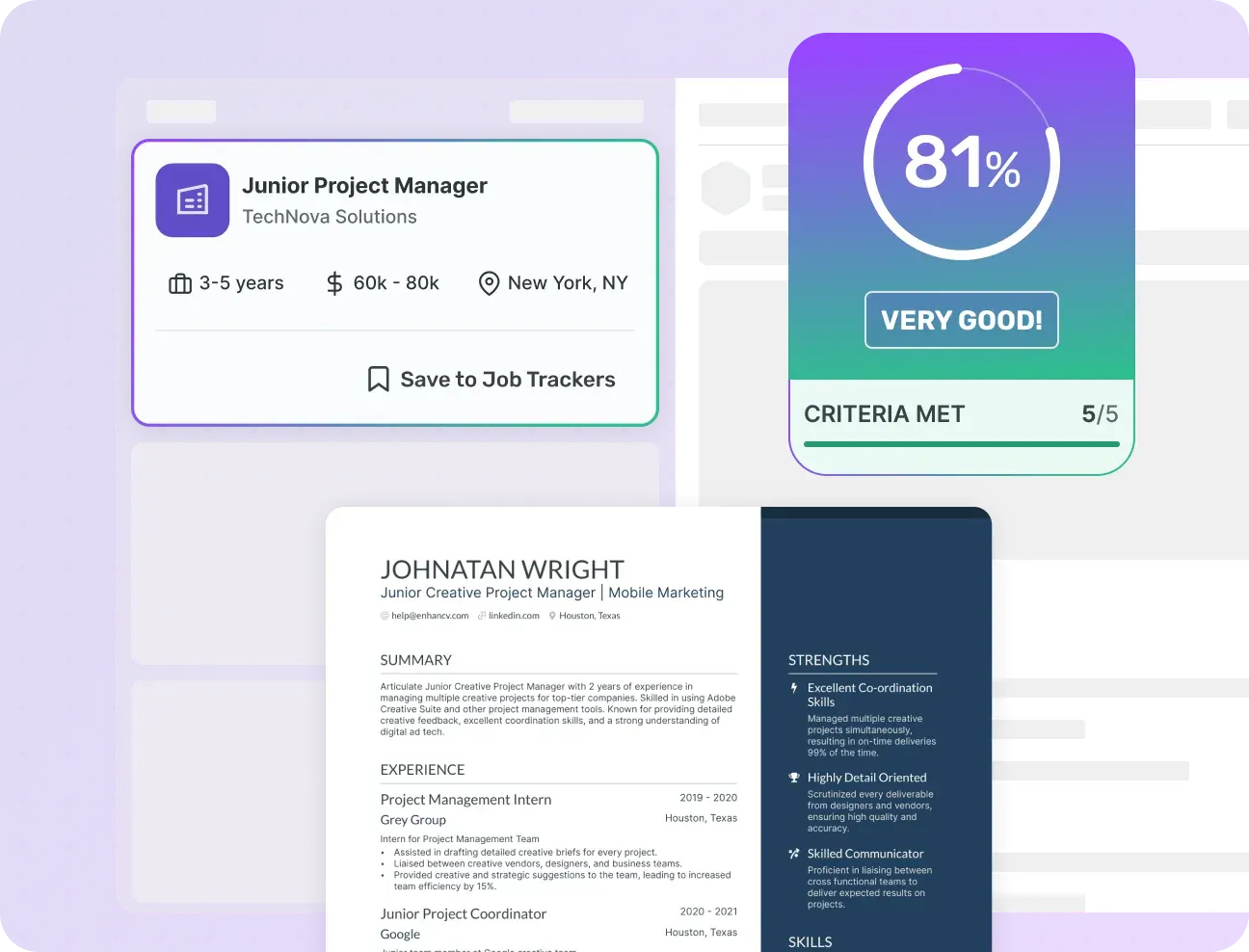
Enhancv Pro gives you a job board with conversational search: describe the role the way you’d talk about it, not just in keywords. It finds new jobs in your country that match your profile and scores each one against your experience.
Applying early improves your chances of a callback, so every listing shows when it was published and the newest appear first.
Most tools match you to a job using one file. Enhancv builds a full picture of your experience across every CV version you create, and that’s what gets scored against each role. Find a job worth applying for, save it and go straight into tailoring.
Job Tracker
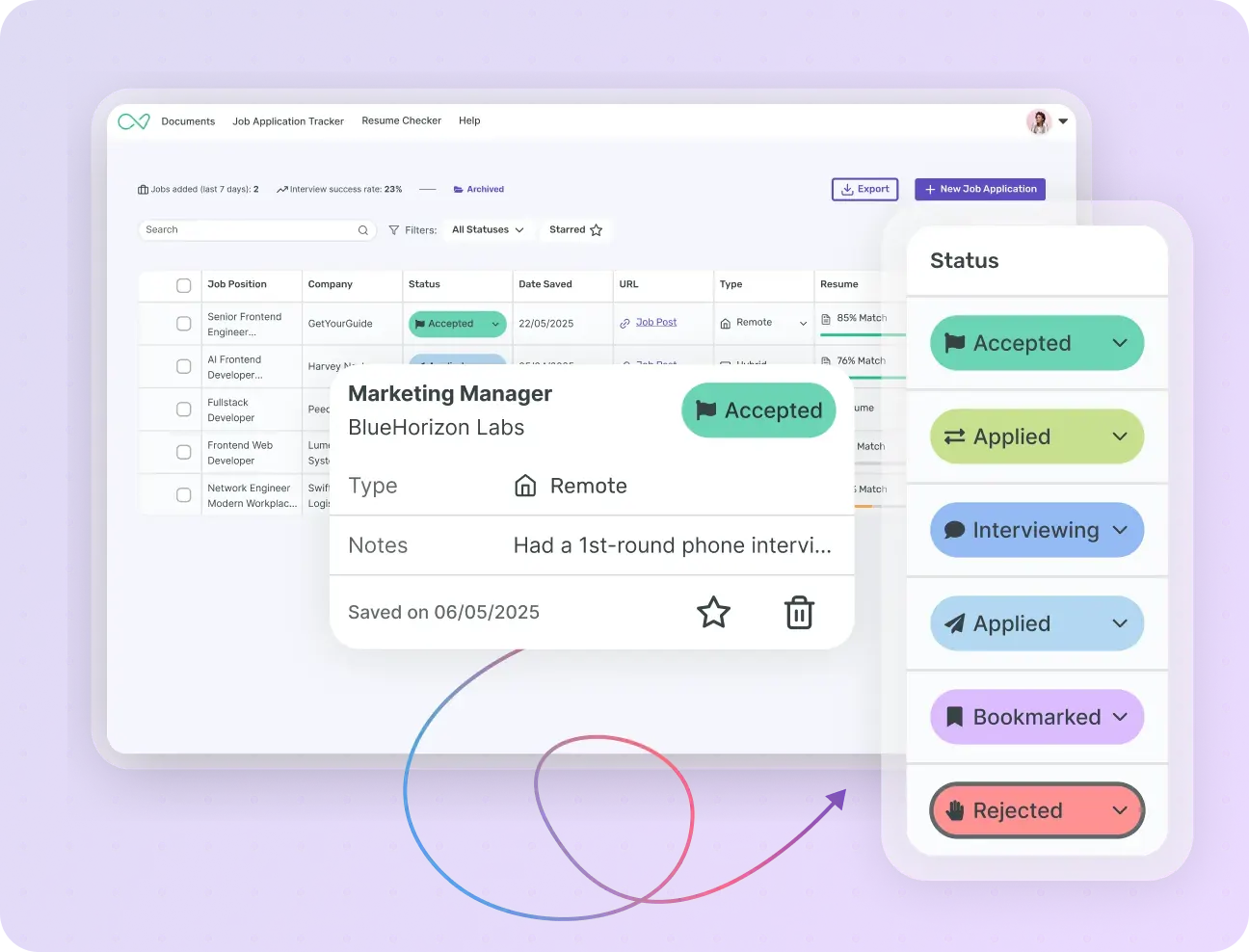
Every application you send sits in the Job Application Tracker. See at a glance where each one stands, your upcoming interviews and the tailored CV you used for each role.
No spreadsheets. No ‘which CV did I send them?’ The whole picture, in one place.
Enhancv in ChatGPT
Already using ChatGPT? Enhancv has an official app in ChatGPT, in countries where ChatGPT apps are available. It takes what you’ve put together and lays it out in a professional CV template, without switching tools or starting again.
 AI Assistant
Features and tools that help you build a
CV that lands interviews

AI CV Builder and assistant
Enhancv’s AI runs through the whole CV builder: an assistant in the editor, one-click CV tailoring and a cover letter generator.

Free and premium CV templates
ATS-tested templates with sections for your experience, skills and measurable achievements.

Share your CV for feedback
Need a second pair of eyes? Share your CV and get comments from friends and family on specific sections.

Export in several formats
Export your CV as a PDF, the most widely accepted format, or as a plain TXT file.

Mobile CV builder
On the move? Edit your CV in the mobile editor: just sign in on your phone.

Translate your CV with AI
Applying abroad? Enhancv’s CV translator tool adapts your CV to another language in seconds.

One-click CV tailoring
Paste a job advert and Enhancv’s AI tailors your CV: skills, a tailored personal statement, action verbs and even a cover letter.

CV Checker
A fast, free CV checker that runs 27 essential checks, so your CV is ready to win interviews.

AI CV feedback
The AI feedback tool reviews your CV and gives you instant, personalised advice to improve it.

Personal statement generator
The AI personal statement generator writes the short profile at the top of your CV.

Cover Letter Generator
Enhancv’s AI cover letter generator writes a tailored cover letter from your CV and the job advert.

Cover letter templates
Choose from 12 cover letter templates designed to get you shortlisted. Pick one, edit it and download it.



Ready to tailor your CV to every job?
Tailor your CV to every role and improve your chances of landing an interview, in just a few clicks.
Tailor Your CVFrequently asked questions
What is CV tailoring?
Tailoring your CV means adjusting its content to the specific requirements of the job you’re applying for. You keep the same experience but present it differently, depending on what the role actually asks for. The ATS looks for matching keywords, the recruiter looks for relevance, and a tailored CV is built to satisfy both.
The candidates who get interviews are often the ones whose CV makes the strongest case for this specific role, not the most qualified ones. You already have the qualifications, and tailoring makes sure they show up in the right place. Enhancv’s guide on how to tailor your CV walks through every step.
How do you tailor your CV to a job description?
- Read the job description carefully and note the essential and desirable criteria: skills, qualifications and keywords.
- Match those terms to your experience and rework your wording so it reflects the advert’s language.
- Reorder your bullet points so the most relevant achievements come first in each role.
- Rewrite your personal statement for the specific role and level of seniority.
- Cut anything that doesn’t connect to this role, even if it’s impressive elsewhere.
- Run your CV through an ATS checker to confirm the keyword overlap before you apply.
What are the best CV tailoring tips?
- Mirror the exact language of the advert. If it says ‘stakeholder management’, don’t write ‘client relations’.
- Lead each role with your most relevant achievement, not your most recent one. Keep the roles in reverse-chronological order, as UK and Irish employers expect, and let relevance decide the order inside each one.
- Adjust your job title if it honestly reflects the role you’re applying for. Titles vary between employers, and yours shouldn’t work against you.
- Rewrite your CV personal statement for every application. It’s the first thing a recruiter reads and the most important part to tailor.
- Cut hard. Two A4 pages is the standard in the UK and Ireland, so fill them with what this employer needs, not with everything you’ve ever done.
- Check your keyword overlap before you apply. A match score below 70% is worth another pass.
- Tailor the content and keep the formatting. A clean, ATS-friendly layout stays the same from one application to the next: only what’s inside it changes.
How do I use keywords from a job description in my CV?
Keywords for your CV are the specific terms a job advert uses to describe the role: skills, certifications, qualifications and experience. They’re also what the ATS scans for.
Start by reading the advert and highlighting the essential criteria. Those are your priority keywords. Then add the ones that honestly reflect your experience to your personal statement, bullet points and skills section.
Put the most important ones near the top, where the ATS and the recruiter see them first. One rule: use the advert’s exact wording, not your own variation. If it says ‘project management’, don’t write ‘managing projects’, because most ATS still look for the match, not the meaning.
How do I optimise my CV for the ATS?
- Use a clean layout in one or two columns. Avoid text boxes, tables and graphics: an ATS can’t extract text from them and may skip that content entirely.
- Stick to standard section headings. ‘Work experience’ and ‘Education’ are safe, while creative alternatives like ‘My journey’ or ‘Where I’ve been’ often aren’t recognised.
- Mirror the language of the advert. Use its exact terms, not your own variations, and save the creativity for the job itself.
- Put your most relevant keywords in your personal statement, bullet points and skills section. The ATS reads these parts first and gives them the most weight.
- Keep important details out of the document’s header and footer. Some ATS skip them.
- Send your CV as a PDF unless the advert asks for Word. A well-built PDF keeps your layout identical on every device and still parses cleanly.
- Check your match score before you apply. Enhancv’s CV Checker runs 27 checks across 7 categories, from content to grammar, and tells you exactly what to fix.
Will a tailored CV get through the ATS?
A tailored CV gives you the best chance, but ‘getting through the ATS’ isn’t a yes-or-no outcome.
Most ATS don’t reject CVs automatically. They score, rank and sort, and a tailored CV moves you up that ranking, so more recruiters see your application and spend longer on it.
The things that matter most are keyword match, clean formatting and standard section headings. Get those right and the ATS works in your favour.
The quickest way to know where you stand is to check before you apply. Enhancv’s CV Checker scores your CV against the job description and shows exactly what’s pulling your match score down.
Should you tailor your CV for every job?
For roles you really want, yes. A tailored CV works better than a generic one: 83% of recruiters say they’re more likely to hire a candidate who tailored their CV to the job (Jobvite).
If you’re applying for lots of similar roles, such as graduate schemes in the same sector, you don’t need to start from scratch each time. Build a strong base version for one type of role, then make targeted changes for each advert. Usually only the keywords, the personal statement and the top bullet points need to change.
Tailoring every application by hand isn’t realistic. That’s why Enhancv keeps your master CV in the background: the heavy lifting is already done, and adapting it to a new role takes minutes, not hours.
Tailored CV or generic CV: which is better?
A tailored CV. Recruiters are more likely to hire candidates who tailored their CV to the role (83%, Jobvite). Hiring managers agree: 61% call it the best way to improve your chances (Zippia).
A generic CV covers everything you’ve done. A tailored CV covers what this job needs. Those are two different documents, and recruiters can tell straight away.
The only argument for a generic CV is speed. But a CV that isn’t matched to the role ranks lower in the ATS, gets less attention from recruiters and leads to fewer interviews.
How long does it take to tailor a CV?
By hand, anywhere from one to three hours, depending on how far the role is from your current CV. You need to read the advert carefully, find the right keywords, rewrite your personal statement, reorder your bullet points and cut what doesn’t fit. You do that for every application, so the time adds up fast.
With Enhancv, the first pass takes seconds. The AI reads the job description, draws on your master CV and rewrites the relevant sections. You spend your time reviewing and approving changes, not writing them from scratch.
Can ChatGPT tailor my CV?
ChatGPT can rewrite the parts of a CV you paste in. But it doesn’t see your full career history and has no access to real job-matching data. The output is only as good as what you give it, and a generic prompt gets a generic result.
Enhancv’s AI tailoring works differently. Its prompts are built with Certified Professional Resume Writers (CPRWs), and it draws on your full profile, built across every CV version you’ve created. The suggestions are specific to you and the role, not a rewrite of whatever you pasted in.
Which AI tools are best for tailoring a CV in 2027?
- Enhancv: the most complete option for experienced professionals. AI tailoring built with CPRWs, a built-in ATS check, a job board with match scores and a Job Application Tracker that links each tailored CV to its application. Free 7-day plan.
- MyPerfectCV: a UK-branded CV builder with AI writing help and templates. Less depth on ATS feedback and job-by-job tailoring.
- Jobscan: strong ATS keyword analysis, focused on the match score rather than on building the CV.
- Resume Worded: useful for feedback and scoring. Less complete for tailoring and building a CV.
- ChatGPT: handy for rewriting sections if you know what to ask. No job matching, no ATS score and no structured CV profile.
Should I use AI to tailor my CV? Will employers know?
Employers care whether your CV is accurate, not how it was written. Using AI to tailor your CV is no different from running a spellcheck or asking a friend to read it over. The goal is a better document, not an invented one.
Enhancv’s AI only works from the experience and skills already in your profile. It rewrites and suggests, but it doesn’t add qualifications you don’t have. What you send is still factually yours: the AI does the tedious part, and you make the decisions.
How do I tailor a CV with no experience?
With no work experience, tailoring is less about your employment history and more about showing what you can do for this role.
Start with the job advert and note the skills and qualities it asks for. Then find where they show up in your background: coursework, projects, a placement year, part-time work or volunteering. These CV examples for a first job show how to present them.
A few specifics:
- Open with a personal statement that positions you for this type of role, not just ‘recent graduate seeking opportunities’.
- Put your skills section high on the page, above your experience.
- Use the exact language of the advert when you describe projects or academic work.
- Don’t pad. One focused A4 page is normal for school leavers and graduates, and the second page can wait until you have more to put on it.
How do I tailor my CV for a career change?
A career change CV has one job: close the credibility gap before the recruiter decides it’s too wide.
Open with a personal statement that frames the move clearly: why this role, why now and what you bring from your previous field. Then go through the advert and pick out the transferable skills, such as project management, stakeholder communication or data analysis. Name them in the language of the new field, not the old one.
Be selective about your previous career. Keep what’s relevant, cut what confuses the story and don’t apologise for the change. A skills-based CV can help when your recent roles say little about the new one.
How do I tailor a CV for tech or software engineering roles?
Tech roles are more keyword-specific than most. The advert lists exact technologies, languages and frameworks, and the ATS scans for those exact strings: ‘Proficient in Python’ and ‘Python developer’ aren’t the same match.
List every technical requirement in the advert, then map your experience against it honestly. For the skills you have, use the advert’s exact terminology. Leave off the skills you’re still developing: a gap does less damage than an exaggeration that comes out in a technical interview.
Beyond the tech stack, tailor your bullet points to show impact the role cares about: system performance, deployment frequency, code reviews, team size. Generic bullet points get ignored in tech hiring, as they do everywhere else. For a model to work from, see this software engineer CV example.
Is CV tailoring free?
Tailoring by hand (reading the advert, rewriting your CV, adjusting the keywords yourself) costs nothing but time.
AI tailoring is where the tools come in, and most CV builders keep it behind a paid plan. Enhancv’s free plan lasts seven days and lets you try the builder, AI Assistant included, before you commit. The ATS check inside the editor and the other Pro features come with Enhancv Pro.
Is there a free CV tailoring checklist I can use?
Here it is: use it before every application. A tailored CV gets more interviews, and this checklist makes sure yours really is tailored.
Step 1: analyse the job advert
- Read the whole advert before you touch your CV.
- Highlight the essential criteria: skills, qualifications, certifications and experience level.
- Note the desirable criteria separately.
- Find the exact keywords: copy the wording, not just the idea.
- Note the job title as it appears in the advert.
Step 2: update your personal statement
- Rewrite your personal statement for this specific role.
- Use the job title from the advert if it honestly reflects your experience.
- Lead with your most relevant strength, not your most recent one.
- Keep it to three to five lines.
Step 3: match the keywords
- Add the essential keywords from the advert to your CV.
- Use the advert’s exact wording.
- Put the most important keywords in your personal statement and top bullet points.
- Add missing skills to your skills section if you really have them.
Don’t add skills you don’t have. The ATS gets you to the interview, and the interview is where you have to prove them.
Step 4: reorder by relevance
- Within each role, put the most relevant bullet point first.
- Keep your roles in reverse-chronological order.
- Cut bullet points with no link to this job.
- Shorten roles that add nothing here, such as older jobs or ones in unrelated sectors.
Step 5: check your formatting
- No text boxes, tables or graphics an ATS can’t read
- Standard section headings only (Work experience, Education, Skills)
- Consistent font, size and spacing throughout
- No important information in the header or footer
- A PDF, unless the advert asks for Word
- Two A4 pages at most, unless your field expects more
Step 6: run your ATS check
- Paste the job advert into Enhancv’s ATS check.
- Review your match score.
- Work through the prioritised list of fixes.
- Aim for a match score above 70% before you apply.
- Run the check again after your changes.
Step 7: final read-through
- Read your CV out loud: if it sounds robotic, it reads robotic.
- Check that every bullet point starts with an action verb.
- Confirm that all dates, job titles and employer names are correct.
- Remove anything that doesn’t serve this application.
- Check that your contact details are up to date.