



Most data entry CVs list "fast and accurate typing" and stop there. That line sits on every other application in the pile, so it settles nothing.
A data entry recruiter is scanning for three things: how fast you key, how clean your work is, and which systems you already know. Put a number against all three and you move to the top of the stack. If you want the fundamentals first, see how to write a CV.

Key takeaways
- Lead with proof, not adjectives. A typing speed and an accuracy rate beat "fast and accurate" every time.
- Name the software you have actually used: Excel, and the specific CRM, ERP, or records system the employer runs.
- Data entry is measurable. Volume keyed, error rate, and turnaround belong in your experience bullets.
- Keep the format clean and ATS-friendly. One column, standard headings, reverse chronological once you have experience.
- No experience is workable. Lead with a typing test score, admin exposure, and evidence of attention to detail.
- Send a PDF for direct applications and keep a Word copy for the agencies that ask for it.
Top skills for your data entry CV
The skills a data entry recruiter screens for fall into two groups, and both are checkable.
Your hard skills are the ones the job runs on: touch typing at a measured speed, numeric ten-key entry, Microsoft Excel, and whichever database or CRM the employer uses. List them in the words the advert uses, and put your typing speed and accuracy rate right next to them.
Typing speed is the one number every data entry advert cares about, so treat it as a headline figure. Around 45 to 50 wpm is a reasonable floor for the role, 60 to 80 wpm is strong, and anything higher is worth stating plainly. If the work is numbers-heavy, quote your keystrokes per hour on the ten-key pad as well.
The soft skills that matter here are narrow and real: attention to detail, concentration over long stretches, and discretion with confidential records. Prove each one in a bullet rather than claiming it in a list.
One skill quietly separates a careful candidate from a merely fast one, and that is an awareness of data protection. Roles that touch personal, financial, or health records expect you to handle confidentiality and basic UK GDPR obligations without being told. A short line noting you have worked to those standards reassures an employer you will not be a compliance risk.
Verification is its own skill, and it is worth naming separately from speed. Double-keying, cross-checking against a source document, and running validation rules in a spreadsheet all show you catch your own mistakes before anyone else does. That is the quality a data manager values most in a hire they cannot watch every minute.

The 10 key data entry skills
Employers ask for the same core set again and again:
- Fast, accurate touch typing (know your words per minute)
- Numeric, ten-key data entry
- Microsoft Excel and spreadsheets
- Database and CRM data management
- Data cleaning, validation, and de-duplication
- Attention to detail and error checking
- Audio and copy transcription
- Records and document management
- Time management against daily volume targets
- Confidentiality and data protection awareness
Once you have named the skills, evidence them. A typing speed only counts if it carries a number, so cite a recent test result like "78 wpm at 99% accuracy". Do the same for accuracy, because an error rate or a QA pass rate is worth more than the word "meticulous".
For software, name versions and the scale you worked at. "Excel, including VLOOKUP and pivot tables, across a 40,000-row database" tells a recruiter far more than "proficient in MS Office". If you have used a specific system, say so, because adverts are often filtered for those exact terms as CV keywords.
List only the software you can be tested on. If a system sits on your CV, an interviewer may hand you a live task in it, so keep the borderline tools under a heading like "familiar with" rather than claiming fluency. Being honest here is not modesty, it is risk management.
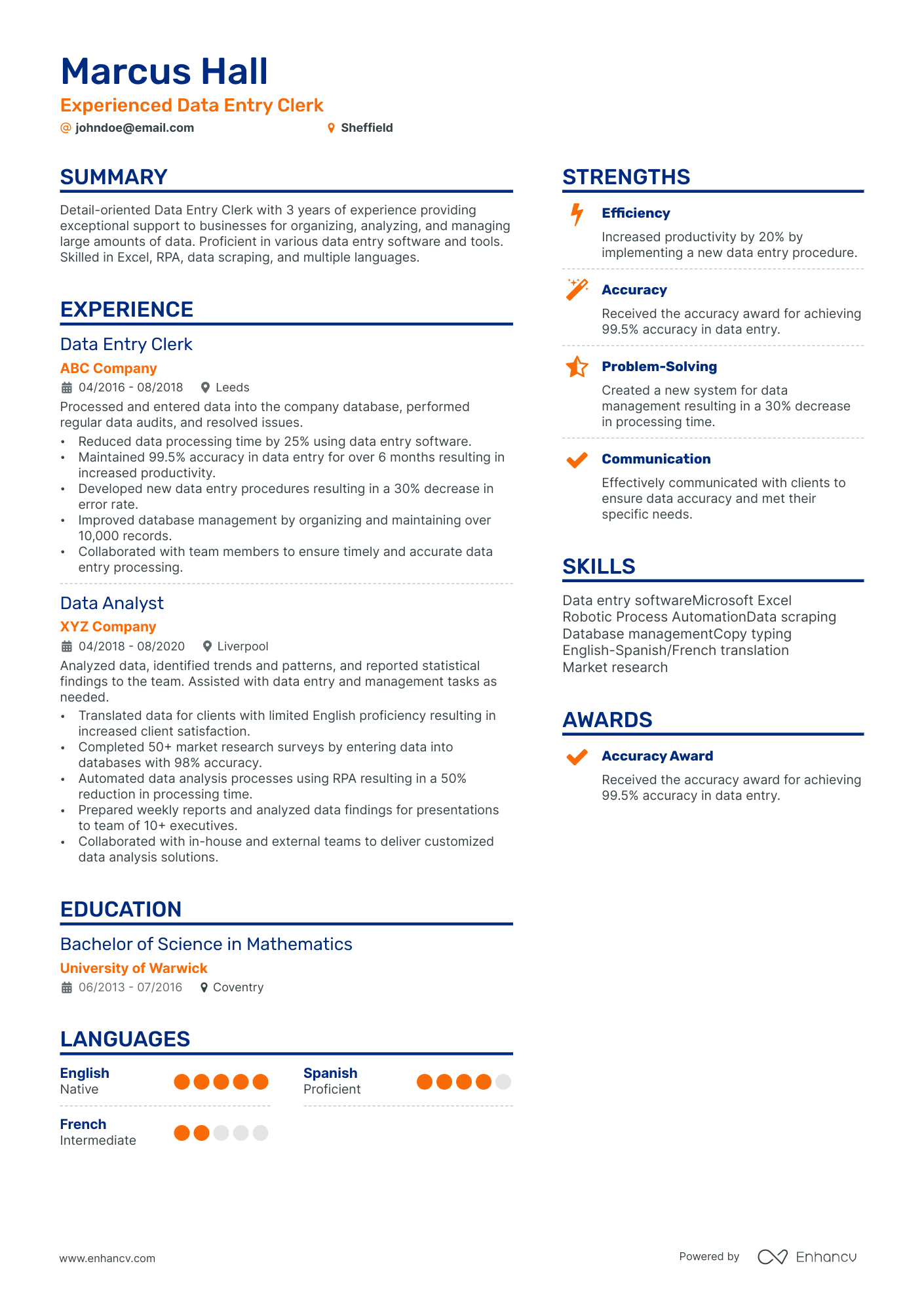
There is a good way and a weak way to say data entry on a CV. "Responsible for data entry" is the weak way. "Keyed 600 records a day into SAP at 99.7% accuracy" names the system and the outcome, which is what a recruiter is actually looking for.
Speed and accuracy pull against each other, and good employers know it. If you can only lead with one, lead with accuracy, because a fast typist who introduces errors creates more work than a slower one who does not. Where you have both, pair them in a single figure so the recruiter cannot read one without the other.
Top skills for your data entry CV:
Touch typing (measured wpm)
Numeric, ten-key data entry
Microsoft Excel and spreadsheets
Database and CRM systems
Data cleaning and validation
Audio and copy transcription
Records and document management
Data protection awareness
Attention to detail
Concentration
Time management
Organisation
Discretion

PRO TIP
Two numbers do most of the work on a data entry CV: your typing speed and your accuracy rate. Run a timed test, screenshot the result, and put both in your header or skills section. A verified "75 wpm at 99% accuracy" beats any adjective.
Formatting your data entry CV
If you have data entry roles behind you, use a reverse chronological layout. If you are starting out, a skills-led structure puts your speed, accuracy, and software before a thin work history.
Keep it to one page early on and two pages once you have the experience to fill them. One column, standard headings, a readable font. Recruiters filling high-volume admin roles skim fast.
Put your typing speed and accuracy in the header or a short key-skills strip near the top, where a recruiter sees them in the first six seconds. Buried on page two, your strongest selling point does no work.
Data entry applications almost always pass through tracking software, so keep the layout clean and the headings standard for an ATS-friendly CV. Skip tables and text boxes, which parse badly.
Send a PDF for direct applications so the layout holds, and keep a Word copy for the recruitment agencies that place a large share of data entry roles. If the advert names a file type, follow it. Building from a tested layout beats a blank page, and Enhancv's CV templates export to a clean PDF.
Writing your data entry personal statement
Three or four sentences at the top: who you are, your headline numbers, the systems you know, and the role you want. Keep it concrete. See more personal statement examples if the opening line is hard.
Change the statement for each advert. Move the system the employer names to the front, and match your headline number to the volume the role deals with. A statement that mirrors the job reads as a fit before the recruiter reaches your experience.
Lead with evidence, not adjectives. Here is the difference.
Data entry CV personal statement example
Accurate data entry clerk with three years in a busy NHS records team, keying 12,000 alphanumeric records a month at 99.8% accuracy across EMIS and Excel. Consistent 78 wpm on annual typing tests. Looking to bring speed, discretion, and a clean audit record to a data entry role in Manchester.
What to avoid
Hard-working and detail-oriented individual with a passion for data entry, seeking a challenging role in a dynamic company where I can utilise my skills and grow.
When I read a data entry CV, I skip straight past the adjectives and look for two numbers: how fast you type and how accurate you are. A line like "78 wpm at 99.8% accuracy across 12,000 records a month" tells me you can do the job on day one. Name the system you worked in, put a figure against your speed and your error rate, and you have already beaten most of the pile.
the Enhancv team
Writing your data entry experience section
Write each role as a dated heading followed by bullets that show what you did and the result. Lead every bullet with a verb. For the mechanics, see work experience on a CV.
Data entry is one of the easier roles to quantify, so use that. Volume keyed, accuracy rate, turnaround time, records cleaned, and hours saved are all CV achievements. Open with an action verb and close with the number.
Tailor each application by pulling the systems and duties from the advert and mirroring the ones that are true of you. Enhancv's CV tailoring feature reads the advert and suggests the matching edits, which saves rewriting from scratch each time.
If your work was confidential or you cannot share exact figures, describe the scale instead of the record. "Maintained a database of roughly 15,000 active customer records" is defensible without breaching anything, and it still gives the recruiter a sense of the volume you are used to.
- Key and verify an average of 600 alphanumeric records a day into SAP at 99.7% accuracy, checked against a daily QA sample
- Cleaned and de-duplicated a 40,000-row customer database, cutting returned mail on the next campaign by a third
- Cut invoice processing from three days to one by building reusable Excel lookup templates for the team
- Trained two new starters on the in-house CRM and the team's data entry standards
PRO TIP
"Responsible for entering data" describes a chair, not a person. Rewrite every duty as a verb plus a number, such as "processed 3,000 invoices a week at 99.5% accuracy". If you never tracked your figures, estimate a defensible one and be ready to explain how you got it.
Writing a data entry CV with no experience
Data entry is one of the more entry-friendly office roles, because employers can test the core skill in minutes and train the rest.
So your first CV leads with proof of the skill itself. Take a free online typing test and put the score on the CV, because "70 wpm at 98% accuracy, TypingTest.com, June 2026" is concrete evidence rather than a claim.
Then mine your life for real data work. It is usually there:
- Updating stock sheets, rotas, or takings in a retail or hospitality job.
- Keeping records for a university society, club, or charity.
- Coursework or projects that used Excel, databases, or survey data.
- Any admin task where accuracy mattered and someone checked it.
Write those in data entry language, with the tool and the volume named. A short computer skills course in Excel signals you are already on the path.
Treat a work trial or a temporary placement as a real role, with dates, the system you used, and what you delivered. Agencies fill a large share of data entry vacancies, so even a week of temp work keyed into a live system is genuine, relevant experience rather than filler.
The same rule holds for any entry-level application. Recruiters know you are early in your career, so they are reading for proof you can be trusted with volume and accuracy from the start, not for a decade of history you do not have yet.
A first-CV statement can still be concrete. "Detail-focused college leaver with a verified 68 wpm typing speed and A-level coursework built on large Excel datasets, seeking a first data entry role in Leeds" names a number, a tool, and a place, which is more than most experienced applicants manage.
Education and certifications for a data entry CV
You rarely need a degree for data entry. GCSEs that include maths and English, or their equivalents, cover the baseline for most roles.
What helps is any certificate that proves speed or software. A Microsoft Office Specialist qualification in Excel, an ECDL or ICDL, or a dated typing certificate all belong on the CV. List them in your education section or under certificates.
If you are still studying, add "in progress" and the expected date. It shows an employer the same thing your skills do, that you are already moving toward the role.
If you hold a degree in an unrelated field, do not hide it, but do not lead with it either. A short entry near the foot of the CV is enough. A recruiter cares far more about your Excel test and your accuracy rate than about the subject of a degree that has nothing to do with keying data.
Conclusion
Lead with your speed and accuracy, name the systems you know, and keep the format clean enough to pass a scanner.
Pair the CV with a short cover letter that points to your best number, and a routine admin application starts getting interviews.
Author's take - the Enhancv team
When I read a data entry CV, I skip straight past the adjectives and look for two numbers: how fast you type and how accurate you are. A line like "78 wpm at 99.8% accuracy across 12,000 records a month" tells me you can do the job on day one. Name the system you worked in, put a figure against your speed and your error rate, and you have already beaten most of the pile.